
Introduction
To find reliable ongoing Webflow site support, compare certified partner agencies, experienced freelancers, or internal resources by their SLA response times, Webflow CMS expertise, custom code troubleshooting process, and use of staging workflows before anything goes live. The right partner should help your team ship campaign pages, protect technical SEO, monitor performance, and resolve bugs without pulling product engineers away from core work.
Keeping a website optimized, secure, and visually flawless requires consistent technical attention. While Webflow stands out as the preferred platform for modern web design due to its clean visual canvas and reliable infrastructure, high-growth marketing teams quickly find that maintaining an active site involves far more than basic hosting.
From launching new campaign landing pages to optimizing Core Web Vitals and refining technical SEO, having an expert team in your corner ensures your digital presence scales smoothly alongside your business goals.
Reliable support also gives marketing leaders a predictable path from request to release. Instead of treating every update as a one-off emergency, the team can maintain a prioritized backlog, define approval owners, and document recurring tasks such as publishing, redirects, analytics checks, and accessibility reviews. That operating rhythm makes website work easier to plan and less likely to interrupt larger campaigns.
Why Your Business Needs Ongoing Webflow Site Support
Webflow provides exceptional visual development tools, modern clean code generation, and robust AWS-powered hosting. However, a high-converting website is never truly static. As your business grows, you constantly add tracking scripts, publish fresh CMS content, run A/B conversion tests, and adjust your visual layouts to support marketing initiatives.
Without regular technical oversight, minor issues can quietly accumulate. A third-party marketing script might conflict with custom JavaScript embeds, form integrations might fail to deliver leads into your CRM, or high-resolution images uploaded by team members might degrade mobile loading speeds. Having reliable ongoing webflow site support ensures these technical challenges are handled proactively before they impact your conversion rates or degrade user experience.

Resolving Marketing Bottlenecks Without Developer Delays
In many growing companies, marketing teams rely on in-house software engineers for website updates. The problem is that internal development teams are naturally focused on core product roadmaps and sprint cycles. When your marketing team needs to launch a time-sensitive campaign, fix an altered navigation menu, or build a high-converting landing page, waiting through two-week engineering sprints creates unnecessary friction and delays business growth.
A dedicated Webflow support partner operates alongside your marketing team, providing agile turnarounds outside rigid product sprint cycles. This allows your growth team to test new messaging, deploy custom landing pages, and optimize conversion pathways without taking core engineering talent away from product development. Continuous support empowers your marketing team to move quickly, seize market opportunities, and publish content without technical bottlenecks.
Protecting Technical SEO and Core Web Vitals
Search engine visibility requires ongoing technical upkeep. As you publish articles, reorganize CMS collections, and alter site structures, technical issues like broken links, unoptimized redirect chains, and missing canonical tags can harm search engine crawlability and dilute your organic rankings.
Modern search engines also evaluate Core Web Vitals—such as Largest Contentful Paint (LCP), Interaction to Next Paint (INP), and Cumulative Layout Shift (CLS)—as key ranking signals. Ongoing support continually audits your asset sizes, script execution orders, CSS efficiency, and mobile responsiveness to ensure fast page loads.
Furthermore, as AI search engines evolve, regular optimizations ensure your site structure remains primed for Generative Engine Optimization (GEO), helping search engines easily parse, understand, and cite your content across conversational discovery platforms.
A dependable support process also protects the measurement layer behind your website. Before and after meaningful changes, a support partner can review analytics events, consent tools, form routing, and advertising pixels so reporting remains trustworthy. This is especially valuable when campaigns depend on accurate lead-source data and teams need to identify whether a performance change came from the page, the offer, or the tracking setup.
Core Services Included in Webflow Website Maintenance
Comprehensive maintenance encompasses both reactive troubleshooting and proactive enhancements that keep your site fast, functional, and visually appealing. A structured maintenance program ensures every aspect of your site's technical foundation is regularly inspected and fine-tuned.
Technical Troubleshooting and Emergency Bug Fixes
Custom code embeds, third-party integrations, and dynamic animations require ongoing care to function properly across shifting browser standards. Routine troubleshooting includes:
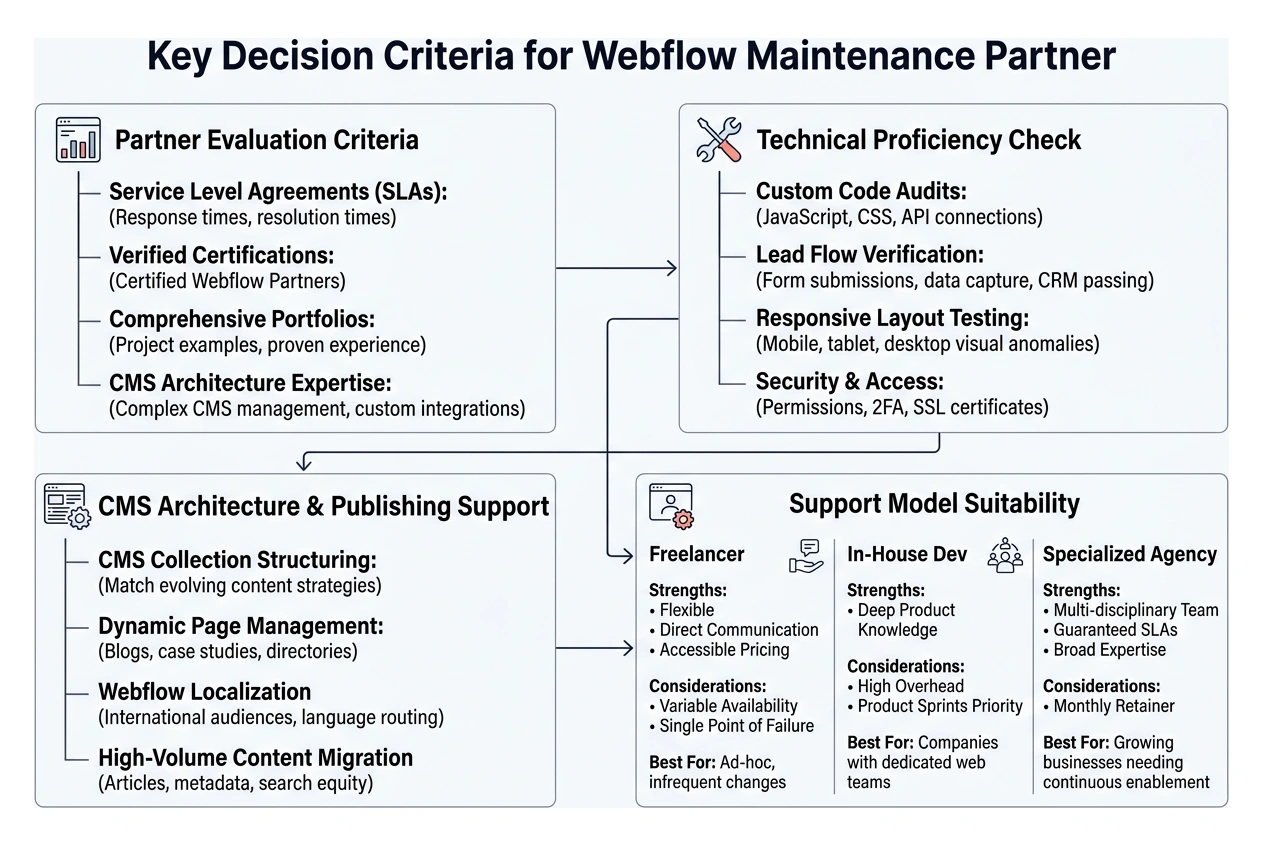
- Custom Code Audits: Checking custom JavaScript, CSS embeds, and third-party API connections for performance issues, console errors, or deprecations.
- Form and Lead Flow Verification: Ensuring form submissions capture clean data, validate user inputs, and pass information directly to your marketing automation tools, webhooks, and CRMs without failure.
- Responsive Layout Integrity: Testing dynamic layouts across various mobile, tablet, and desktop screen sizes and orientations to catch visual anomalies or unintended horizontal scrolling.
- Security and Access Governance: Managing role-based workspace permissions, enabling two-factor authentication, enforcing access protocols, and verifying SSL certificate renewals.
- Uptime Monitoring and Automated Backlogs: Regularly monitoring site availability and maintaining clear version restore points so your team can roll back changes instantly if needed.
CMS Architecture Scaling and Content Publishing
As your marketing library expands, your CMS collections must remain organized, modular, and maintainable. Ongoing support assists with:
- Structuring CMS collection fields to match evolving content strategies and dynamic filtering needs.
- Managing and styling dynamic page templates for blogs, case studies, team directories, and resource libraries.
- Implementing Webflow Localization features to serve international audiences with appropriate language routing and localized assets.
- Migrating high volumes of legacy articles, images, and metadata into clean, optimized Webflow CMS collections without losing search equity or link integrity.
Performance, Accessibility, and Governance Reviews
A mature support engagement should include recurring reviews rather than waiting for a visible problem. These reviews can cover image compression, font loading, unused scripts, navigation behavior, keyboard access, color contrast, cookie-banner effects, and CMS publishing permissions. Documenting findings and assigning owners helps the website remain usable for visitors while giving internal teams a clear record of what changed and why.
For teams with several stakeholders, governance matters just as much as technical skill. Define who can publish directly, who approves design changes, where credentials are stored, and how urgent requests are escalated. Clear guardrails reduce accidental production changes and make it easier to onboard new marketers or external contributors.
Choosing the Right Webflow Support Partner: Freelancer vs. Agency vs. In-House
Selecting the right support structure depends on your team's workflow, budget, and task volume.
| Support Model | Strengths | Considerations | Best Suited For |
|---|---|---|---|
| Freelancer | Flexible, direct communication, accessible pricing | Variable availability, single point of failure | Ad-hoc updates and smaller, infrequent site changes |
| In-House Dev | Deep internal product knowledge | High overhead, prioritized on product sprints rather than marketing | Companies with extensive, dedicated web engineering teams |
| Specialized Agency | Multi-disciplinary team (design, dev, SEO), guaranteed SLAs, broad expertise | Structured monthly retainer commitment | Growing businesses needing continuous marketing enablement |
Evaluating Freelancer Portfolios vs. Certified Webflow Partners
While exploring options on community channels like the Webflow community support discussion can connect you with individual specialists, larger teams often benefit from the stability of a certified partner agency.
When evaluating potential providers, look for verified certifications, comprehensive project portfolios, and proven experience managing complex CMS architectures and custom integrations.
Key Criteria for Selecting Ongoing Webflow Site Support
To maintain smooth collaboration, look for partners who offer:
- Clear Service Level Agreements (SLAs): Defined response and resolution times for standard updates versus critical fixes.
- Integrated Communication: Direct access via shared collaboration tools such as Slack or project management boards like ClickUp.
- Staging Review Workflows: A structured process using Webflow staging environments to preview, review, and approve changes before publishing to your live domain.
- Transparent Activity Tracking: Clear visibility into completed tasks, ongoing optimizations, and monthly technical health checks.
Before signing an agreement, ask each provider how they scope incoming requests and communicate tradeoffs. A strong partner can explain what is included in ongoing support, which work should be handled as a separate project, and how urgent issues are prioritized. It is also useful to request examples of similar Webflow builds, migration work, CMS maintenance, and performance improvements.
The best choice is not always the largest team or the lowest monthly cost. Look for a working style that fits your organization: regular reporting, straightforward estimates, documented quality assurance, and enough technical range to handle both everyday content needs and less common integration problems.
Webflow Maintenance Pricing Models and Cost Breakdown
Selecting the right financial structure ensures predictable budgeting while giving your marketing team the resources they need to scale digital operations efficiently.
Reviewing native Webflow pricing and hosting tiers helps you understand underlying platform and workspace costs, which run alongside your development support agreements.
Understanding Monthly Retainers vs. Hourly Rates
- Monthly Retainers: A fixed monthly investment provides dedicated capacity, guaranteed turnaround times (typically 24 to 48 hours for standard requests), and priority issue triage. This model suits businesses with active marketing campaigns, regular publishing needs, and continuous optimization goals.
- Hourly Packages: You purchase a block of hours used as tasks arise. While this provides flexibility for occasional fixes, response times may vary depending on provider availability, and unused hours often require periodic tracking.
- Fixed-Scope Projects: Ideal for discrete initiatives like site redesigns, complex migrations, custom web application integrations, or major functional additions that require clear milestone planning.
How to Transition to Ongoing Webflow Site Support
Transitioning your website to a dedicated maintenance partner is a straightforward, non-disruptive process:
- Comprehensive Site & Code Audit: The partner reviews your Webflow Designer setup, style guide consistency, class naming conventions (such as Client-First), and custom script integrations.
- Access and Permissions Setup: You grant appropriate workspace or site-level permissions, maintaining administrative control while enabling the support team to build, stage, and test updates.
- Backlog Prioritization: You collaborate on an initial list of technical fixes, performance optimizations, and upcoming marketing initiatives to organize immediate deliverables.
- Staging & Deployment Protocol: Establishing a reliable review cycle ensures all updates are thoroughly tested on a staging subdomain before publishing to the production domain.
What to Clarify Before Choosing a Support Plan
A clear proposal should distinguish between reserved capacity, response targets, and delivery timelines. For example, a provider may acknowledge an urgent issue quickly while the full resolution depends on third-party access, platform limitations, or required design review. Ask how unused capacity is handled, whether strategy and reporting are included, and how larger requests are estimated when they exceed the monthly scope.
It is also wise to confirm ownership of the Webflow workspace, domains, analytics properties, code repositories, and connected tools. Keeping these assets in accounts your business controls reduces transition risk if you change providers later. An effective partner should be comfortable documenting the setup and supporting an orderly handoff when needed.
Frequently Asked Questions About Webflow Support
What is the typical turnaround time for ongoing Webflow maintenance tasks?
Standard maintenance requests—such as adding a new CMS collection field, publishing a landing page variation, or updating styling—are typically completed within 24 to 48 business hours. Critical issues, such as broken checkout flows or lead capture errors, are triaged with priority response times to restore full functionality immediately.
What are the risks of ignoring ongoing Webflow site maintenance?
Neglecting maintenance can lead to outdated custom code embeds, broken tracking scripts, slow page load speeds from uncompressed assets, and crawling errors that degrade search rankings. Over time, unorganized classes and bloated CMS collections make future edits slower and more prone to visual breakage. Regular oversight prevents small configuration issues from turning into major disruptions.
How does ongoing support keep Webflow marketing sites running smoothly?
A dedicated support team handles technical implementation, allowing your marketing team to focus entirely on strategy, messaging, and campaign creative. By eliminating technical bottlenecks and managing code hygiene, your team can launch initiatives faster and maintain a clean, high-performing website that consistently converts visitors into customers.
Should a Webflow Support Partner Work From a Defined Backlog?
Yes. A shared backlog gives both sides a practical way to prioritize fixes, improvements, and campaign requests. Each item should include the goal, urgency, expected outcome, owner, and any needed assets or approvals. Reviewing the backlog on a regular schedule keeps small tasks from being lost and helps the support team identify related work that can be completed more efficiently.
How Can a Business Measure the Value of Ongoing Webflow Support?
Track outcomes that matter to the marketing and revenue teams, such as time from request to launch, form reliability, avoided production issues, page-speed improvements, conversion-path clarity, and the number of campaigns released without engineering delays. Qualitative signals matter too: stakeholders should know where to request work, what is in progress, and when a change is ready for review.
Conclusion
A high-performing website requires continuous attention to stay fast, secure, and visually compelling. Partnering with an experienced team provides the technical reliability, fast turnarounds, and strategic guidance needed to keep your marketing engine moving forward.
The most effective arrangements combine responsive execution with a repeatable operating model. When your support partner understands your brand, CMS structure, analytics stack, and campaign calendar, each request starts with more context and requires less rework. That continuity helps your team publish with confidence while keeping the website aligned with changing business priorities.
At Refresh, we support businesses with comprehensive Webflow development, digital marketing, and strategic maintenance to elevate your digital presence and ensure your website consistently supports your growth goals.


.avif)