Why Webflow UX Design is Crucial for Your Digital Strategy
Webflow UX design is more than just creating visually appealing websites. It's about crafting user-centric designs that resonate with your audience and improve your digital presence.
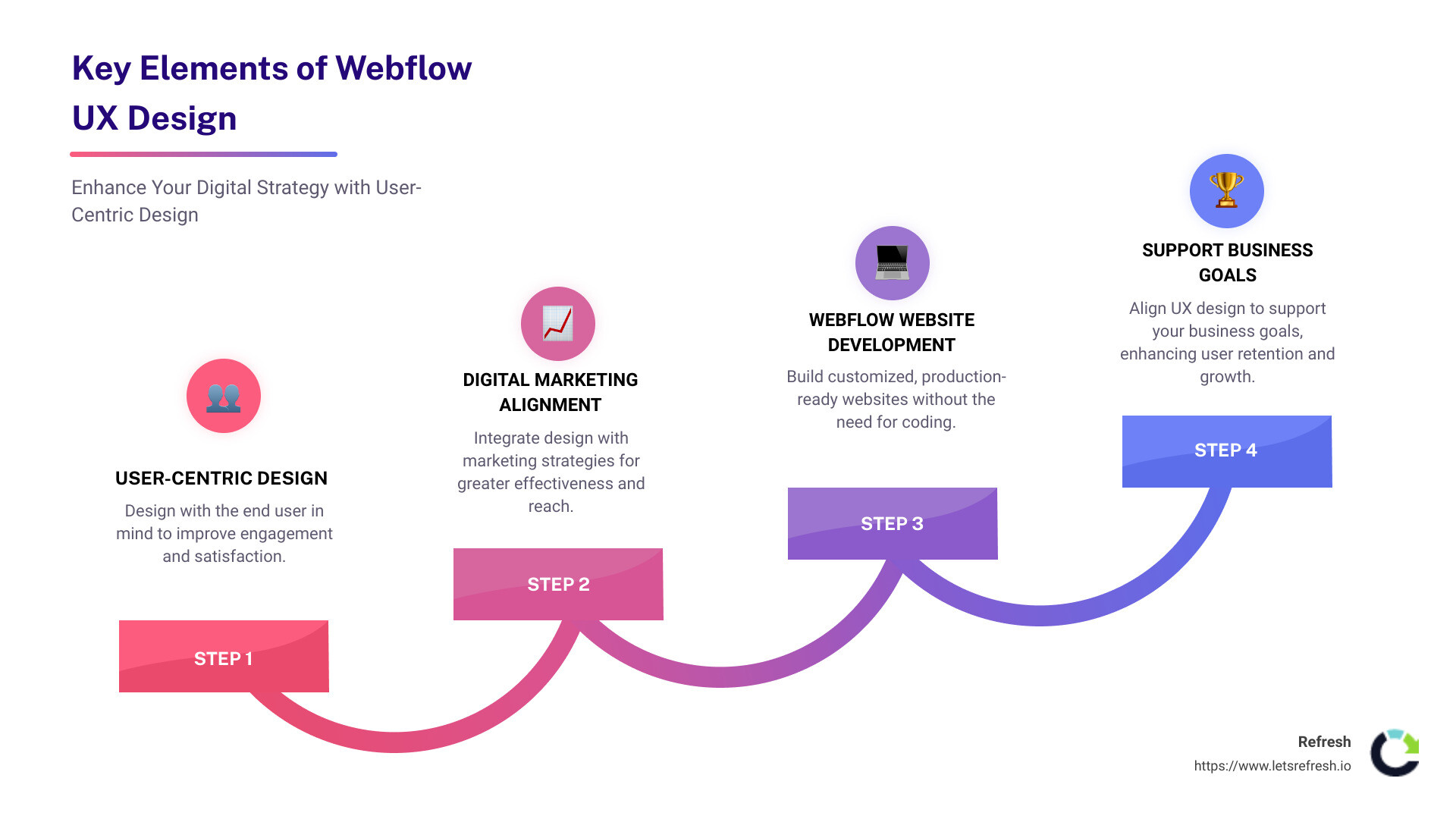
Key elements of Webflow UX design:- User-centric design: Ensure your site is designed with the end user in mind.- Digital marketing alignment: Integrate design with marketing strategies for better effectiveness.- Webflow website development: Build and launch customized, production-ready websites without coding.
In today's digital landscape, having an outdated website can hamper your growth. A user-centric approach not only creates a pleasant experience but also supports your business goals and improves user retention. It’s an investment in your brand's future, leveraging state-of-the-art tools like Webflow to stay ahead.
My name is Alexander Palmiere, and as the founder and CEO of Refresh, I’ve led the development and launch of over 200 websites using Webflow UX design, helping businesses improve their online visibility and achieve their digital goals.
Understanding Webflow UX Design
Webflow UX design is about creating websites that are not only visually stunning but also user-friendly. Let's break down the key components involved:
User Experience (UX)
User experience focuses on how someone feels when interacting with your website. It’s about making the user's journey smooth, intuitive, and satisfying. Good UX design means understanding what your users need and providing it in the simplest way possible.
UI Design
User Interface (UI) design deals with the look and feel of your website. It includes elements like buttons, typography, and color schemes. While UX focuses on the overall experience, UI zeroes in on the specifics that make the experience enjoyable.
Webflow Designer
Webflow Designer is a powerful tool that allows you to build custom websites visually. You don't need to write code, but you can if you want to. This tool gives you the flexibility to create unique designs that stand out.
Visual Design
Visual design is about more than just aesthetics. It's about creating an intuitive layout that guides users through your site. Webflow offers advanced visual design features like reusable components and Quick Stack elements, making it easier to maintain consistency across your site.
Prototyping
Prototyping is an essential part of the design process. It allows you to create a model of your website to test and refine your ideas. In Webflow, you can build high-fidelity prototypes that look and behave like the final product. This helps in identifying issues early and making necessary adjustments.
Interactions
Interactions in Webflow let you add dynamic elements to your site without needing to understand JavaScript. You can create scroll effects, hover effects, and page transitions with ease. This makes your website more engaging and interactive.
Animations
Animations can make your website feel more alive. Webflow offers around 20 preset animation types like 'fade', 'shrink', and 'spin' to get you started. You can set triggers such as page load, mouse click, or scroll into view, to make your site interactive and engaging.
By focusing on these elements, you can create a website that not only looks great but also provides an exceptional user experience. This is the essence of Webflow UX design: blending visual appeal with usability to create a site that users love and businesses benefit from.
Best Practices for Webflow UX Design
Conducting User Research
User research is crucial in understanding what your users need and want from your website. Here are some key methods to ensure your research is effective:
- User Interviews: Sitting down with real users can reveal insights you might miss otherwise. Ask them to steer your site and observe their interactions. This helps identify any pain points or confusing elements.
- Surveys: Use surveys to gather both quantitative and qualitative data. Ask specific questions about their experiences and preferences. Ensure your questions are neutral to avoid bias.
- Creating User Personas: Based on your research, develop personas that represent your typical users. These personas help in tailoring the design to meet user needs more accurately.
- Ongoing Research: User preferences can change over time. Continuously gather feedback and update your personas and design strategies accordingly.
Creating Effective Wireframes and Prototypes
Wireframes and prototypes are essential in translating your ideas into a visual format:
- Wireframes: Start with low-fidelity wireframes to outline the basic structure and layout. These are simple sketches that focus on the placement of elements rather than detailed design.
- Mockups: Move to high-fidelity mockups to add more detail and visual elements. These should closely resemble the final design but are still static.
- Prototypes: In Webflow, you can create high-fidelity prototypes that are interactive and functional. This allows you to test user interactions and gather feedback before the final build.
Usability Testing Techniques
Usability testing ensures your design is user-friendly and intuitive:
- Task Performance: Assign specific tasks to users, like finding a product or completing a purchase. Observe how easily they can accomplish these tasks.
- User Feedback: Gather feedback during and after the testing sessions. This can provide valuable insights into what works and what doesn't.
- In-Person Testing: Conducting tests in person allows you to see users' immediate reactions and ask follow-up questions on the spot.
- Remote Testing: Use tools to conduct usability tests remotely. This can be more convenient and allows you to reach a broader audience.
By focusing on these best practices, you can create a user-centric design that is both functional and engaging. This is the core of Webflow UX design: understanding your users, iterating through wireframes and prototypes, and validating your design through usability testing.
Tips for Success in Webflow UX Design
Aligning UX Design with Business Goals
Aligning UX design with business goals is crucial for creating a website that not only looks good but also drives results. Here's how to do it:
- Business Strategy: Start by understanding the larger strategy of the business. What are the key objectives? Whether it's increasing sales, boosting sign-ups, or providing information, your design should support these goals.
- Content and Functionality: Combine content and functionality to create a memorable brand. For instance, if the goal is to increase sales, your design should make it easy for users to find and purchase products.
- Marketing Goals: Your design should also align with marketing goals. This means understanding the type of actions you want users to take, such as subscribing to a newsletter, downloading an eBook, or filling out a contact form.
- User Actions: Identify the actions you want users to take. Use clear calls to action (CTAs) to guide them. If you want users to sign up for a service, make the sign-up button prominent and easy to find.
Ensuring Branding Consistency
Branding consistency is key to building trust and recognition. Here's how to ensure your Webflow UX design aligns with your brand:
- Brand Perception: Your website should reflect the perception you want to create. For example, if your brand is quirky and fun, like Mailchimp, your design should include playful elements.
- User Experience: A bad user experience can tarnish even the best brands. Ensure your site is easy to steer and that users can find what they need quickly.
- Brand Identity: Keep your brand identity consistent across all elements. This includes typography, color schemes, and imagery. Consistency helps users recognize and trust your brand.
- Visual Design: Use visual design to communicate your brand’s personality. High-quality visuals, consistent use of brand colors, and well-chosen typography can make a big difference.
By focusing on these areas, you can create a Webflow UX design that is both user-centric and aligned with your business goals. This ensures a cohesive experience that not only meets user needs but also supports your brand and business objectives.
Frequently Asked Questions about Webflow UX Design
Do UX designers use Webflow?
Yes, many UX designers use Webflow for its powerful design capabilities and flexibility. Webflow allows designers to create and publish fully custom websites without writing code. This makes it a popular choice for those who want to focus on design rather than coding.
Webflow also supports the entire design process from wireframing to prototyping. You can create high-fidelity prototypes that closely resemble the final product, making it easier to gather feedback and iterate quickly.
Quote: "Webflow’s built-in security features give me peace of mind," noted one user.
Is it better to design in Figma or Webflow?
Both Figma and Webflow have their strengths, and the choice depends on your needs.
Figma is excellent for collaboration. Multiple designers can work on the same project simultaneously, making it ideal for web design teams. It also offers robust prototyping features, allowing you to create interactive designs that can be easily shared with stakeholders.
On the other hand, Webflow excels in turning designs into live websites. With Webflow Designer, you can build the site structure, interactions, and even add custom code if needed. This makes it a great tool for those who want to see their designs come to life without the need for handoff to developers.
Table: Figma vs. Webflow
FeatureFigmaWebflowCollaborationExcellentGoodPrototypingRobustRobustLive WebsiteNoYesCustom CodeLimitedExtensive
Can you design directly in Webflow?
Absolutely, you can design directly in Webflow. The Webflow Designer tool allows you to create the site's structure, add interactions, and even integrate custom code. This means you can go from concept to a fully functional website all within one platform.
Webflow supports a range of interactions and animations, making it easy to create engaging user experiences. You can also manage the site structure and ensure everything is optimized for SEO and performance.
Fact: "Webflow makes it easy to optimize my site for search engines," a digital marketer shared.
By using Webflow, you can streamline your workflow and ensure that your designs are both visually appealing and functional. This makes it a powerful tool for UX designers who want to take their projects from idea to reality without the need for extensive coding knowledge.
Now that we've covered frequently asked questions about Webflow UX design, let's dive deeper into some practical tips for success.
Conclusion
At Refresh, we understand the importance of Webflow UX design in creating engaging, user-friendly websites. Our approach combines empathy, user research, and cutting-edge design techniques to ensure that your digital presence aligns with your business goals and resonates with your audience.
Long-term Partnerships
Our commitment to long-term partnerships means we don't just build your website and leave you hanging. We offer ongoing support to adapt to changing user needs and market trends. User research and usability testing are continuous processes. As your business evolves, so does our approach to maintaining and enhancing your website.
Expert Webflow Support
Our team of experts is well-versed in Webflow and its capabilities. Whether you need help with complex interactions, animations, or custom code, we have the expertise to bring your vision to life. We focus on creating websites that are not only visually stunning but also functional and optimized for performance.
By partnering with Refresh, you gain access to a team dedicated to your success. From initial design to ongoing maintenance, we're here to ensure your website remains a powerful tool for your business.
Ready to lift your digital presence with Webflow UX design? Schedule a call with our founder to discuss how Refresh can drive results for your business.
By following these best practices and tips, you can create a user-centric, effective, and visually appealing website using Webflow. The key to success lies in continuous user research, empathy, and aligning your design with your business goals.


.avif)