
Hire Affordable Webflow Developers Without Sacrificing Quality
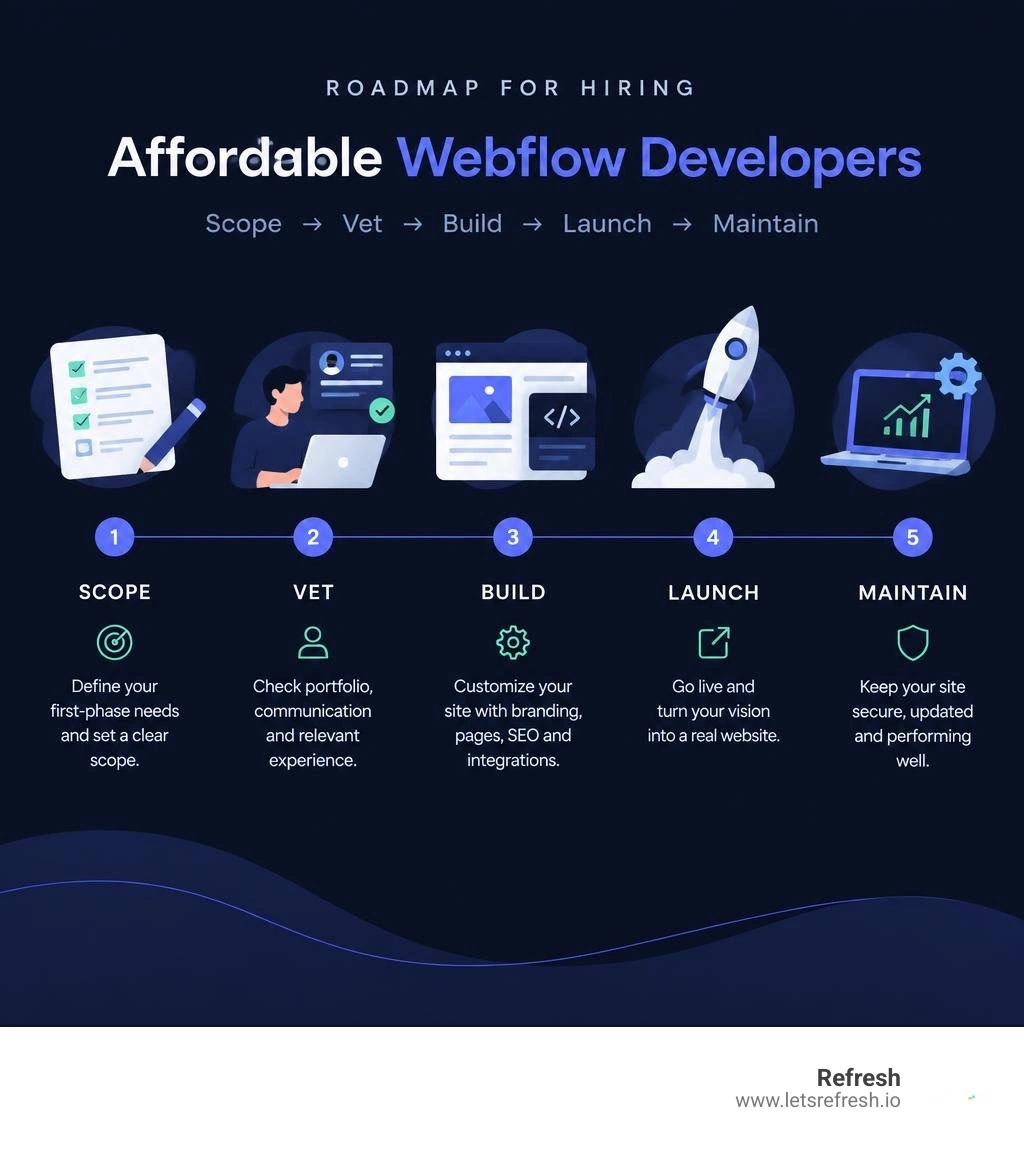
For affordable small business Webflow development, start with a defined first-phase scope, then hire based on the work you actually need. A practical approach is to:
- Choose a responsive template when speed and budget matter most.
- Hire a Webflow specialist to customize branding, pages, SEO settings, and integrations.
- Reserve custom development for unique functions, complex CMS needs, or a site that must scale quickly.
Webflow is a strong fit for growing businesses because it combines visual design control, responsive layouts, CMS tools, and hosting in one platform. A well-chosen template can keep upfront costs lower - many templates fall between $24 and $129 - while professional customization helps avoid a generic-looking site and ensures the build supports leads, bookings, or sales.
The key is not to hire the lowest-priced developer. Hire someone who can show clean, mobile-first Webflow work, explain the scope clearly, and build a site your team can update after launch. That gives you a better website without turning an early-stage rebuild into an oversized project.
I am Alexander Palmiere, Founder and CEO of Refresh, where we have launched more than 200 websites and help growing companies improve their digital strategy, SEO, and online presence. In the sections ahead, I will break down practical ways to plan, source, and manage small business Webflow development within a sensible budget.
Whether you need a complete branding refresh for websites, high-performing seo optimized webflow sites that rank well, or reliable ongoing website support services, strategic planning keeps your growth on track.
For a broader perspective on website builders, you can refer to Webflow's Wikipedia entry.
6 Proven Ways to Approach Small Business Webflow Development on a Budget
Managing a website budget does not mean cutting corners or settling for a subpar digital presence. When planning your build, the goal is finding the intersection between clean execution, fast load speeds, and long-term maintainability.
Whether your company operates in Pittsburgh, PA, Cleveland, OH, or Charlotte, NC, modern customers expect an intuitive, high-performance browsing experience. Achieving that without overspending requires deliberate project scoping, smart resourcing, and strict timeline management. Below are six practical approaches to keep your build cost-effective while maintaining exceptional build quality.
1. Customizing Pre-Built Small Business Templates
Starting with a pre-designed layout is one of the fastest and most economical ways to launch. Commercial Webflow templates typically cost between $24 and $129 USD, with roughly 70% priced under $79 USD. These off-the-shelf options come packed with pre-built page structures, standard interactions, and baseline layouts tailored to various business verticals.
Reading a comprehensive Webflow review on website builder capabilities makes it clear why this method works: Webflow writes clean semantic code underneath, making it far superior to bloated drag-and-drop builders. While an out-of-the-box template provides the skeleton, pairing it with a developer ensures your typography, color palette, custom graphics, and copy align seamlessly with your brand identity. If your business outgrows a standard template or needs complex interactive structures, shifting toward custom Webflow design allows for tailored layouts that match your precise operational workflows.
2. Sourcing Freelance Specialists on Vetted Platforms
If you have a clear scope of work and a ready-to-use template, bringing on an independent freelance developer can reduce overhead costs. Freelancers on vetted networks often charge lower overhead fees than full-service creative agencies, giving you direct access to technical implementation.

When reviewing candidate portfolios, look past pretty visuals and check how their previous builds perform across varying screen dimensions. Assess their class naming conventions and determine whether they structure projects using standardized frameworks like Client-First. Hiring a freelancer on a fixed-price milestone contract protects your budget against unexpected delays, while an hourly arrangement works better if your team prefers iterative updates.
3. Partnering with a Dedicated Webflow Agency
For businesses that require end-to-end guidance—spanning brand positioning, conversion architecture, technical development, and long-term scalability—a dedicated agency offers unmatched strategic value. Working alongside top Webflow developers within an agency environment ensures your site is engineered for peak performance from day one.
A specialized Webflow development company removes technical friction by handling complex logic, custom JavaScript integrations, dynamic CMS collections, and multi-tier quality assurance. While the initial investment is higher than hiring a solo freelancer, an agency mitigates risks associated with missed deadlines, buggy code, or developer abandonment, providing stability and ongoing technical oversight as your operations expand.
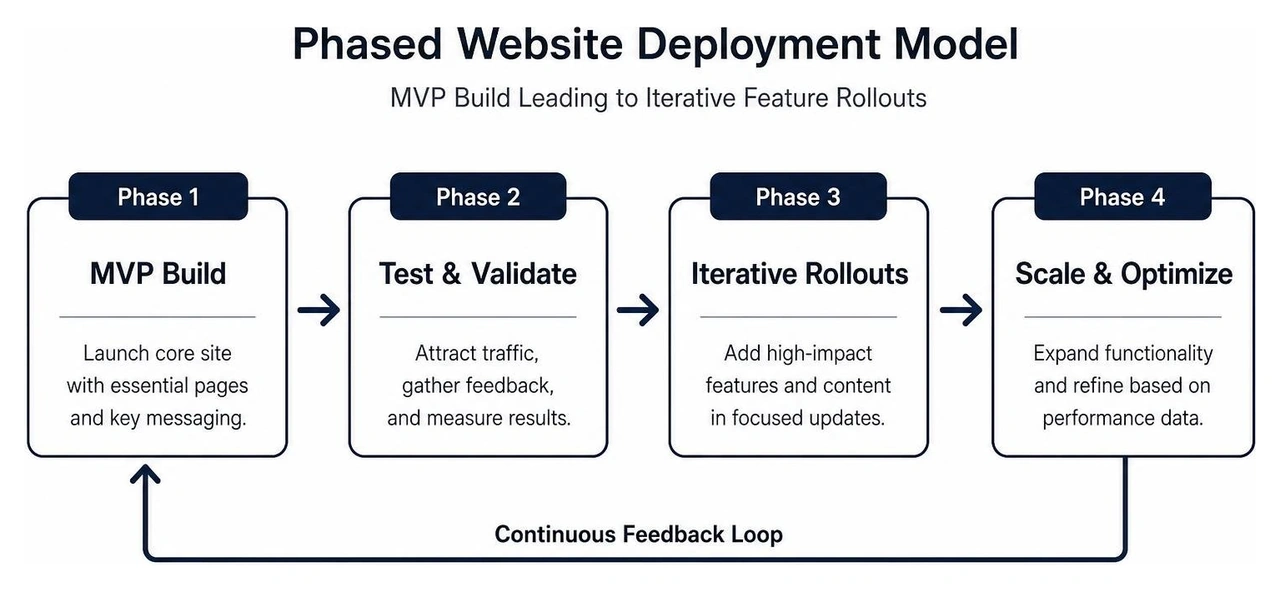
4. Implementing a Phased MVP Website Build
You do not need a twenty-page website on day one to start capturing high-intent leads. Launching a high-converting Minimum Viable Product (MVP) site allows you to validate your value proposition and generate revenue before investing in ancillary pages.
Focusing initial efforts on high-impact Webflow landing page design lets you test headlines, showcase your core services, establish social proof, and streamline lead intake forms. Once traffic begins converting, you can funnel generated revenue into subsequent development phases—such as resource centers, interactive calculators, or expanded case study directories.
5. Utilizing Hybrid In-House Content and External Development
Development costs escalate quickly when you rely on outside programmers to write copy, source photography, and manually input blog posts. A hybrid workflow lets you leverage the intuitive Webflow Editor to handle internal content staging while outsourcing technical structure and styling to an expert.
By taking ownership of text creation, asset organization, and basic on-page formatting, you drastically cut down billable developer hours. For teams looking to streamline this workflow, consulting a Webflow website support complete guide provides practical frameworks for training non-technical staff to manage ongoing content updates independently.
6. Securing On-Demand Maintenance Retainers
A website is not a static asset; it requires periodic adjustments, platform updates, and conversion tweaks to remain competitive. Rather than scrambling to find emergency help when an issue arises, securing structured maintenance agreements keeps your overhead predictable.
Tapping into dependable Webflow expert support gives your team priority access to developers who can quickly diagnose styling bugs, update outdated CMS schemas, or implement new marketing tracking pixels. Reviewing a detailed Webflow maintenance complete guide helps you identify the essential service tiers needed to safeguard your digital presence over time.
Key Criteria for Evaluating Webflow Talent
Selecting the right partner requires balancing technical skill, budget constraints, and communication transparency. The comparison below highlights the operational trade-offs between execution models:
| Sourcing Model | Typical Upfront Cost | Time to Launch | Customization Flexibility | Ideal Business Stage |
|---|---|---|---|---|
| Template Customization | Low ($500 – $2,500) | 1 to 2 Weeks | Moderate (Bounded by layout) | Early-stage startups & local services |
| Vetted Freelancer | Moderate ($1,500 – $6,000) | 3 to 6 Weeks | High (Tailored build) | Growing brands with clear scopes |
| Specialized Agency | Higher ($5,000 – $20,000+) | 4 to 8 Weeks | Maximum (Custom UX & strategy) | Scaling businesses needing deep support |
Beyond budget considerations, ensure your prospective developer upholds exceptional standards in visual hierarchy and intuitive Webflow UX design. A website must not only look sharp—it must effortlessly guide visitors toward conversion actions.
Core Capabilities for Small Business Webflow Development
To ensure your investment yields tangible results, verify that your development team masters these essential engineering fundamentals:
- Responsive Breakpoint Optimization: Seamless adaptability across desktops, tablets, and smartphones via clean mobile-first responsive design practices.
- Search Engine Optimization Setup: Structuring semantic HTML tags, managing schema markup, and establishing SEO optimized Webflow sites that capture search engine visibility and support Generative Engine Optimization (GEO) algorithms.
- Performance Optimization: Rigorous asset compression, responsive image rendering, and Webflow page speed optimization to ensure sub-second load times.
- Structured Class Architecture: Clean global style guides and modular CSS class systems that prevent layout conflicts during future updates.
Essential Integrations and Small Business Webflow Development Features
Your website must act as an automated engine for your day-to-day operations. When scoping your build, prioritize these functional tools:
- Form & Lead Automation: Reliable Webflow forms integration hooked directly into your email marketing platform or CRM.
- Appointment Scheduling: Embedded widgets (such as Calendly or HubSpot Meetings) allowing clients to book consultations instantly.
- Transactional E-Commerce: Lightweight checkout workflows, dynamic shipping calculation, and secure payment processing.
- Multi-Channel Analytics: Correctly mapped tracking tags for Google Tag Manager, analytics platforms, and conversational chat tools.
Understanding Webflow Pricing and Ongoing Maintenance Costs
Webflow eliminates expensive external database management and complex server configurations by bundling high-performance hosting into its native infrastructure. To budget accurately, small business owners must account for ongoing hosting fees alongside initial build expenses.
Reviewing Webflow hosting pricing and selecting the right tier from available Webflow hosting plans ensures you only pay for the bandwidth and CMS collection limits your business actually consumes. In addition to standard monthly hosting fees, your annual operational budget should factor in custom domain renewal ($12 to $20/year) and an on-demand support retainer for seasonal updates.
Frequently Asked Questions About Webflow for Small Businesses
How much does it cost to build a small business website on Webflow?
A basic template customization project typically ranges between $500 and $2,500 depending on page count and custom asset requirements. A fully bespoke website with dynamic CMS functionality, advanced interactions, and third-party integrations generally spans from $3,000 to $15,000+.
Is Webflow a good choice for small service businesses?
Yes. Webflow provides bank-grade enterprise hosting backed by Amazon Web Services (AWS) and Fastly CDN. It eliminates the constant security vulnerabilities, plugin conflicts, and database crashes commonly found on older content management systems.
Can business owners manage Webflow sites without coding skills?
Webflow provides a visual on-page Editor that allows non-technical team members to edit text, swap images, create blog posts, and publish updates with a single click—without risking changes to the underlying code or layout structure.
Conclusion
Finding affordable Webflow developers comes down to scoping your project intelligently, picking the right build approach, and prioritizing functional performance over unnecessary complexity. By investing in scalable architecture, clean mobile responsiveness, and high-converting layouts, your website becomes an active growth driver rather than a static expense.
Ready to launch a high-performing digital experience tailored to your business goals? Connect with Refresh for dedicated Webflow development and support and let our team engineer a site that scales alongside your vision.


.avif)