
What Makes a Webflow Site Actually Rank in Search?
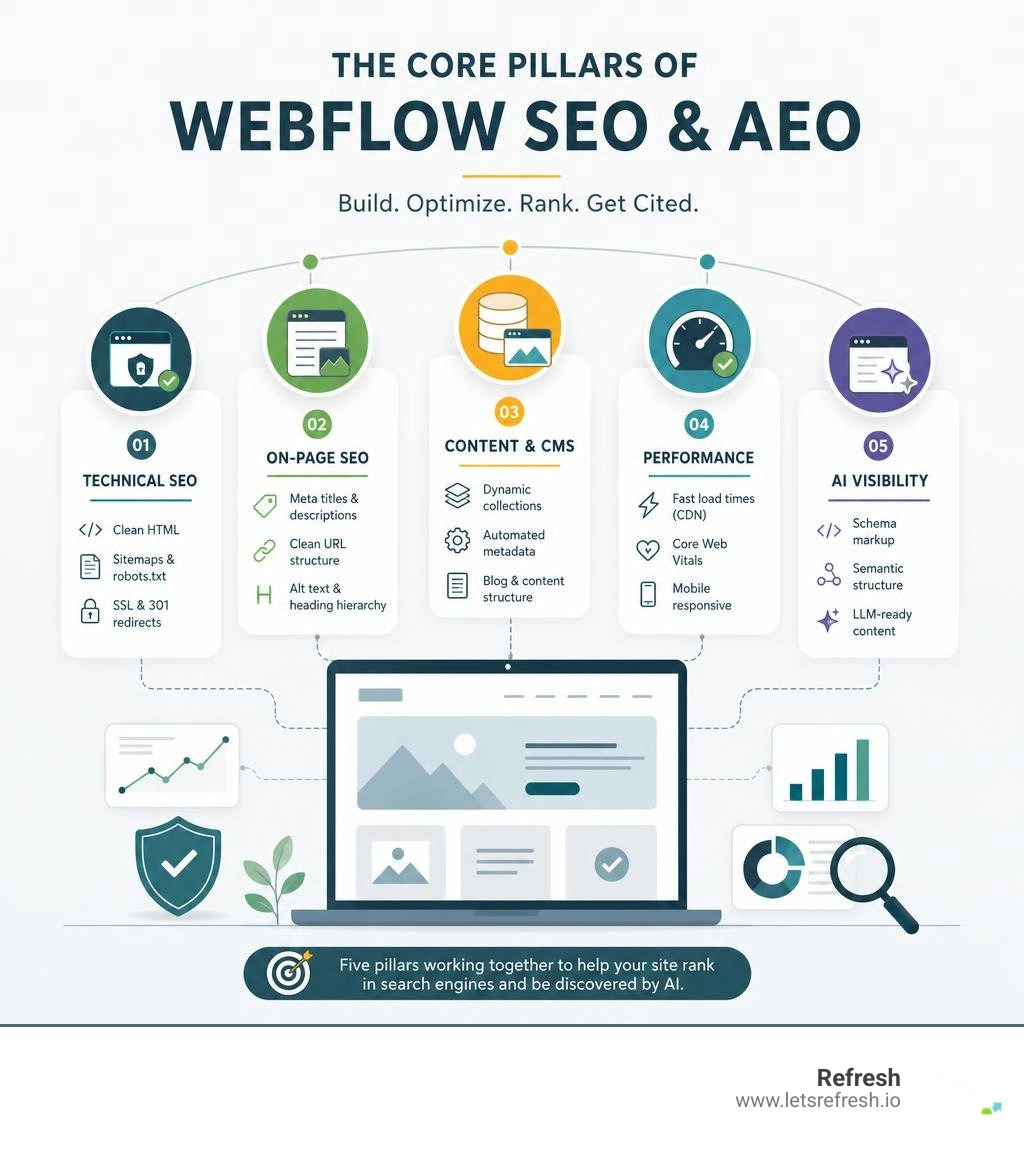
SEO optimized Webflow sites are websites built on the Webflow platform that combine clean technical architecture, strong on-page signals, and modern content strategies to rank well in both traditional search engines and AI-powered discovery tools.
Here's a quick snapshot of what that looks like in practice:
| Pillar | What It Means for Your Webflow Site |
|---|---|
| Technical SEO | Clean HTML, SSL, XML sitemaps, robots.txt, 301 redirects |
| On-Page SEO | Meta titles, descriptions, URL structure, alt text, heading hierarchy |
| Content & CMS | Dynamic collections, automated metadata, blog structure |
| Performance | Fast load times via AWS/CDN, Core Web Vitals, mobile responsiveness |
| AI Visibility (AEO) | Schema markup, semantic structure, LLM-ready content formatting |
Webflow gives you strong native control over all five of these pillars — without needing plugins or a developer on standby for every change.
But here's the reality most founders miss: a beautifully designed Webflow site and a well-ranking Webflow site are not the same thing. Design gets visitors to stay. SEO gets them there in the first place.
Webflow's globally distributed hosting, automatic sitemap generation, and semantic HTML output give your site a solid technical foundation out of the box. But that foundation still needs to be built on — with intentional on-page optimization, structured content, and increasingly, a strategy for how AI search tools like ChatGPT, Perplexity, and Google's AI Overviews will find and cite your pages.
I'm Alexander Palmiere, Founder and CEO of Refresh Digital Strategy, and over the course of launching 200+ websites, I've seen how SEO optimized Webflow sites consistently outperform visually impressive ones that were never built with search in mind. In this guide, I'll walk you through exactly what it takes to make your Webflow site perform — not just look good.
The Core Architecture of SEO Optimized Webflow Sites
When evaluating Webflow’s SEO capabilities, the most common comparison is with WordPress. For years, WordPress has been the default recommendation for organic search, largely due to its vast library of plugins. However, relying on a stack of third-party plugins to handle basic search optimizations introduces security risks, code bloat, and maintenance headaches.
Webflow takes a different approach by building core technical SEO controls directly into its designer and hosting environment.
| Feature | Webflow (Native) | WordPress (Native) |
|---|---|---|
| HTML Output | Clean, semantic, and light | Often bloated by themes and plugins |
| Hosting & Speed | Globally distributed AWS CDN | Varies (depends on hosting provider) |
| XML Sitemaps | Automated & self-updating | Requires external plugins |
| 301 Redirects | Built-in dashboard | Requires plugins or .htaccess edits |
| SSL Certificates | Included, automatic one-click setup | Varies; often manual configuration |
At the heart of seo optimized webflow sites is clean, semantic HTML. Unlike traditional visual page builders that wrap elements in endless nested <div> tags—which search crawlers struggle to parse—Webflow acts as a visual interface for writing clean code. This is particularly important because studies show that up to 25% of heavy JavaScript content on the web fails to get indexed correctly. By outputting clean, lightweight markup, Webflow ensures search engines can crawl and index your content without getting stuck in code bloat.
Furthermore, Webflow hosting is built on Amazon Web Services (AWS) and utilizes a global CDN spanning over 100 data centers worldwide. This ensures that your pages load exceptionally fast, regardless of where your visitors are located. Because page speed is a prioritized signal for modern search engines, this global infrastructure gives Webflow sites an immediate advantage.
To see how top brands leverage these native features to build high-ranking, visually stunning digital experiences, you can browse through the Best Seo Optimized Websites Websites showcase. For businesses looking to migrate or build from scratch, partnering with a dedicated Webflow Development Company ensures that these technical advantages are fully integrated from day one.
Technical and On-Page SEO Best Practices in Webflow
On-page SEO is where many beautiful websites fall short. To rank in July 2026, we have to look past the design and focus on the technical details that tell search engines exactly what our pages are about.

To get the most out of your Webflow site, follow these core on-page best practices:
- Meta Titles and Descriptions: Keep your page titles under 60 characters (ideally around 55 characters to avoid truncation) and your meta descriptions between 150 and 155 characters. Use unique, descriptive pairs for every single page. A great formula to follow is:
[Brand Name] + [Product/Service] + [Value Proposition/Outcome]. - Logical URL Structures: Create short, descriptive, and keyword-rich slug paths. Avoid nesting pages too deep inside subfolders unless necessary. Top-level pages are generally easier for search engines to crawl and prioritize.
- Header Tag Hierarchy: Use exactly one
<h1>tag per page for the main title. Organize subsequent sections with<h2>tags for major headings, and<h3>tags for subsections. This clear hierarchy helps search engines understand the structure of your content. - Image Alt Text and Filenames: Images are returned for roughly 13.4% of all search queries. Instead of uploading files named
image-241.png, rename them to descriptive, keyword-conscious titles (e.g.,pittsburgh-webflow-developer-team.png) and write detailed, context-rich alt text directly inside Webflow's asset manager. - Canonical Tags: Duplicate content is a major issue that can dilute your search equity. Always set up a global canonical tag in your Webflow project settings to tell search engines which version of your URL is the definitive master copy.
- 301 Redirects: When deleting or moving pages, never leave your users (or search bots) hanging on a broken link. Webflow’s hosting settings include a simple, built-in 301 redirect management system that allows you to easily point old URLs to new ones, preserving your hard-earned link equity.
Using pre-designed, search-friendly frameworks is a highly efficient way to implement these practices. For example, the Cleveland Website Page Template for Webflow provides a clean, pre-structured layout that follows strict SEO guidelines out of the box. By starting with a strong foundation, you can ensure that your Webflow UX Design keeps users engaged while supporting your technical search visibility.
Scaling Content with Dynamic Collections and Programmatic SEO
For blogs, resource hubs, or directory websites, optimizing pages manually one by one is simply not scalable. This is where Webflow’s visual CMS shines. We can design a single template page and map its SEO settings dynamically using custom CMS fields.
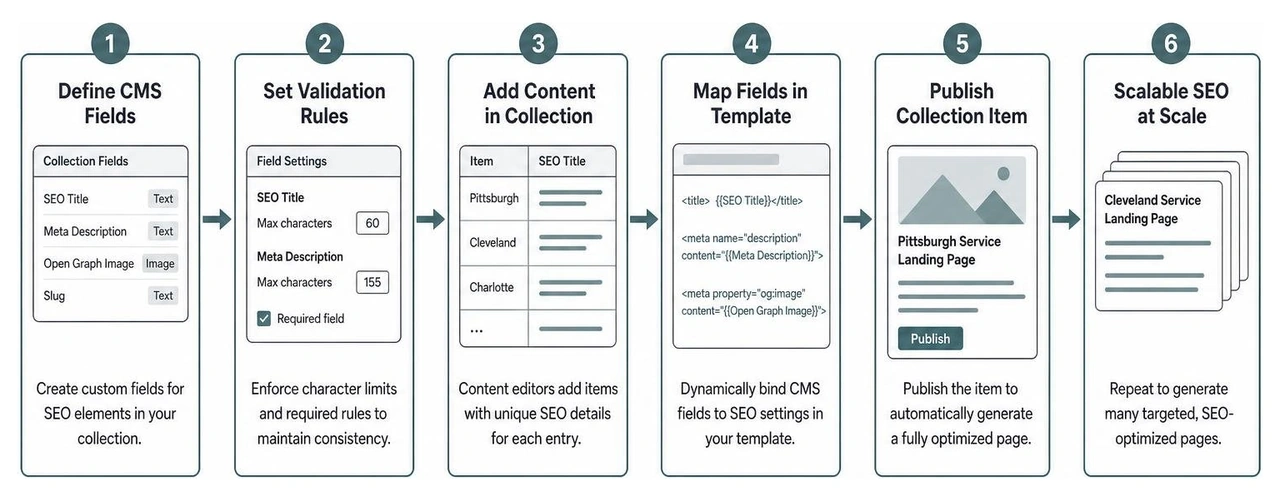
By turning your Webflow CMS into an automated SEO engine, you can define fields for custom titles, meta descriptions, and open graph images. You can even set strict character limits on these CMS fields so that content editors cannot accidentally publish meta tags that are too long.
This approach is the foundation of Programmatic SEO Webflow strategies. If you are targeting localized keywords across our service areas—such as Pittsburgh, PA, Cleveland, OH, or Charlotte, NC—you can use dynamic collections to spin up highly targeted, structured landing pages at scale without touching a single line of code.
Furthermore, Webflow’s localization engine automatically handles complex hreflang tags, making it incredibly easy to scale your content strategy internationally while ensuring search engines serve the correct language version to the right audience.
Optimizing Page Performance and Mobile Responsiveness
With mobile users accounting for the vast majority of web traffic, search engines prioritize mobile-first indexing. If your site does not perform flawlessly on a smartphone, it will not rank.
Webflow builds with responsiveness in mind by default, allowing you to visually adjust layouts across multiple breakpoints. However, keeping your Core Web Vitals in the green requires active optimization:
- Minify Assets: In Webflow's Advanced Publishing Options, always toggle on the minification options for HTML, CSS, and JavaScript. This strips out unnecessary spaces and characters, reducing file sizes.
- Compress Images: Large image files are the number one cause of slow websites. Convert your images to modern formats like WebP and compress them before uploading.
- Use Lazy Loading: Ensure that non-critical images are set to lazy load so they only download as the user scrolls down the page.
- Avoid Custom Code Bloat: While custom scripts can add exciting functionality, too many external JS files will slow down your site's rendering speeds.
For a comprehensive breakdown of how to audit and improve your site's speed metrics, refer to our guide on Webflow Page Speed Optimization.
Modern Search Horizons: AI Visibility, AEO, and Structured Data
Search is changing rapidly. Users are no longer just typing keywords into Google; they are asking complex questions to AI assistants like ChatGPT, Claude, Gemini, and Perplexity. To stay visible, we must optimize our sites for both traditional Search Engine Optimization (SEO) and Answer Engine Optimization (AEO).
AEO is all about making your content as easy as possible for Large Language Models (LLMs) to read, understand, and cite. LLMs rely on structured information, clear content hierarchies, and explicit data relationships. If your site's code is messy or lacks clear semantic context, AI search engines will simply bypass your content in favor of a competitor's.
One of the most effective ways to establish this machine-readable context is through schema markup (JSON-LD). Schema markup tells search engines exactly what your data means. For example, instead of just displaying a review or an FAQ, schema explicitly labels that text so search engines can display rich snippets in search results—which can boost your click-through rates by up to 30%.
To simplify this process, we recommend using dedicated tools like Create and Manage Structured Data in Webflow - Boost AI traffic and CTR!, which helps automate schema generation and keeps your structured data perfectly in sync with your Webflow CMS.
Leveraging AI Tools for SEO Optimized Webflow Sites
You do not have to handle the heavy lifting of SEO and AEO optimization alone. The modern Webflow ecosystem is packed with AI-powered tools designed to streamline your workflows:
- Semflow: This integrated SEO app allows you to crawl your Webflow site, calculate an SEO and AI visibility score, and receive a personalized checklist of improvements directly inside your designer workspace.
- FluidSEO: Excellent for automating repetitive on-page tasks, FluidSEO can generate AI-powered alt text for thousands of CMS images in a single click, manage bulk metadata updates, and run real-time audits to catch missing tags before you publish.
- Webflow's Native AI Audit Panel: Webflow’s built-in designer audit panel automatically flags common usability and SEO issues, such as skipped heading levels or missing alt text, ensuring your site remains highly accessible and crawlable.
By leveraging these integrations, marketing teams can scale their organic visibility efforts without needing constant developer support.
Implementing Schema Markup for SEO Optimized Webflow Sites
Implementing structured data manually used to require custom code blocks on every page, which quickly became a maintenance nightmare when CMS content changed. Today, we can use dynamic schema mapping to link schema fields directly to our Webflow CMS collections.
For example, if you run a job board, a recipe blog, or an events directory, you can map your CMS fields to corresponding Schema.org properties. When you update a CMS item, the JSON-LD schema updates automatically. This keeps your structured data highly accurate, avoiding search engine penalties for mismatched live content and ensuring your business is ready to be cited by AI search assistants.
Frequently Asked Questions about Webflow SEO
How does Webflow handle duplicate content across multiple domains or TLDs?
Duplicate content can severely damage your search rankings. If you run multiple versions of your site or use multiple top-level domains (TLDs) (for example, a .com for general business and a .ai or .ch for specialized regions), search engines may view this as spammy if the content is identical.
To prevent this, always implement canonical tags pointing to your primary domain version. Additionally, you should disable the indexing of your default webflow.io subdomain in your Webflow site settings to prevent search engines from indexing your staging site. For international sites, use Webflow's native localization features to manage hreflang tags, which explicitly tell search engines which regional domain or language variation to display to users.
Can Webflow scale for enterprise-level SEO and high-traffic websites?
Yes, absolutely. Webflow is built to handle enterprise-scale traffic and complex content requirements. Because its hosting is backed by AWS, your site can handle massive traffic spikes without slowing down.
For enterprise marketing teams, Webflow offers features like bulk 301 redirect uploads via CSV, automated SEO settings for unlimited CMS items, and robust localization controls. This allows large organizations to manage complex international SEO strategies across thousands of pages without relying on custom developer queues or bloated backend databases.
Which analytics and tracking tools integrate best with Webflow?
Webflow integrates seamlessly with all major search tracking and analytics suites. You can quickly connect Google Search Console by pasting your HTML verification tag directly into Webflow's site settings.
For traffic analysis, Google Analytics 4 (GA4) can be integrated globally via a simple measurement ID or through Google Tag Manager. Additionally, third-party SEO suites like Semrush, Ahrefs, and Moz work perfectly with Webflow sites to track keyword rankings, monitor backlink profiles, and run deep technical site health audits.
Conclusion
At the end of the day, search engines and AI assistants have the exact same goal: to provide searchers with the most helpful, fast, and accurate answer to their questions.
Building seo optimized webflow sites is not about trying to trick an algorithm with keyword stuffing or technical shortcuts. It is about creating a high-quality, human-centric user experience that is built on a clean, lightning-fast technical foundation. Webflow gives us all the tools we need to achieve this—without the clutter of traditional plugins.
If you are ready to transform your website from a simple online brochure into a high-performing organic growth channel, we are here to help. At Refresh, we specialize in building fast, scalable, and search-optimized Webflow websites for businesses throughout Pittsburgh, PA, Cleveland, OH, and Charlotte, NC. Let’s partner to build a digital presence that doesn't just look spectacular, but actually drives real revenue for your business.


.avif)