
Protect Rankings Before You Modernize Your Website
A successful SEO website redesign starts before design work begins. Protect your rankings by benchmarking current organic performance, keeping valuable content and on-page signals intact, mapping every changed URL to its closest new page with a 301 redirect, and testing the new site on staging before launch.
The core priorities are simple:
- Crawl and document the existing site - especially top traffic pages, backlinks, titles, headings, internal links, canonicals, and schema.
- Keep URLs stable when possible - if a URL must change, use a direct one-to-one 301 redirect.
- Preserve content that earns rankings - improve it for users rather than deleting it for a cleaner design.
- Test technical SEO before launch - crawlability, mobile usability, page speed, XML sitemaps, robots directives, and Core Web Vitals all matter.
- Monitor closely after launch - use Google Search Console and analytics to spot indexing, redirect, or traffic issues early.
A modern visual layer, clearer site architecture, and a move to a flexible platform such as Webflow can strengthen search performance. But redesigns can also quietly remove the signals search engines rely on: a useful H1, internal links, descriptive alt text, server-rendered metadata, or a fast-loading page template.
This guide shows how to make modernization a controlled SEO project, not a leap of faith. It also covers Generative Engine Optimization (GEO), so your new pages are clear, well structured, and easier for AI-driven search experiences to understand and cite.
I’m Alexander Palmiere, Founder and CEO of Refresh, where our team has launched more than 200 websites and helps growing businesses pair modern Webflow development with durable search strategy. In an SEO website redesign, that experience means protecting the assets already driving discovery while building a stronger foundation for what comes next.

Handy seo website redesign terms:
Redesign vs. Migration: Scope and SEO Risk Assessment
Before touching a layout or editing copy, you must define the operational scope of your overhaul. In digital architecture, teams frequently confuse a visual template update with a full platform migration. The distinction is critical because each introduces different levels of technical risk to your traffic retention, crawl equity, and backlink authority.
A standard redesign focuses on visual interface updates, modular styling, and user experience enhancements while keeping the underlying URL structure and domain intact. A migration, by contrast, alters the fundamental mechanics of your digital presence—such as switching content management systems, restructuring permalink taxonomies, moving to a new domain, or altering the host server. Understanding this distinction is essential when planning a modern business website redesign that elevates visual appeal without sacrificing organic discovery.
| Factor | Same-URL Redesign | Platform Migration |
|---|---|---|
| URL Stability | Kept identical across templates | Permalinks, paths, or protocols change |
| Primary SEO Risk | Accidental removal of on-page signals, H1s, text, or schema | Broken 301 mappings, lost backlinks, rendering differences |
| Link Equity Impact | Retains 100% direct internal link equity | Requires redirect rules to pass link equity |
| Crawl Depth Adjustments | Minimal shifts unless primary navigation changes | Substantial reorganization of site taxonomy and depth |
| Testing Requirement | Staging crawl diff for content and code parity | URL mapping verification, protocol tests, full redirect checks |
Preserving Critical On-Page Elements and Content Parity
The quietest way to damage organic performance is to strip away core on-page elements in pursuit of a minimalist aesthetic. Visual designers often replace keyword-rich introductory paragraphs with broad marketing slogans or remove structured subheadings altogether.
When templates change, you must maintain content parity. If a legacy service page ranks on page one because of a well-crafted H1, three descriptive H2s, structured FAQ modules, and 800 words of body text, replacing that page with a 150-word layout will erode topical relevance.
Ensure the new templates protect:
- Title Tags and Meta Descriptions: Ensure unique, high-performing metadata is migrated directly into CMS collection fields.
- Heading Hierarchy: Retain a single H1 containing core topical entities, supported by logical H2 and H3 tags.
- Contextual Internal Links: Preserve in-body cross-links that pass link equity to deeper commercial pages.
- Image Metadata: Carry over descriptive alt text rather than leaving asset fields blank.
- Server-Side Rendering: Verify that page text renders immediately in the raw HTML response rather than relying solely on client-side JavaScript execution.
Mitigating Ranking Volatility and Traffic Loss
Even in a smooth redesign, expect a brief phase of algorithmic re-indexing. When search engine crawlers encounter updated CSS styles, revised DOM trees, and fresh internal links, they re-evaluate the site's topical relevance and structural authority.
A temporary fluctuation of 5% to 10% during the initial two to four weeks post-launch is common as Google recalculates crawl frequency and processes page changes. However, unmanaged redesigns that overlook broken links or unmapped URLs can trigger traffic drops of 20% to 50%. You can mitigate this volatility by preserving your URL structure, maintaining content volume, keeping key pages within three clicks of the homepage, and ensuring fast server responses.
The Core Pillars of an SEO Website Redesign Strategy
Protecting search equity during a digital refresh requires a balance between creative user experience design and rigorous technical architecture. Partnering with a dedicated web redesign company ensures that information architecture, topical authority, and search intent are established from the start rather than retrofitted at launch.
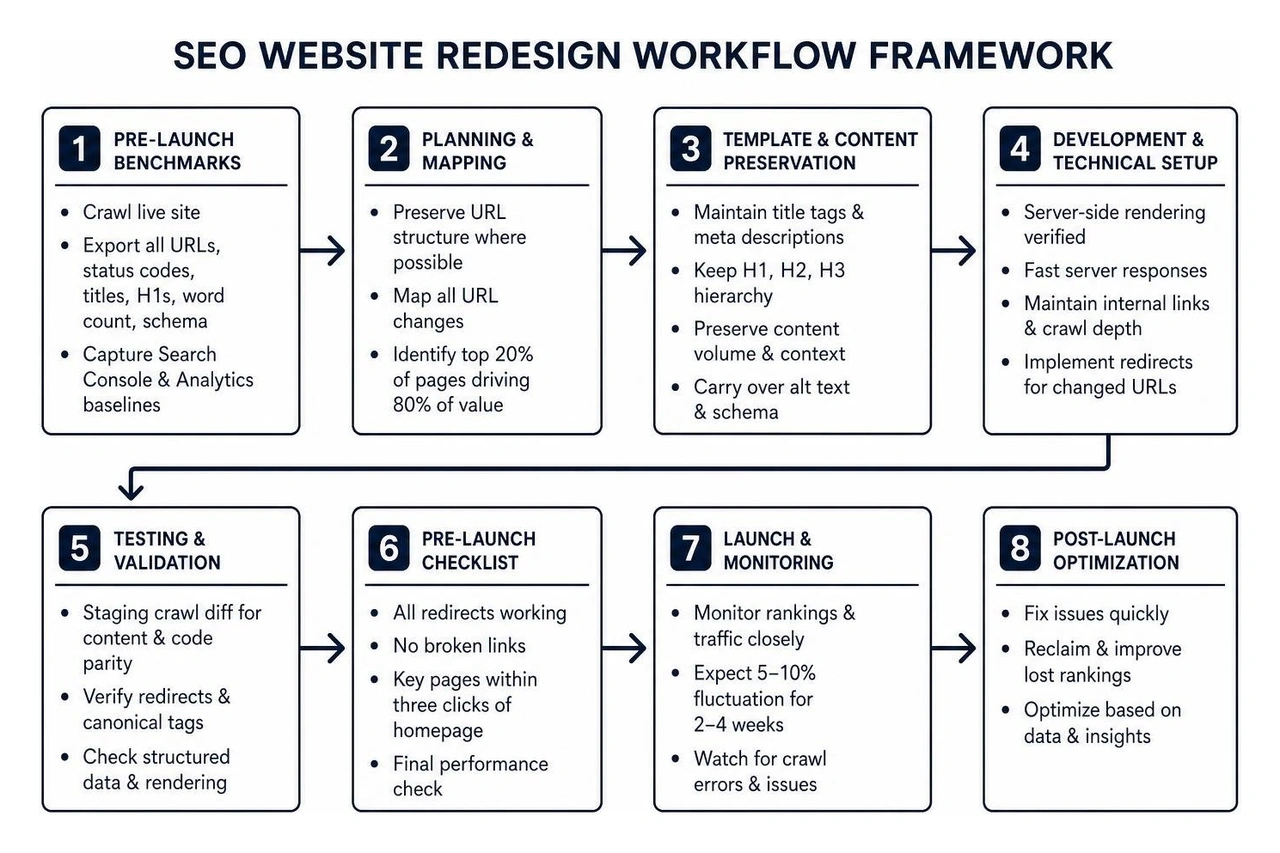
Pre-Launch Benchmarks for an SEO Website Redesign
You cannot protect what you have not documented. The discovery phase must begin with a thorough crawl of your live production website to capture baseline metrics across all performance areas.
Begin by running a baseline crawl using a trusted crawler like Screaming Frog to export every live URL, canonical target, status code, title tag, H1, word count, and structured data block. Next, extract historical data from Google Search Console and Google Analytics to identify your top 20% of pages that drive 80% of total organic traffic, conversions, and revenue.
Supplement this inventory with a comprehensive backlink export from platforms such as Ahrefs or Moz. Identify every external URL with high referring domains; these high-equity URLs must be preserved or prioritized in your mapping strategy. Reviewing a detailed technical audit checklist will help ensure no legacy assets are left uncataloged before design iterations begin.
URL Mapping and 301 Redirect Architecture
If your redesign requires changing permalinks, updating subfolder taxonomies, or retiring outdated content, an accurate redirect map is essential. Failing to redirect legacy URLs leads to 404 errors, broken user journeys, and lost backlink equity.
Follow these direct principles when constructing your URL mapping plan:
- One-to-One Redirect Mapping: Map every old URL to its exact conceptual counterpart on the new site. Avoid lazy shortcuts, such as pointing dozens of legacy blog posts or service pages directly to the homepage, as search engines often interpret mass homepage redirects as soft 404 errors.
- Eliminate Redirect Chains and Loops: Point the legacy URL directly to the final 200 OK destination. Never allow a URL to resolve through intermediate hops (e.g., URL A to URL B to URL C).
- Consolidate Thin Content: When retiring legacy pages, merge their subject matter into a primary pillar asset and 301 redirect the retired URLs to that comprehensive guide.
- Preserve URL Formats: Maintain clean, lowercase, hyphenated slugs without trailing slash discrepancies, and ensure server rules enforce a single canonical protocol (HTTPS and non-WWW).
Developing a comprehensive revamp website plan ensures that every redirect rule is tested in a staging environment before the domain DNS records update.
Technical Safeguards for an SEO Website Redesign Launch

A staging environment is essential for catching technical errors before they impact your live rankings. Conducting a field-by-field staging crawl diff allows you to compare the new build directly against your production baseline.
Key technical safeguards to enforce before going live include:
- Staging Protection Controls: Keep search engines from indexing the pre-production build by using HTTP authentication or a
noindexresponse header, rather than relying solely on a temporary robots.txt file that may accidentally block asset rendering. - Self-Referential Canonical Tags: Ensure every new template outputs a clean, absolute canonical tag matching the new URL structure.
- Crawlable XML Sitemaps: Generate dynamically updated XML sitemaps containing only indexable 200 OK URLs, and remove redirected or canonicalized variations.
- Broken Link Validation: Scan staging builds to eliminate broken internal hrefs, dead image paths, or placeholder navigation links.
Modern development teams often build on SEO-optimized Webflow sites because the platform generates clean semantic markup, automates sitemap updates, and allows granular control over redirects and metadata without requiring messy third-party plugins.
Modernizing Architecture for Core Web Vitals and Generative AI Search
A redesign is the best time to resolve underlying code bloat, reduce server response latency, and build a site ready for modern search features. Incorporating B2B website redesign best practices ensures your visual identity looks sharp while meeting Google's Core Web Vitals standards and modern AI search requirements.
Optimizing Performance, Render Speed, and Mobile Usability
Page speed and visual stability are confirmed ranking signals. When modernizing your site, ensure every template meets Google's Core Web Vitals thresholds across mobile and desktop devices:
- Largest Contentful Paint (LCP): Ensure primary hero assets load within 2.5 seconds. Avoid lazy-loading above-the-fold hero images; instead, compress them into next-gen formats (such as WebP or AVIF) and apply high fetch priority attributes.
- Cumulative Layout Shift (CLS): Prevent shifting page elements by setting explicit width and height dimensions on images, videos, and dynamic embeds. Preload primary brand typography to prevent layout shifts caused by fallback system fonts.
- Interaction to Next Paint (INP): Minimize third-party tracking scripts, streamline heavy animations, and eliminate render-blocking JavaScript to keep the interface fast and responsive to user input.
Webflow visual development provides an advantage here by producing clean semantic HTML5, streamlined CSS styling, and reliable hosting through modern global CDNs, avoiding the database bloat common in legacy CMS setups.
Structuring Content for Generative Engine Optimization (GEO)
Search engines increasingly use AI summaries and direct answer boxes alongside traditional organic listings. Generative Engine Optimization (GEO) is the practice of organizing your site's content and technical structure so large language models and search engines can easily find, understand, and cite your information.
To optimize your redesigned site for generative AI discovery:
- Implement Structured Schema Markup: Provide explicit machine-readable context through comprehensive JSON-LD schemas across all primary page templates.
- Write Clear, Modular Answers: Structure content with clear subheadings, bulleted lists, and concise introductory definitions that answer search intent directly within the first two paragraphs.
- Maintain Clear Information Architecture: Build logical topic clusters and internal linking structures to highlight your brand's expertise across core service areas.
High-impact schema types to include in your redesign:
- Organization Schema: Defines your brand name, official logo, contact information, social profiles, and physical service locations.
- WebPage and ItemList Schema: Clarifies the structural purpose of your landing pages, navigation menus, and breadcrumb trails.
- Service and Product Schema: Details commercial offerings, pricing structures, and key features.
- Article and BlogPosting Schema: Highlights authors, editorial dates, and publication details on thought leadership content.
Post-Launch Monitoring, Crawl Diagnostics, and Rollback Safeguards
Launch day is not the finish line; it marks the start of a critical 90-day verification phase. Active post-launch monitoring lets you identify and fix technical anomalies before they affect organic performance.

Search Console Verification and Sitemaps
As soon as your DNS switches to the new production environment, complete these essential verification steps:
- Remove Pre-Launch Crawl Blocks: Verify that staging
noindexheaders are removed from production pages and confirm yourrobots.txtfile permits crawling of all key directories and assets. - Submit Updated XML Sitemaps: Upload your updated XML sitemaps to Google Search Console and Bing Webmaster Tools to prompt crawling of new layouts and URLs.
- Inspect Key Commercial URLs: Use the URL Inspection Tool to test live URL rendering, confirm proper server-side HTML delivery, check canonical tag indexing, and ensure structured schema validates without errors.
- Monitor Search Console Coverage Reports: Check the Pages report daily to catch 404 errors, accidental redirect loops, or unintended canonical anomalies.
Setting Rollback Triggers and Continuous Monitoring
A solid redesign strategy always includes an emergency fallback plan. Before launch, establish clear operational thresholds that indicate whether a deployment is successful or requires an immediate fix:
- Define Clear Performance Thresholds: If high-priority commercial pages experience a continuous drop in organic traffic of more than 20% over 14 consecutive days, initiate an immediate technical audit.
- Conduct Staging vs. Production Crawl Audits: Compare a live crawl against your pre-launch baseline to catch any missing title tags, dropped H1s, broken canonicals, or untracked 404 errors.
- Keep Complete Site Backups: Maintain accessible database and CMS backups of your legacy site, allowing you to restore templates quickly if critical technical errors occur.
- Track Performance Over 90 Days: Monitor keyword positions, user engagement metrics, and conversion rates across your 30-, 60-, and 90-day post-launch milestones to ensure long-term stability and growth.
Frequently Asked Questions About Redesigning Without Losing SEO
How do I protect existing keyword rankings during a site overhaul?
Protect rankings by auditing your top-performing pages before making any changes. Preserve their title tags, heading structures, body copy, and internal links within the new design templates. If page URLs must change, implement direct 301 redirects, test all assets on staging to prevent broken links, and verify that metadata and schema render cleanly server-side before pointing DNS records to the new site.
What is the difference between a redesign and a full site migration?
A redesign updates visual layouts, templates, and user interface styling while keeping your existing domain, CMS, and URL paths intact. A full migration involves moving your website to a new domain, switching CMS platforms, or restructuring permalink taxonomies. Migrations carry higher SEO risk and require comprehensive URL redirect mapping, protocol tests, and platform data validation.
How long does it take for search rankings to stabilize after launch?
Search rankings typically stabilize within two to six weeks after launch, depending on the size of your site and how often search engines crawl it. Minor ranking shifts can happen early on as search engines process the new layouts, evaluate internal link changes, and update index records. Providing clean XML sitemaps, reliable 301 redirects, and fast-loading pages helps shorten this re-indexing window.
Conclusion: Building a Resilient Digital Foundation
Modernizing your website does not have to put your hard-earned search rankings at risk. When you treat technical SEO as a core foundation of the redesign process rather than an afterthought, you can launch a modern user experience that protects your organic traffic and positions your brand for long-term growth.
As a dedicated Webflow design partner, Refresh helps growing companies transform their digital presence through clean, high-performance web development and practical search strategy. Whether you are updating a legacy layout or structuring content for Generative Engine Optimization, our team provides the technical planning and execution needed to safeguard your traffic.
Ready to modernize your digital presence with confidence? Explore our ultimate guide to website redesign services to see how our team combines modern visual design with proven SEO architecture.


.avif)