

Boost Website Performance by Removing What Users Do Not Need
To boost website performance, start with the biggest blockers: oversized images, unused CSS and JavaScript, render-blocking third-party scripts, and slow server responses. Measure your current mobile experience first, then prioritize these fixes:
- Compress and resize images, and deliver responsive WebP or AVIF files.
- Defer non-essential JavaScript and remove scripts that do not support a clear user or business goal.
- Cache pages and static assets, then use a CDN to serve them closer to every visitor.
- Improve server response time by choosing capable hosting and reducing slow database or application work.
- Track Core Web Vitals over time, especially Largest Contentful Paint, Interaction to Next Paint, and Cumulative Layout Shift.
A fast website helps visitors see useful content sooner, interact without frustrating delays, and stay focused on your offer. It also supports technical SEO: Google uses page experience signals alongside many other factors when evaluating search results. When preparing to revamp your website, partnering with an experienced web redesign company or dedicated website redesign agency ensures performance and clean Webflow architecture stay front and center from day one.
I'm Alexander Palmiere, Founder and CEO of Refresh Digital Strategy, where I have helped launch more than 200 websites for growing businesses. My work helping companies boost website performance combines responsive Webflow development, technical SEO, and practical digital strategy that supports measurable growth.

Why You Must Boost Website Performance for SEO and Conversions
Every millisecond a user spends staring at a blank screen chips away at your bottom line. Web speed is no longer just a technical vanity metric; it is the fundamental bridge between acquiring traffic and closing sales. When a site responds instantly, visitors explore deeper, engage more thoughtfully, and purchase with less friction. Conversely, slow rendering immediately degrades brand trust and elevates bounce rates.
From an organic search perspective, search engines reward pages that deliver rapid, stable user experiences. Understanding maximizing website performance is essential because speed directly correlates with crawling efficiency, user satisfaction metrics, and technical indexing health. When your digital architecture is stripped of unnecessary bloat, search engine spiders navigate your content without exhausting crawl budgets, and visitors stay engaged.
Implementing revenue-focused optimization techniques allows businesses to capture value across every digital touchpoint. Industry data on website speed and user engagement proves that shaving just one second off your load time can dramatically lift conversion rates, improve average order value, and slash customer acquisition costs across paid media channels.
Core Web Vitals and Technical Search Signals
Google's search systems integrate user experience directly into ranking calculations through Core Web Vitals. These metrics evaluate real-world engagement by measuring three essential pillars of the user experience:
- Largest Contentful Paint (LCP): Gauges perceived loading speed by marking the exact point when the main content of a page has likely loaded. A good score sits at 2.5 seconds or less.
- Interaction to Next Paint (INP): Assesses responsiveness and interactivity by measuring the latency of every user interaction throughout the visit. A solid score remains below 200 milliseconds.
- Cumulative Layout Shift (CLS): Measures visual stability by tracking unexpected layout movement as assets load asynchronously. A stellar score is 0.1 or less.
Search engines source these vital benchmarks from the Chrome User Experience Report (CrUX), capturing authentic field data from real visitors on diverse network connections. If your technical architecture fails these thresholds, your organic visibility suffers regardless of your on-page keyword density.
The Bottom-Line Impact of Speed on UX and Revenue
A streamlined, fast loading website acts as a high-conversion sales engine. Empirical research demonstrates that a one-second delay in page response can reduce conversion rates by up to 20%, while sub-two-second load times can lift mobile transactions by 50%.
When a site lags, checkout abandonment surges. Users encountering sluggish forms, delayed visual updates, or layout shifts during payment abandon their carts out of frustration and security concerns. Optimizing asset delivery directly counters mobile drop-offs, keeping prospective buyers engaged through every step of your conversion funnel.
Diagnosing Speed Bottlenecks: How to Audit Your Website
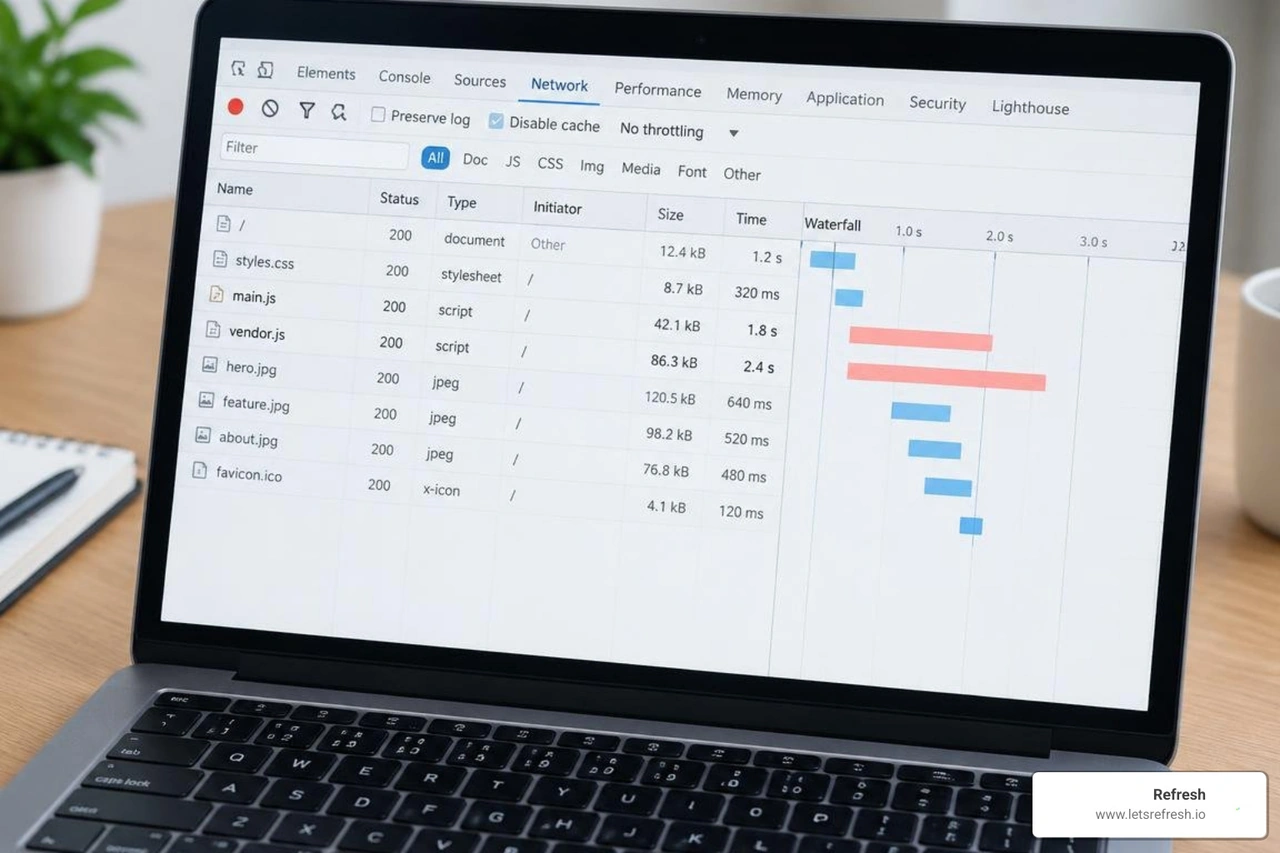
Before modifying a single line of markup or restructuring assets, you need an accurate diagnostic baseline. Identifying exact bottlenecks prevents wasted engineering effort and ensures every code refinement yields measurable speed gains.
Effective performance audits evaluate server responsiveness, DOM tree depth, stylesheet bloat, and JavaScript execution times. Comprehensive tools like Google PageSpeed Insights, GTmetrix, and Google Lighthouse allow you to isolate whether your primary bottlenecks stem from origin server latency (Time to First Byte, or TTFB), uncompressed visual assets, or render-blocking script libraries.
Analyzing Waterfall Charts and Network Payloads
A browser network waterfall chart provides a visual breakdown of how every single asset loads over time. Analyzing this timeline reveals the exact order in which files are fetched, parsed, and executed.

When reviewing waterfall data, pay close attention to:
- DNS Lookup Latency: Prolonged connection times indicating slow domain name resolution.
- Time to First Byte (TTFB): Server processing delays before the initial HTML response arrives.
- HTTP Request Volume: Excessive requests generated by bloated third-party tags and unbundled files.
- Main-Thread Execution Bottlenecks: Heavy JavaScript files locking the browser parser and stalling visual layout rendering.
Benchmarking Synthetic Tests Against Real User Monitoring
A complete audit requires balancing synthetic lab tests with Real User Monitoring (RUM). Synthetic tests, such as automated Lighthouse runs, provide controlled environments where you can test isolated changes against simulated network throttling.
However, field metrics from CrUX reflect real-world performance across varied hardware and network environments. Setting continuous performance budgets ensures that new product features, marketing tags, or design updates never degrade the established baseline.
Front-End Code and Asset Optimization Strategies
Optimizing front-end code requires stripping out dead weight while streamlining critical asset delivery. The goal is simple: deliver only what the browser needs to display the immediate viewport, while deferring everything else.
| Asset Type | Primary Bottleneck | Optimal Delivery Strategy | Target Metric Impacted |
|---|---|---|---|
| Images & Media | Oversized dimensions, raw formats | AVIF/WebP conversion, responsive srcset, lazy loading | Largest Contentful Paint (LCP) |
| CSS Stylesheets | Render-blocking files, unused rules | Critical CSS inlined, non-critical deferred, minification | First Contentful Paint (FCP) |
| JavaScript | Heavy parsing on main thread | Tree-shaking, async/defer attributes, interaction triggers | Interaction to Next Paint (INP) |
| Third-Party Tags | Uncontrolled script execution | Viewport/scroll triggers, idle execution | INP, Total Blocking Time (TBT) |
On-Page Script and Code Optimization to Boost Website Performance
Excessive JavaScript remains the leading cause of poor web performance. Modern browsers spend significant CPU cycles downloading, parsing, compiling, and executing complex script bundles. This locks the main thread, making pages feel completely unresponsive.
To streamline scripts effectively:
- Minify and Tree-Shake Code: Strip out whitespace, comments, and unused functions from production stylesheets and scripts.
- Implement Script Deferral: Apply
deferorasyncattributes to non-essential scripts so they do not block initial DOM parsing. - Utilize Interaction-Based Loading: Delay non-critical marketing pixels until user interaction occurs, freeing the browser main thread for meaningful content.
- Refactor Complex Logic: Adopting platform-native best practices via webflow page speed optimization ensures code remains clean, modular, and performant without unnecessary script overhead.
Next-Gen Image Delivery and Media Compression
Visual assets often account for more than 70% of a page's total payload. Serving uncompressed raw images is one of the fastest ways to ruin your site's speed.
Modern image workflows should always convert legacy JPEG and PNG formats into modern formats such as WebP and AVIF, which offer superior compression ratios without visual degradation. Additionally, define responsive srcset attributes so mobile devices receive smaller versions of images. Always define explicit width and height dimensions on image containers to reserve layout space and eliminate Cumulative Layout Shift (CLS).
Mobile-First Layouts and Critical CSS Implementation
With mobile traffic dominating digital interactions, building responsive layouts from the ground up prevents unnecessary asset downloads on handheld devices. A well-executed mobile first design strategy prioritizes lean markup and mobile-specific visual assets before progressively enhancing the experience for larger desktop viewports.
Implementing Critical CSS takes this a step further by extracting and inlining the styles required to render above-the-fold content directly into the document <head>. The browser paints the visible screen instantly while loading remaining stylesheets asynchronously in the background.
Infrastructure and Server Tuning to Accelerate Load Times

Front-end optimizations must be supported by a solid backend infrastructure. If your origin server takes 1.5 seconds just to respond with the initial HTML document, no amount of front-end image compression will produce a fast user experience.
Upgrading to modern networking protocols such as HTTP/2 and HTTP/3 enables multiplexing—allowing browsers to download multiple assets simultaneously over a single TCP connection, eliminating head-of-line blocking. Pairing modern networking with low-latency DNS resolution ensures visitors establish connections with minimal delay.
Leveraging CDN Networks and Advanced Caching Strategies
Content Delivery Networks (CDNs) distribute static assets across a global network of edge servers. When a visitor requests your page, assets are served from the nearest geographical node, drastically cutting physical latency.
Effective caching strategies store rendered pages and static assets at both the edge and within the user's local browser cache:
- Browser Cache Headers: Set long
max-ageCache-Control headers for immutable assets like fonts, scripts, and logos. - Edge Caching: Cache static HTML at the network edge so requests do not hit the origin web server.
- Static Page Caching Architecture: Serve pre-rendered static files directly, bypassing resource-heavy database calls and application-level processing entirely.
Modern Platform Choices to Boost Website Performance
Legacy content management systems often accumulate layers of technical debt: abandoned plugins, conflicting database queries, and redundant stylesheets. Choosing a modern web architecture eliminates this overhead at the root.
Webflow's performance advantages are clear: visual development platforms with clean, semantic code generation, native enterprise-grade hosting, and integrated CDN delivery outperform disjointed legacy setups. By replacing bloated server stacks with clean markup and managed hosting, your team eliminates plugin vulnerabilities and maintains superior Core Web Vitals effortlessly.
Frequently Asked Questions About Website Speed Optimization
What is the ideal page load time for SEO and user experience?
The gold standard for modern website performance is delivering fully rendered above-the-fold content in under 2.0 seconds, with an initial Time to First Byte (TTFB) under 200 milliseconds. Maintaining an LCP below 2.5 seconds, an INP under 200 milliseconds, and a CLS below 0.1 ensures compliance with Google's Core Web Vitals thresholds and delivers a seamless experience across mobile and desktop connections.
How do third-party scripts affect Core Web Vitals?
Third-party scripts—including marketing pixels, tag managers, heatmaps, and live chat widgets—frequently execute unoptimized JavaScript on the browser's main thread. This delay prevents users from clicking buttons, submitting forms, or scrolling smoothly, severely degrading your Interaction to Next Paint (INP) score. Managing tag execution via tag manager triggers or interaction-based loading ensures these scripts run only when needed.
Why does Webflow provide better native performance than legacy platforms?
Webflow generates clean, semantic HTML, CSS, and modern JavaScript without relying on third-party plugins or convoluted template hierarchies. Assets are hosted across globally distributed Amazon Web Services (AWS) and Fastly CDN infrastructure, providing enterprise-grade speed and reliability out of the box. Ongoing maintenance is simplified because the platform handles hosting and performance optimizations natively, as detailed in our webflow maintenance complete guide.
Conclusion: Transform Your Digital Experience with Speed
Boosting your website's performance is not a one-time technical chore—it is an ongoing operational discipline that elevates search engine visibility, user engagement, and measurable revenue. By systematically eliminating bloated code, deferring non-essential scripts, serving responsive next-generation images, and relying on world-class hosting architecture, you build an exceptional digital asset that converts traffic efficiently.
At Refresh, we partner with growing businesses to engineer clean, lightning-fast digital experiences. Operating from our hubs in Pittsburgh, PA, Cleveland, OH, and Charlotte, NC, our team combines technical SEO precision with high-performance Webflow engineering to help your brand lead its market. We help you transition away from fragile, slow platforms toward modern, reliable web architecture that scales seamlessly with your business goals.
Ready to eliminate code bloat, pass every Core Web Vitals audit, and convert more visitors into loyal customers? Explore our comprehensive Webflow performance optimization solutions and partner with Refresh to elevate your digital presence today.


.avif)