What Is Programmatic SEO for WordPress (and Why It Matters for Growth)
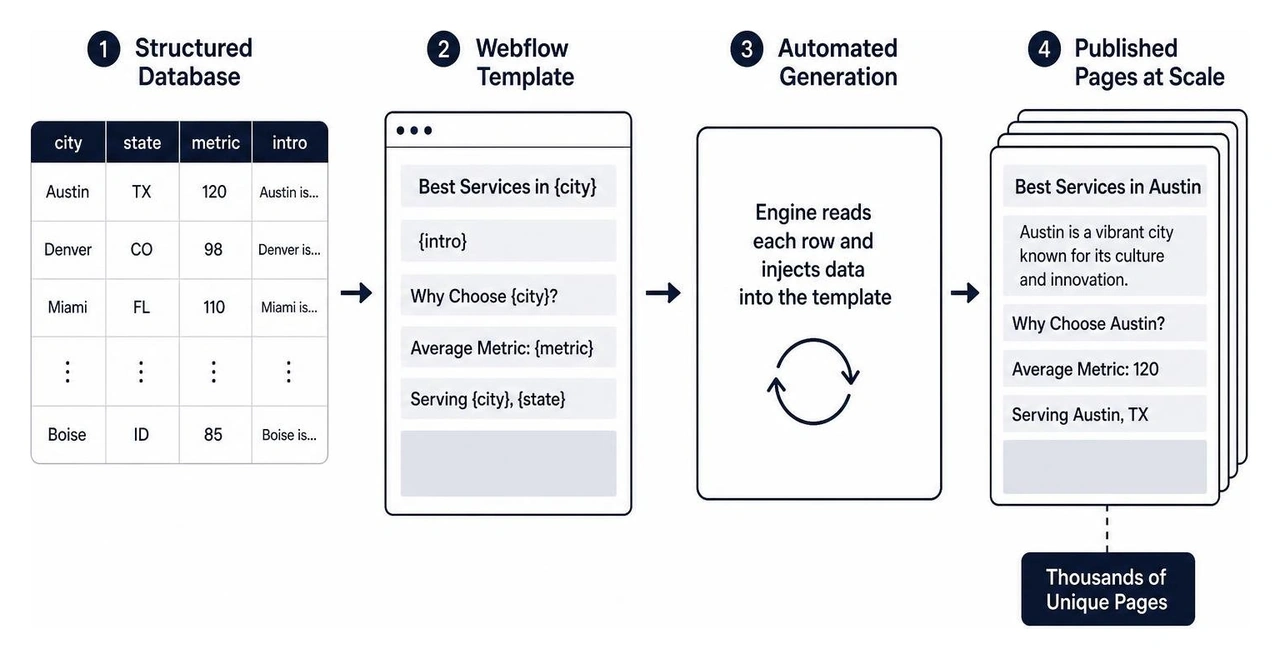
Programmatic SEO in WordPress lets you automatically generate hundreds — or even thousands — of optimized landing pages from a single template and a structured data source.
Here's a quick overview of what that means in practice:
| Concept | What It Means |
|---|---|
| What it is | Auto-generating SEO-optimized pages at scale using templates and data |
| How it works | A page template pulls variables from a database to create unique pages |
| Why it matters | Lets you rank for thousands of long-tail keywords without writing each page manually |
| Tools needed | WordPress, a CSV or Google Sheet, and the right plugins |
| Best for | Startups and growing businesses targeting location or niche-based search traffic |
For a growth-stage startup, this is a big deal. You probably don't have time to write 500 individual landing pages. But you do want to show up when potential customers search for your product or service in their city, industry, or use case.
That's exactly the problem programmatic SEO solves.
Instead of publishing pages one by one, you build a smart template once — then let data do the heavy lifting. The result? Massive organic reach with a fraction of the manual effort.
While WordPress can handle programmatic SEO with the right plugins, Webflow is our preferred platform for programmatic CMS setups due to its superior design control, clean code structure, and built-in hosting performance.
I'm Alexander Palmiere, Founder and CEO of Refresh Digital Strategy, where I've helped over 200 businesses build smarter digital presences — including scaling organic traffic through programmatic SEO on WordPress, Webflow, and other platforms. In the sections below, I'll walk you through exactly how to set this up, step by step.
Key programmatic seo wordpress vocabulary:
What is Programmatic SEO?
Programmatic SEO is a search engine optimization strategy that focuses on creating landing pages at scale using database technology and automation. Instead of manually writing, formatting, and publishing every single page, we build a single template that automatically pulls information from a structured database.
This automation is particularly powerful for targeting long-tail keywords. By combining a main "head term" (like "plumbing services") with "modifiers" (like specific neighborhoods or cities), you can rank for thousands of highly specific searches. While WordPress can handle this process with the help of various plugins, we recommend Webflow as the preferred platform for programmatic CMS setups due to its superior design control, clean code structure, and robust built-in hosting.
How to Set Up Programmatic SEO in WordPress
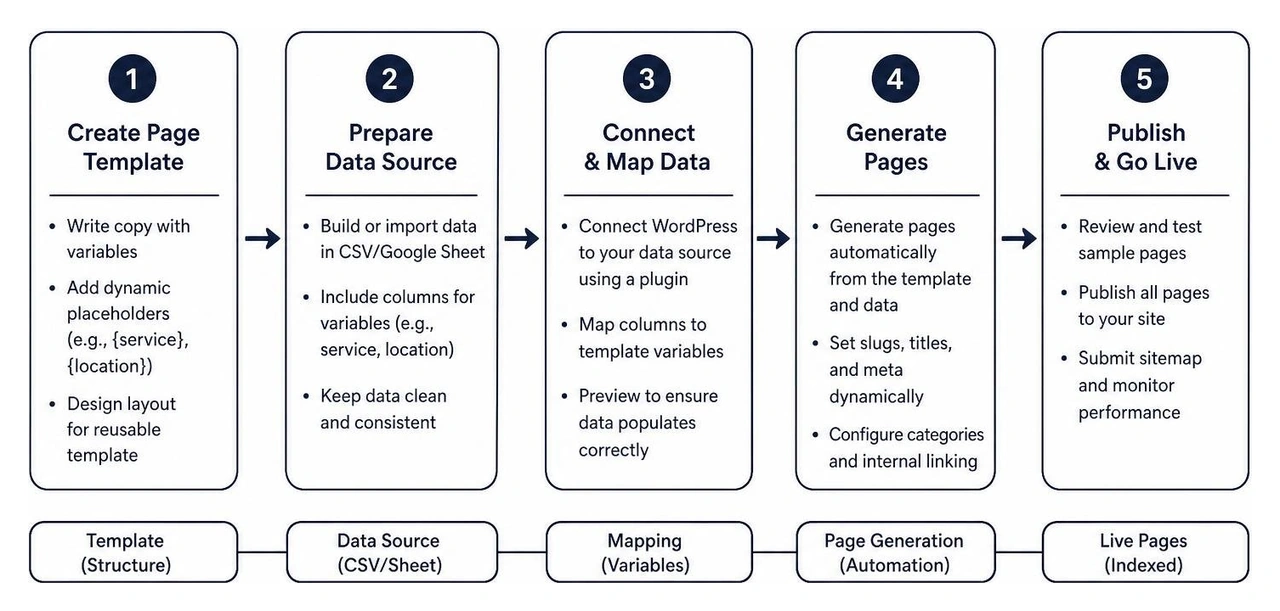
Setting up a programmatic seo wordpress site does not require advanced coding skills. By leveraging specialized plugins and a structured database, we can create thousands of pages efficiently. Here is the step-by-step process to get your programmatic campaign up and running.
Step 1: Write Copy with Variables for Your Landing Page Template
The foundation of any programmatic SEO campaign is a high-quality template. You need to write copy that sounds natural while leaving placeholders (variables) for the dynamic data.
For example, instead of writing "We offer web design services in Pittsburgh," you would write: "We offer {service} in {location}."
Ensure your copy is engaging and comprehensive. The goal is to make every generated page feel like it was handcrafted for the user, rather than mass-produced by a machine.
Step 2: Create the Back-End Template
Once your copy is ready, you need to design the template in WordPress. You can use the default WordPress block editor (Gutenberg) or the classic editor.
This template will serve as the visual layout for all your generated pages. You will place your variables inside the editor where the dynamic data should appear. When the programmatic plugin runs, it will duplicate this template for every row in your database, replacing the variables with actual data.
Step 3: Create Custom Fields for Variables
To map your database to your WordPress template, you need to set up custom fields. This is where plugins like Advanced Custom Fields (ACF) or the ACF Views plugin come in handy.
By creating custom fields for each variable (such as "Location," "Price," or "Service Type"), you create designated slots in your WordPress database. The programmatic template will pull information directly from these fields to populate each page.
Step 4: Upload Your Copy
With your template and custom fields in place, it is time to connect your written copy. You will import your structured content using a CSV file or a Google Sheet. During the import process, you will map the columns in your spreadsheet to the custom fields you created in WordPress. This tells the system exactly which piece of data belongs in which part of the template.
Step 5: Create an Information Database
Your information database is the engine of your programmatic SEO campaign. This is typically a spreadsheet created in Google Sheets or Microsoft Excel.
Each row in your spreadsheet represents a unique landing page, while each column represents a specific variable. For a localized campaign in our active markets like Cleveland, OH, or Charlotte, NC, your spreadsheet would contain columns for city names, local landmarks, regional pain points, and specific service offerings. Keep this database clean and well-structured, as any formatting errors will carry over to your live website.
Best Plugins for Programmatic SEO in WordPress
To successfully execute programmatic seo wordpress campaigns, you need the right tools. Here are the best plugins currently available for managing bulk content creation and data integration in WordPress.
WP All Import
WP All Import is a powerful tool for importing XML or CSV data into WordPress. It features a simple drag-and-drop interface that makes it easy to map your database columns to your WordPress custom fields. It integrates seamlessly with custom post types and popular SEO plugins, making it a reliable choice for importing thousands of records at once.
Multi Page Generator
The Multi Page Generator plugin is designed specifically for bulk page creation. It allows you to upload a template and a source file (like a CSV) to generate thousands of search-engine-friendly pages instantly. It also supports customizable URLs and dynamic content insertion, ensuring that each page is fully optimized for search engines.
SEOBrrr Programmatic SEO Plugin
SEOBrrr is a specialized programmatic SEO plugin that assists with bulk page generation, data integration, and automated updates. It helps streamline the process of managing large-scale websites by allowing you to update your template in one place and push those changes across all generated pages instantly.
SEOMatic.ai
SEOMatic.ai is built for mass content generation. It features advanced keyword research integration and supports spin syntax, which helps you vary your copy across different pages to avoid duplicate content penalties. It is an excellent choice for businesses looking to scale their organic reach rapidly.
Challenges of Programmatic SEO in WordPress
While building a programmatic seo wordpress site is highly effective, it does come with unique challenges:
- Thin Content: If your templates do not contain enough unique, valuable information, search engines may flag your pages as thin content and refuse to index them.
- Content Uniqueness at Scale: Traditional WordPress setups often require external tools to inject unique, AI-generated descriptions into pages at scale, which can complicate your workflow.
- Slow Loading Times: Generating and hosting thousands of database-heavy pages can put a strain on your WordPress hosting, leading to slower page speeds. This is one reason why we prefer Webflow, which offers lightning-fast, global hosting out of the box.
- Plugin Updates: Relying on multiple third-party plugins for custom fields, imports, and SEO can lead to compatibility issues when WordPress updates its core software.
For teams looking to avoid these challenges, Webflow's modern CMS architecture provides a more streamlined and reliable foundation for programmatic SEO at scale.
Frequently Asked Questions about Programmatic SEO in WordPress
What is Programmatic SEO?
Programmatic SEO is the practice of using database-driven automation to create large volumes of search-optimized web pages. It allows businesses to target thousands of long-tail search queries simultaneously using dynamic templates.
How to Start Programmatic SEO?
To start, identify your head terms and modifiers (such as services and locations). Next, design a high-quality page template and compile your data into a spreadsheet. Finally, use a programmatic tool to merge your data with your template to generate your pages.
Which SEO Plugin is Best for WordPress?
For managing general SEO settings on a programmatic site, Yoast SEO, Rank Math, and SEOPress are all excellent options. They allow you to set global meta title and description templates using variables, ensuring your programmatic pages remain optimized.
Conclusion
Building a programmatic seo wordpress site is an incredibly efficient way to scale your organic traffic and reach new customers in target markets like Pittsburgh, Cleveland, and Charlotte. By automating the page creation process, you can capture valuable long-tail search volume without spending months writing individual pages.
While WordPress is a functional platform for this strategy, managing numerous plugins and database loads can become complex over time. At Refresh, we specialize in building high-performing, scalable websites. We prefer utilizing Webflow's modern, secure, and clean CMS architecture to deliver seamless programmatic SEO experiences for our clients.
If you are ready to scale your organic presence and build a powerful lead-generation engine, contact us at Refresh today to see how we can help you grow.


.avif)