
Why Understanding Small Business Hosting Cost Matters
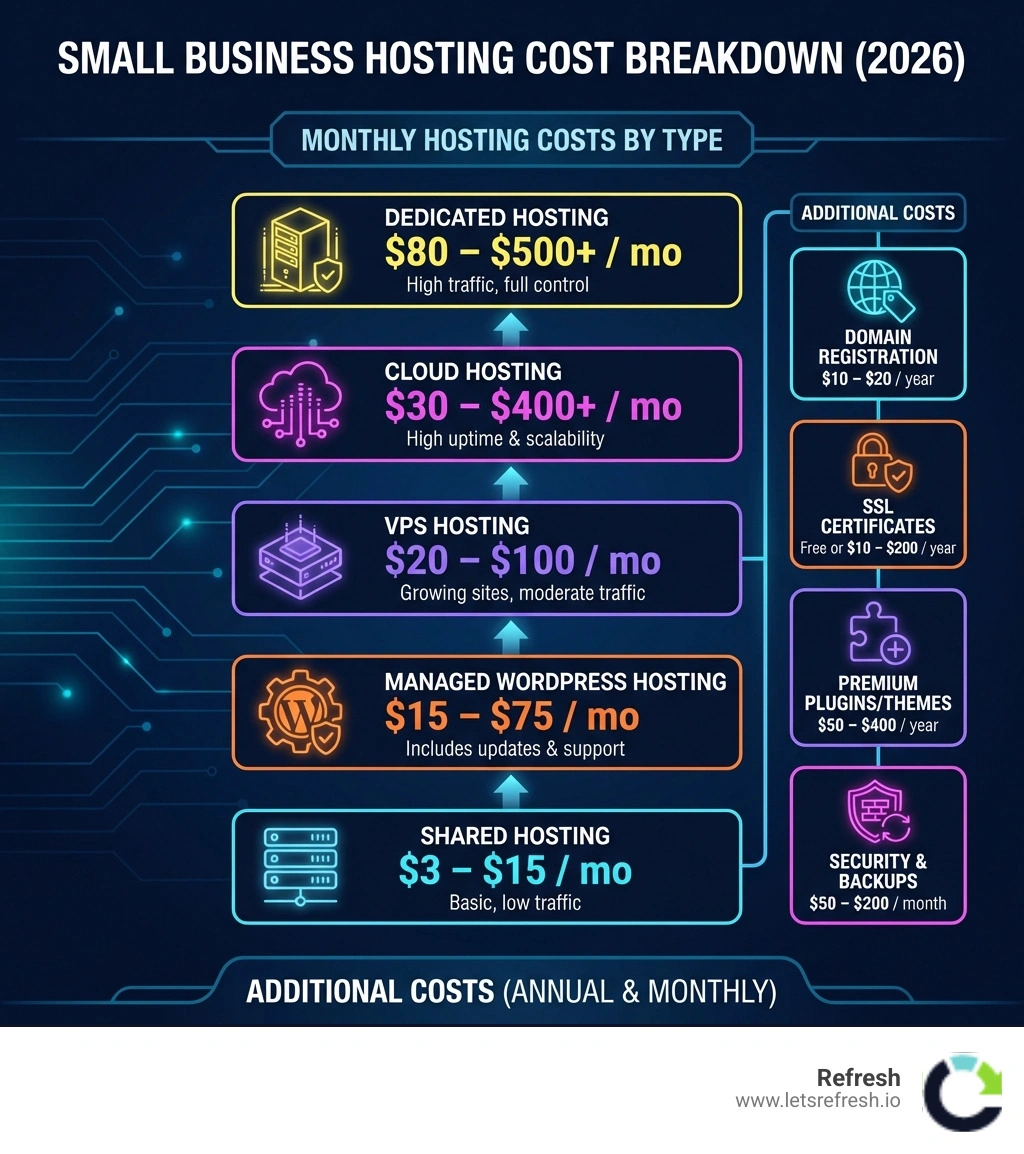
Small business hosting cost typically ranges from $3 to $500+ per month, depending on your hosting type and business needs. Here's what most small businesses pay:
Quick Cost Breakdown:
- Shared Hosting: $3–$15/month (good for new sites with low traffic)
- Managed WordPress/Webflow: $15–$75/month (includes updates and support)
- VPS Hosting: $20–$100/month (for growing sites with moderate traffic)
- Cloud Hosting: $30–$400+/month (for sites needing high uptime and scalability)
- Dedicated Hosting: $80–$500+/month (for high-traffic sites requiring full control)
Additional Annual Costs:
- Domain registration: $10–$20/year
- SSL certificate: Often free, or $10–$200/year
- Premium plugins/themes: $50–$400/year
- Security and backups: $50–$200/month
The real challenge isn't just the sticker price. It's understanding why hosting costs vary so dramatically and which option actually matches your business goals. Too many entrepreneurs either overpay for features they'll never use or choose the cheapest option and watch their site crash during a traffic spike.
The research shows that shared hosting costs can jump from $2–$5 per month to $10–$30 upon renewal, catching business owners off guard. Meanwhile, hidden costs like premium plugins, CDN services, and email hosting can add 10–20% to your total spend. And if you're running an eCommerce site, expect to budget 40–60% more than a basic informational website.
Web hosting is essentially the digital land where your website lives. Your hosting provider stores all your website files—photos, videos, code, and content—on their servers and makes them accessible to anyone with an internet connection. Think of it like renting office space, except this space is available to customers 24/7 from anywhere in the world.
I'm Alexander Palmiere, and over the past several years helping businesses develop over 200 websites at Refresh, I've seen countless small businesses struggle to navigate small business hosting cost decisions. Our experience shows that the right hosting choice can mean the difference between a site that scales with your growth and one that becomes a bottleneck.
Small business hosting cost helpful reading:
Breaking Down the Average Small Business Hosting Cost
When we talk about small business hosting cost, it is rarely a single flat fee. Instead, it is a spectrum of services tailored to different levels of traffic and technical needs. For many startups in Pittsburgh or Cleveland, the journey begins with shared hosting, but successful growth often necessitates a move toward more robust infrastructure.
| Hosting Type | Intro Price (Monthly) | Renewal Price (Monthly) | Best For |
|---|---|---|---|
| Shared | $2 – $5 | $10 – $30 | New blogs, local service sites |
| Managed | $15 – $35 | $30 – $75 | Small businesses wanting "hands-off" tech |
| VPS | $20 – $80 | $40 – $120 | Growing eCommerce, high-traffic catalogs |
| Cloud | $10 – $100+ | Usage-based | Scalable apps, fluctuating traffic |
| Dedicated | $80 – $300 | $150 – $700+ | Large enterprises, maximum security |
Shared Hosting: The Entry Level
Shared hosting is the most common starting point. In this setup, your website shares server resources (like CPU and RAM) with hundreds of other sites. It’s affordable because the provider spreads the cost of the hardware across many users. However, it can suffer from "noisy neighbor" syndrome—if another site on your server gets a massive traffic spike, your site might slow down. While it handles up to 400,000 monthly visitors in theory, most businesses find it restrictive as they scale.
Managed Hosting: The Proactive Choice
For those who aren't technical experts, managed hosting acts like an outsourced IT squad. The provider handles server maintenance, security patches, and automatic backups. This is why many of our clients prefer this route; it allows them to focus on their business rather than troubleshooting server errors.
Cloud Infrastructure: The Modern Standard
Cloud hosting, offered by platforms like Amazon Web Services or integrated into builders like Webflow, spreads your data across multiple interconnected servers. This ensures high uptime (often 99.99%) because if one server fails, another takes over. It is ideal for businesses with unpredictable traffic patterns.
Ensuring you have the right foundation is a key reason why web hosting is important for a small business as you look to build long-term authority online.
Understanding the Small Business Hosting Cost for Webflow and WordPress
The two giants of the web today are WordPress and Webflow, and their cost structures differ significantly. WordPress powers over 43% of the internet, but being "free" software (WordPress.org) doesn't mean the hosting is free.
- WordPress Hosting: You can find shared WordPress plans for as little as $3/month, but high-end managed WordPress hosting (offered by specialized providers) typically starts at $20–$30/month. You’ll also need to budget for premium themes ($20–$100) and essential plugins. For instance, a speed optimization plugin like WP Rocket costs $59/year, while eCommerce tools like WooCommerce extensions often cost $50–$100 per year.
- Webflow Hosting: At Refresh, we often recommend Webflow for its integrated approach. Webflow bundles hosting, a Content Management System (CMS), and security into one monthly fee. For a standard business site, you might pay around $23/month (billed annually). While it seems higher than "budget" WordPress hosting, it eliminates the need for many paid plugins and manual maintenance.
To dive deeper into how these platforms compare in a professional setting, check out our more info about Webflow and WordPress hosting and support.
Hidden Expenses in the Total Small Business Hosting Cost
The "sticker price" of a hosting plan is often just the beginning. To avoid budget surprises, we always advise our clients in Charlotte and beyond to account for these "invisible" costs:
- Domain Registration: Your address on the web (e.g., .com or .net) usually costs between $10 and $20 per year. Beware of "free domain" offers that only apply to the first year; renewal rates can be higher.
- SSL Certificates: This is the "green padlock" in the browser. While many hosts now provide a free Let's Encrypt SSL, some still charge up to $200/year for premium certificates. This isn't optional—Google prioritizes ranking sites with SSL certification, and sites without it will trigger security warnings for visitors.
- Site Security & Malware Protection: Basic plans often lack proactive malware removal. Professional security services can add $50 to $200 per month to your maintenance budget.
- Premium Templates: While almost 60,000 of them are available for free on WordPress, professional business themes often cost $60 to $100 for a single license.
For a full breakdown of these essentials, see our guide to domain and email hosting for small business.
Factors That Influence Your Monthly Hosting Bill

Several technical and contractual factors dictate your final small business hosting cost. Understanding these helps you avoid over-provisioning (paying for more than you need) or under-provisioning (risking downtime).
- Traffic Volume and Bandwidth: Most hosting plans have limits on how much data can be transferred to your visitors. While many claim "unlimited" bandwidth, there is always a ceiling. If you run a high-traffic eCommerce store or host large video files, you will need a plan with higher resource allocations.
- Storage Capacity: This is the "hard drive space" on the server. A simple brochure site might only need 1GB, but a site with thousands of high-resolution product images will require significantly more.
- Contract Length: This is where many businesses save money. Paying monthly is flexible but usually the most expensive option. Committing to a 12-month or 36-month contract can reduce your monthly rate by 20% to 30%.
- Renewal Rates: This is the "gotcha" of the hosting industry. A provider might offer an introductory rate of $2.95/month, but after your first term, the price might jump to $15.99/month. Always check the fine print before signing up.
- Geographic Location: Where your server is physically located matters. Hosting your site on servers closer to your audience can improve page load times by up to 40%. For a business serving Pittsburgh, having a data center on the East Coast is vastly superior to one in Singapore.
Finding the right balance requires choosing the best hosting for a small business based on your specific growth trajectory.
Comparing All-in-One Builders vs. Self-Hosted Solutions
One of the biggest decisions affecting your small business hosting cost is the choice between a SaaS (Software as a Service) builder and a self-hosted solution.
SaaS Builders (like Webflow):These are "all-in-one" platforms. You pay one monthly fee that covers the builder, the hosting, the security, and the support.
- Pros: Extremely easy to manage; no manual updates; high security.
- Cons: Less "ownership" of the underlying code; monthly fees are generally higher than budget shared hosting.
- Our Take: At Refresh, we recommend Webflow because it offers the ease of a SaaS platform with the design freedom of a custom-coded site. It’s the perfect middle ground for businesses that want professional results without the headache of server management.
Self-Hosted Solutions (WordPress.org):Here, you download the software for free and then pay a separate provider to host it.
- Pros: Total control over every file; potentially lower costs if you handle maintenance yourself.
- Cons: You are responsible for security, updates, and backups. If a plugin update breaks your site at 2 AM, it’s on you to fix it.
For those just starting out, we have a guide on the best places to host simple websites to help you weigh these options.
How to Optimize Your Hosting Budget for Growth
You don't always need to buy a bigger hosting plan to get better performance. Often, optimization can make a $20/month plan perform like a $100/month plan.
- Implement Caching: Caching stores a "snapshot" of your site so the server doesn't have to rebuild the page every time a visitor clicks. Tools like WP Rocket or built-in server-side caching can drastically reduce resource usage.
- Use a Content Delivery Network (CDN): A CDN like Cloudflare stores your images and files on servers around the world. This reduces the load on your main server and speeds up the site for global visitors.
- Image Optimization: Large images are the #1 cause of slow sites. Compressing images before uploading them can save storage space and bandwidth, potentially keeping you on a cheaper hosting tier.
- Generative Engine Optimization (GEO): In the modern era, performance isn't just about human visitors; it's about how AI and search engines perceive your data. High-speed hosting and clean code (like that found in Webflow) ensure that generative search engines can easily crawl and index your content.
- Geographic Load Balancing: As mentioned, geographic load balancing and page speed are linked. Ensuring your host uses a modern network can save you from needing to upgrade your hardware prematurely.
For more strategies on speed, explore our complete guide to fast website hosting.
Frequently Asked Questions about Hosting Costs
Can I host my business website for free?
Technically, yes, through various entry-level website platforms. However, we strongly advise against it for professional use. Free hosting usually requires you to use a subdomain (like yourbusiness.wordpress.com), displays the provider's ads on your site, and offers very limited storage and bandwidth. It can erode customer trust and make your business look unprofessional.
What is the difference between managed and unmanaged hosting?
Unmanaged hosting gives you the "keys to the server." You are responsible for installing the operating system, security software, and managing updates. It is cheaper but requires high technical expertise. Managed hosting includes a support team that handles these tasks for you, making it the preferred choice for most small business owners.
How much should I budget for annual maintenance?
Beyond the small business hosting cost, you should budget for ongoing maintenance. For a WordPress site, this might be $50–$200/month for a professional to handle updates and security scans. For a Webflow site, maintenance costs are often lower because the platform handles the core updates automatically.
Conclusion
Navigating small business hosting cost doesn't have to be a mystery. By understanding the difference between shared, managed, and cloud options—and accounting for hidden fees like SSL and domain renewals—you can build a budget that supports your growth without breaking the bank.
At Refresh, we specialize in helping small to medium-sized businesses in Pittsburgh, Cleveland, and Charlotte build high-performance Webflow sites that eliminate the technical headaches of traditional hosting. We believe in long-term partnerships, providing the expert support you need to ensure your digital presence is always fast, secure, and scalable.
Ready to stop worrying about server uptimes and start growing your brand? Start your project with Refresh today.


.avif)