What Is a Starter Website Builder and Hosting for Small Business?
The best starter website builder and hosting for small business options available in 2026 include:
| Platform | Best For | Key Included Feature |
|---|---|---|
| Wix | General small business | 2,000+ templates, multi-cloud hosting |
| WordPress.com | Content and blogging | Open-source, 1 GB storage |
| Google Sites | Simple internal or info sites | Included Google integration |
| Weebly | Basic eCommerce | Square payment integration |
| Canva | Design-forward one-pagers | 1M+ templates, drag-and-drop |
| Yola | Fast AI-generated sites | Hosting included, 250+ templates |
| Odoo | All-in-one business tools | Starter plan with domain |
| Tilkly | Lean storefronts | 1.5% transaction fee, low monthly cost |
Note: Starter plans come with trade-offs. Most include platform branding, limited storage, and no custom domain.
Getting your small business online has never been more accessible. Dozens of platforms now let you build and publish a website without writing a single line of code — and many include bundled hosting.
But accessible doesn't always mean effective.
Over 15,000 new sites are launched on Wix alone every single day. That tells you something important: the barrier to entry is gone. What separates businesses that grow online from those that stall is no longer whether they have a website — it's how well that website performs.
Starter tools are a legitimate starting point. They help you test ideas, establish a basic presence, and learn what your audience responds to. But as your business scales, the gaps become harder to ignore: limited SEO control, generic design, no custom domain, and platform ads that undercut your credibility.
This guide breaks down the top budget-friendly website solutions available right now, what they actually include, and where they fall short — so you can make a smart, informed decision for your business.
I'm Alexander Palmiere, Founder and CEO of Refresh Digital Strategy, where I've helped over 200 businesses navigate decisions around starter website builder and hosting for small business tools — and when to move beyond them. Whether you're just getting started or ready to level up, the next sections will give you a clear picture of your options.
Starter website builder and hosting for small business terminology:
- best domain and email hosting for small business
- best web hosting for small online store
- wordpress hosting for small business
Understanding the Starter Website Builder and Hosting for Small Business Model
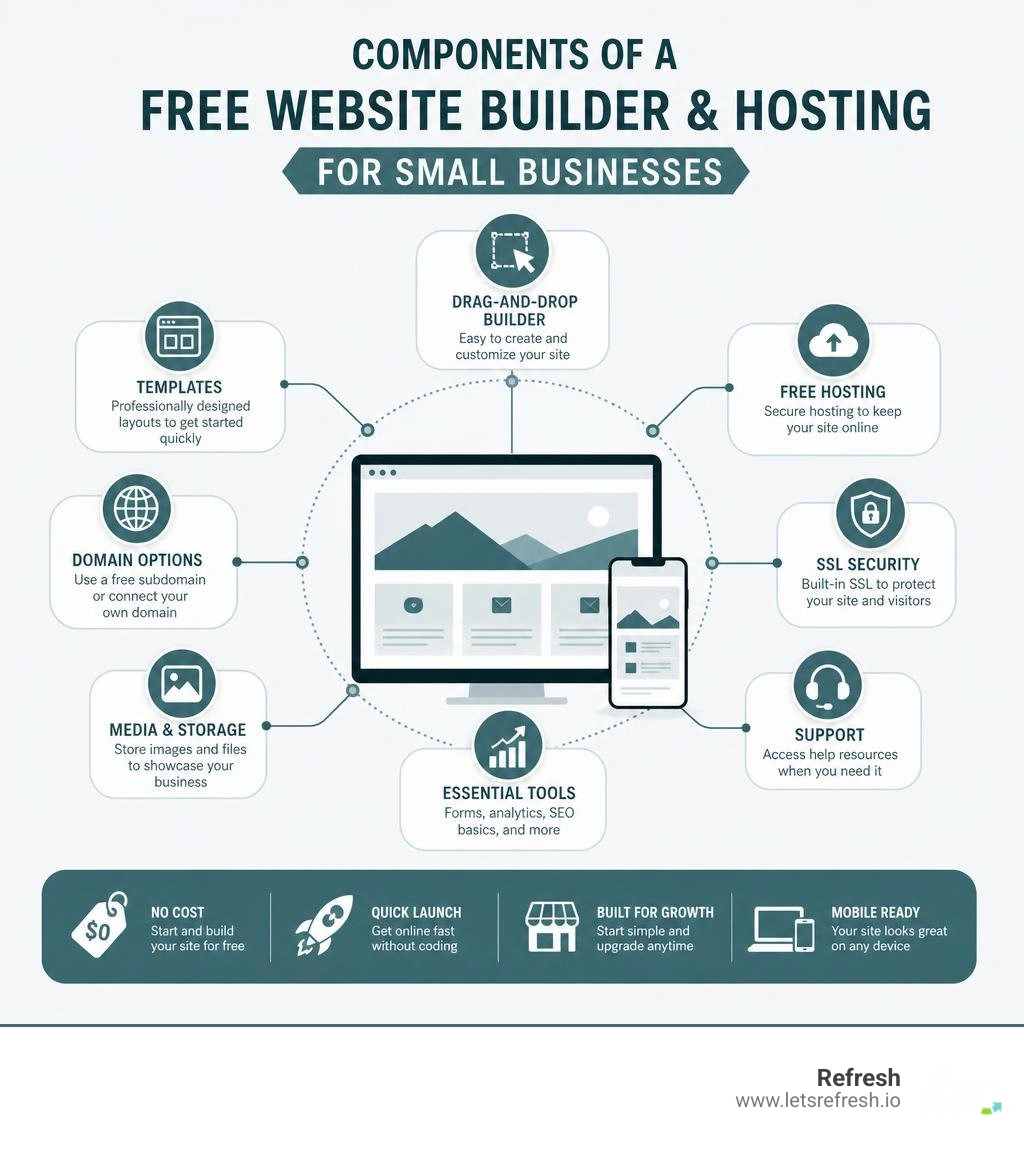
To understand how a starter website builder and hosting for small business works, we have to look behind the curtain. These platforms are utilizing a highly strategic tiered business model. They provide just enough value for you to launch a basic page, with the expectation that as your business grows, you will pay to unlock essential features like a custom domain, more storage, or the removal of their brand logos.
At its core, this model relies on three technological pillars: cloud hosting, visual editors, and no-code development. Cloud hosting means your website files are stored on virtual servers spread across the globe. This ensures that when a customer in Pittsburgh, Cleveland, or Charlotte clicks on your link, your site loads quickly and remains online.
Visual editors allow you to build pages using a "What You See Is What You Get" (WYSIWYG) interface. Instead of typing lines of HTML and CSS, you drag an image block or a text box and drop it exactly where you want it. This democratization of web design has allowed millions of non-technical entrepreneurs to establish an immediate digital presence. To understand how these host environments function on a deeper level, check out our guide on hosting services for small business.
How a Starter Website Builder and Hosting for Small Business Platform Operates
When you sign up for an entry-level plan, the platform assigns you a branded subdomain (for example, yourbusiness.wixsite.com or yourbusiness.googiehost.com). This means you do not own your unique web address; instead, you are renting space under the host's primary domain.
Behind the scenes, your site is placed on shared hosting infrastructure. This means your website shares server resources—such as memory, processing power, and bandwidth—with thousands of other starter sites. While this keeps initial costs minimal for you, it also means your site's performance can be impacted by the traffic spikes of other websites on that same server.
To help you build quickly, these platforms provide pre-designed templates. You choose a layout that matches your industry, swap out the placeholder text and images with your own, and click publish. It is a highly streamlined assembly line that can get a basic landing page live in under an hour.
Key Features to Look For in an Entry-Level Website Setup
If you are going to use a starter platform to get started, you should not settle for a subpar setup. Even on an entry-level tier, certain features are non-negotiable for a professional business presence:
- SSL Certificates: A Secure Sockets Layer (SSL) certificate encrypts the data sent between your visitor's browser and your website. Without it, browsers like Google Chrome will display a prominent "Not Secure" warning next to your URL, instantly killing your credibility.
- Mobile Responsiveness: Over half of all web traffic comes from mobile devices. Your site must automatically adapt its layout to look great on smartphones, tablets, and desktops alike.
- Storage Limits: Pay close attention to how many megabytes (or gigabytes) of space you are allocated. Platforms like GoogieHost offer 1,000 MB of NVMe SSD storage, while WordPress.com gives you 1 GB. If you plan to host high-resolution images or videos, you will hit these limits quickly.
- Bandwidth: This determines how much data your site can transfer to visitors over a given period. If your bandwidth is capped too low, your site may go offline temporarily if you experience a sudden wave of visitors.
Evaluating Entry-Level Site Builders vs. Professional Custom Platforms
As a business grows, its digital requirements change. What worked on day one will rarely suffice on day one thousand. While a basic site builder is an excellent testing ground, it is crucial to understand how these platforms compare to professional, custom-built solutions.
The primary differences lie in scalability, custom domain integration, and true brand ownership. On a starter plan, you do not own your website's underlying code. If you ever want to migrate your site to a different host, you often have to start completely from scratch because proprietary visual builders do not allow you to export your design. For a deeper look into how hosting choices impact your business trajectory, explore our best starter website builder for small business insights.
Limitations of Entry-Level Site Creation Tools
While the low initial cost is highly appealing, the hidden costs of basic site builders often show up in your user experience and brand perception:
- Forced Platform Ads: Most starter plans require you to display a banner or footer ad promoting their service (e.g., "This site was made with Wix"). This can make your business look temporary or amateurish to prospective clients.
- Restricted SEO Capabilities: Search engine optimization is how you get found on Google. Starter plans often restrict your access to advanced SEO settings, such as schema markup, custom robots.txt files, and deep sitemap customization.
- Limited Storage and Performance Throttling: Because you are on shared servers, your loading speeds may be slower. A slow-loading site frustrates users and is penalized by search engines. To learn more about balancing budget and performance, see our affordable website hosting guide.
Why Professional Webflow Development Outperforms Basic Builders
At Refresh, we don't build on basic, rigid templates. We specialize in custom Webflow website development because we believe your digital presence should be as unique as your business. Webflow combines the visual design freedom of a builder with the clean, high-performance code of a custom-coded site.

When we build a custom Webflow site for your business in Pittsburgh, Cleveland, or Charlotte, you get:
- Clean, Semantic Code: Unlike basic builders that generate bloated, slow-loading code behind the scenes, Webflow outputs clean HTML, CSS, and JavaScript. This dramatically improves your page loading speeds and search rankings.
- Unrivaled Design Freedom: We can bring any visual concept to life without being boxed in by template limitations. Your site will look entirely unique, helping you stand out from competitors who use the same generic layouts.
- Advanced Generative Engine Optimization (GEO): As search behavior shifts toward AI assistants like ChatGPT, Claude, and Google Gemini, standard SEO is no longer enough. Generative Engine Optimization (GEO) is the process of structuring your website's content, data, and technical architecture so that AI models can easily crawl, understand, and recommend your business in conversational search results. Webflow's clean code and flexible schema integration make it the ideal foundation for modern GEO strategies.
Please note: Refresh is a premium digital agency. We do not offer starter plans, trials, or entry-level services. We build custom, high-performing assets designed to drive revenue for businesses ready to invest in their growth.
Essential Steps to Launch Your First Business Website
If you decide to start with a basic builder, success comes down to preparation. Jumping straight into an editor without a plan usually results in a cluttered, confusing website.
First, focus on content planning. Write down exactly what you want each page to say before you touch a design tool. Map out your homepage, your services page, your about page, and your contact page. Next, sketch a basic wireframe—a simple visual blueprint of where your text, images, and buttons will sit on the page.

Once your layout is planned, gather your visual assets. Use high-quality, professional photography. If you don't have custom photos yet, utilize high-quality, royalty-cleared libraries rather than generic, outdated stock images. To understand what goes into a high-converting visual layout, refer to these professional web design standards.
Designing for Mobile Responsiveness and Search Visibility
Building a site that looks great on your desktop computer is only half the battle. You must design with a mobile-first mindset. When customizing your template, constantly switch to the mobile preview option to ensure your text is readable, your buttons are easy to tap with a thumb, and your images don't crowd the screen.
For search visibility, make sure to fill out the SEO metadata for every page. This includes:
- Page Titles: Keep them under 60 characters and include your primary keyword and location (e.g., "Residential Plumbing Services | Cleveland, OH").
- Meta Descriptions: Write a compelling 150-character summary that encourages searchers to click on your link.
- Image Alt Text: Describe what is in your photos so search engine crawlers (and visually impaired users using screen readers) can understand them.
Transitioning to a Custom Domain and Professional Email
Using a branded subdomain (like yourbusiness.weebly.com) is fine for a weekend project, but it can hinder your growth as a commercial enterprise. To build long-term trust, you should transition to a custom domain (e.g., yourbusiness.com) as soon as budget permits.
You can purchase a domain through reputable domain registrars for around $10 to $20 per year. Once purchased, you will need to point your Domain Name System (DNS) settings to your website host. Having your own domain also allows you to set up a professional email address (e.g., hello@yourbusiness.com), which instantly elevates your professionalism compared to using a generic Gmail or Yahoo account. For more on selecting the right foundation, read about the best place to host simple websites.
Frequently Asked Questions About Entry-Level Web Solutions
Navigating web hosting and site builders can bring up plenty of questions. Here are clear, straightforward answers to the most common queries we hear from business owners.
Can I use a custom domain with a starter website builder and hosting for small business?
Generally, no. Most platforms restrict the use of custom domains to their paid tiers. If you are on a starter plan, you will be required to use their branded subdomain. To connect a domain you already own, you will typically need to upgrade to a basic premium plan, which enables domain mapping.
How secure are entry-level website hosting services?
Basic hosting services from reputable platforms are highly secure against standard threats. They typically include built-in SSL certificates, basic DDoS (Distributed Denial of Service) protection, and automatic platform updates. However, because you are on shared servers, you have very little control over advanced security configurations. If you require advanced data protection or handle sensitive client information, you will eventually want to transition to dedicated hosting. Read more about these safeguards in our guide on website hosting and management services.
Can I run an online store on an entry-level website plan?
Yes, but with significant limitations. Some platforms allow you to list a limited number of products on their entry-level plans, but they often charge higher transaction fees (sometimes around 1.5% to 3% per sale) or limit your payment gateway integrations. For a simple setup with a few items, it can work, but a growing eCommerce business will quickly outgrow these limitations due to inventory caps and restricted checkout customization.
Conclusion
A starter website builder and hosting for small business platform is a practical tool for launching your first digital presence, testing a new business concept, or getting an informational page online quickly. It allows you to learn the basics of digital layout and content structure without an initial financial commitment.
However, a template-based site on shared infrastructure is rarely a permanent home for a business aiming for significant growth. When you are ready to remove platform ads, gain full creative control over your brand, and implement advanced Generative Engine Optimization (GEO) to ensure your business is recommended by modern AI search engines, a custom solution is the logical next step.
At Refresh, we partner with small to medium-sized businesses in Pittsburgh, Cleveland, and Charlotte to build high-performance, custom Webflow websites that act as true revenue generators. We don't do generic templates, and we don't do shortcuts. We focus on long-term digital strategies that help your brand stand out and scale.
If you are ready to transition from a basic starter site to a professional, custom-designed digital presence, we are here to help. Discover the importance of a strong digital strategy for your brand, or explore our comprehensive best website hosting small business guide to plan your next move. Reach out to us at Refresh today, and let's build something exceptional together.


.avif)