

How to Plan a WordPress Website Redesign
Start with an audit, not a new theme. Measure page speed, list the plugins and content you need, and check which pages bring in search traffic. Then choose whether to rebuild in WordPress or move to a platform like Webflow. Build and test the new site in staging, map old URLs to new ones, and verify backups, redirects, and forms before launch.
This approach helps you fix the architecture behind an outdated site, not just its appearance. It also gives you a clear way to protect search visibility while making the site easier to manage.
I'm Alexander Palmiere, founder of Refresh, where we've launched more than 200 websites. I bring that experience in digital strategy, SEO, and Webflow development to planning a WordPress website redesign. Whether you collaborate with an experienced website redesign agency or evaluate a specialized web redesign company, understanding the projected cost for website redesign ensures your project scope aligns with measurable growth.

Auditing Legacy Systems for a WordPress Website Redesign
Before writing a single line of code or sketching wireframes, we must perform a complete technical audit of your existing infrastructure. Over years of operation, WordPress installations accumulate technical debt: orphaned database tables, unused custom post types, incompatible shortcodes, and heavy visual page builders. This technical debt can affect Core Web Vitals, increasing page weight and slowing down Time to First Byte (TTFB).
Our audit begins by inventorying every active and inactive plugin, custom script, and theme template. Plugins often inject unminified stylesheets and JavaScript sitewide, running heavy queries even on pages where their functionality is never utilized. By consulting our small business website redesign guide, teams can establish baseline performance criteria to benchmark legacy pages against modern standards.

Beyond frontend scripts, we examine the wp_options table and autoloaded transients. A cluttered database forces PHP to allocate excessive memory on every HTTP request. Resolving these bottlenecks requires evaluating DNS health, server-level response curves, and database query executions to map out what needs refactoring versus complete replacement.
Evaluating Hosting Architecture and Total Cost of Ownership in a WordPress Website Redesign
Your hosting infrastructure forms the baseline of your site's speed, reliability, and security. Many businesses launch on entry-level shared hosting environments where resource contention and renewal increases can shape long-term planning.
Promotional shared hosting tiers often advertise low entry rates, such as $3.75 to $5.99 per month, only to climb by 100% to nearly 300% upon renewal. For instance, basic introductory shared tiers frequently renew at $10.99 to $11.99 per month, while introductory VPS plans starting around $34.99 per month often experience renewal increases exceeding 54%. Beyond raw price shifts, shared environments can involve resource contention, shared IP reputation considerations, and strict memory execution limits.
When planning an architectural overhaul, review options for website hosting and management services to assess total cost of ownership (TCO) across server tiers:
- Shared Hosting: Low upfront cost, but shared CPU/RAM resources, limited PHP worker threads, and steep renewal jumps.
- Cloud VPS & Dedicated Virtual Instances: Dedicated virtual allocations, isolated environments, configurable operating systems, and rapid server provisioning.
- Enterprise NVMe Infrastructure: High-throughput NVMe storage drastically outperforms traditional SATA SSDs, reducing database read/write bottlenecks during traffic spikes.
- Global Edge Networks: Hosting providers with multi-region data centers and integrated Anycast CDNs minimize physical latency across domestic and international audiences.
Structuring Data, Custom Post Types, and Gated Content
A redesign offers the perfect opportunity to clean up fragmented content structures. Over time, sites that rely on multiple content plugins end up with conflicting database schemas. When planning a b2b website redesign, establishing structured custom taxonomies ensures scalable content governance.
If your site delivers digital courses or gated subscription materials, architectural planning becomes even more critical. Industry data reveals that only about 3% of students who buy an online course actually complete it, while typical subscription platforms experience an annual churn rate between 5% and 10%—with course-heavy portals seeing churn rates twice as high.
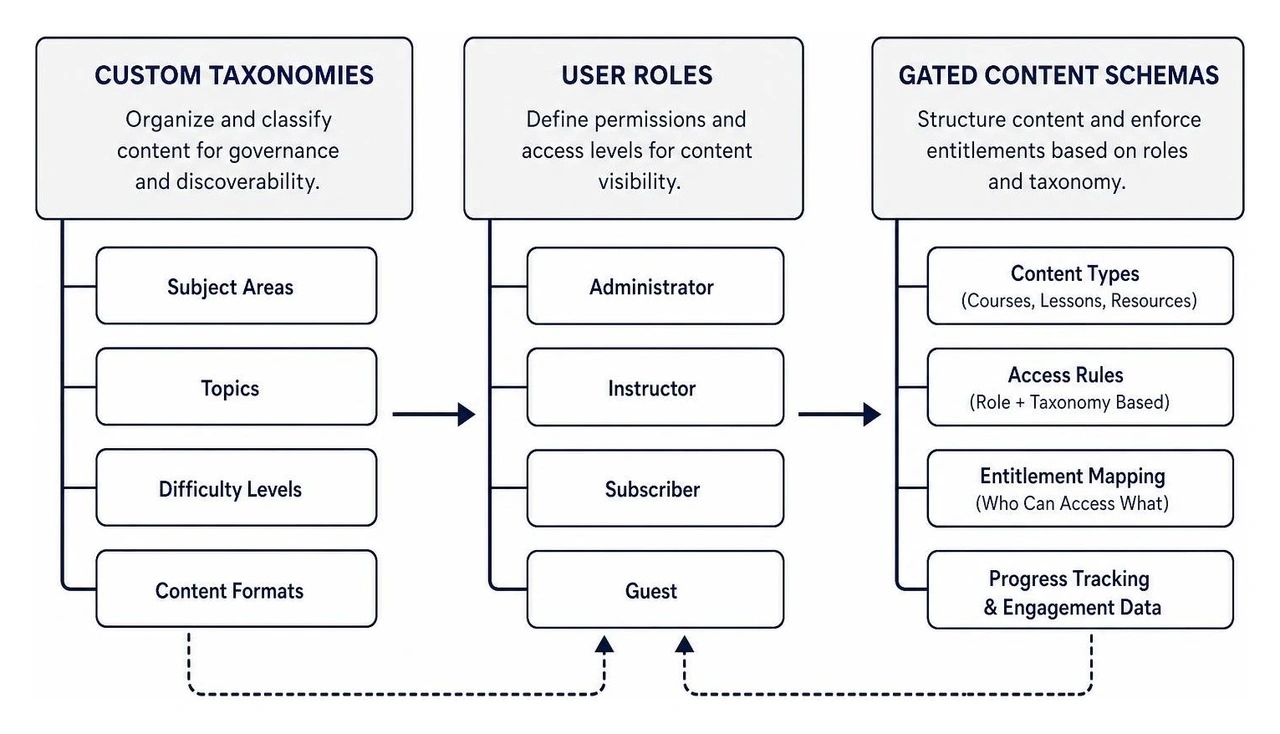
Combating this churn requires purpose-built engagement mechanisms such as interactive progress tracking, gamification triggers, and robust user management. We evaluate whether custom post types inside WordPress or specialized membership ecosystems provide the cleanest experience without introducing plugin bloat.
Step-by-Step Modernization and Migration Strategy
Transitioning from a legacy architecture to a modern custom build demands a structured staging and cutover pipeline. We never develop on a live production environment. Instead, we establish isolated staging sandboxes to test data serialization, API integrations, and third-party dependencies.
To modernize your architecture successfully, industry perspectives from leaders like Alex Musil - Modern Web Architecture Insights emphasize decoupling content authoring from rigid server configurations. When rebranding assets and refreshing core messaging, teaming with a dedicated website rebranding agency ensures brand identity aligns with high-speed digital performance.
| Architectural Feature | Legacy Monolithic WordPress | Modern Custom / Decoupled Stack |
|---|---|---|
| Rendering Model | Server-side PHP rendering on every request | Pre-built static edge delivery & clean semantic markup |
| Database Overhead | High query volume via relational SQL & autoloads | Streamlined native CMS collections or decoupled APIs |
| Security Surface | Broader plugin, XML-RPC, & SQL injection exposure | Zero exposed runtime database; hardened global CDN layer |
| Maintenance Burden | Constant core, theme, and plugin version patching | Minimal infrastructure maintenance; seamless platform updates |
| Core Web Vitals | Often hindered by script bloat and asset chaining | Optimized HTML/CSS structures out of the box |
Security Baselines, WAF, and Automated Backups
Security is not an add-on; it must be engineered directly into the foundation. A modernized build requires an enterprise-grade baseline:
- Automated SSL & TLS Encryption: Modern cryptographic protocols configured with strict HSTS policies.
- Web Application Firewall (WAF) & DDoS Mitigation: Filtering malicious traffic, brute-force login attempts, and bad bots at the edge before requests reach the origin server.
- Malware Scanning and Isolation: Automated daily file-integrity monitoring and runtime virtual patching.
- Disaster Recovery & Offsite Backups: Continuous, automated snapshots stored in geographically redundant locations, coupled with tested single-click rollback capabilities. Ongoing WordPress hosting and support prevents vulnerabilities from emerging post-launch.
Retaining Search Equity and SEO Signals During a WordPress Website Redesign
Redesigning an architecture carries significant SEO risk if URL structures, internal links, and metadata are handled carelessly. Preserving your hard-earned rankings requires strict data continuity.
Map every legacy URL to its new location using permanent 301 redirects, ensuring that redirect loops and chains are completely eliminated. Implement clean canonical tags, update XML sitemaps, and deploy rich schema markup to clarify entity relationships. Integrating an intentional content seo strategy allows your redesigned hierarchy to thrive in modern search environments, including Generative Engine Optimization (GEO) algorithms that value semantic clarity, fast load speeds, and structured data over unstructured text dumps.
Migrating from Monolithic WordPress to Modern Visual Platforms
While WordPress remains capable when heavily optimized, many growing businesses find that monolithic CMS setups require ongoing engineering hours to maintain security and plugin compatibility. For organizations looking to streamline platform management, modern visual development platforms like Webflow are the preferred alternative.
We frequently guide clients through migrations from complex PHP templates to streamlined visual architectures. With Webflow, clean semantic HTML5, CSS3, and JavaScript are generated directly through an intuitive visual canvas. You get enterprise-grade security, global AWS/Fastly edge hosting, and an intuitive CMS editor that marketing teams can update without breaking layout styles.
To understand how visual frameworks outperform traditional database-heavy engines, our comparison of Webflow vs WordPress highlights dramatic improvements in uptime, page rendering velocity, and maintenance overhead.
Frequently Asked Questions about WordPress Redesign
What is the typical timeline and cost for restructuring a WordPress site?
A complete architectural restructuring generally spans 6 to 12 weeks, depending on data complexity, custom integrations, and custom taxonomy hierarchies. The discovery and auditing phase takes 1 to 2 weeks, design and prototyping take 2 to 4 weeks, development and data migration require 3 to 4 weeks, and QA, SEO mapping, and user acceptance testing conclude the remaining timeline. For detailed budgetary breakdowns, consult our website redesign cost guide to align project scope with business goals.
How do you prevent traffic and SEO loss during migration?
Preventing traffic loss requires strict parity between old and new indexing signals. We crawl the legacy site to build a comprehensive redirect map, verify metadata tags, implement breadcrumb schema, and preserve high-performing content structures. Following best practices for maximizing website performance helps ensure that Core Web Vitals improve post-launch, signaling positive quality metrics to search engine crawlers immediately upon cutover.
Should dynamic membership content be built in WordPress or separate SaaS platforms?
It depends on your team's technical resources and functional requirements. WordPress plugins like MemberPress offer extensive customization within your existing database, but they add maintenance overhead and can slow query performance. Dedicated SaaS membership platforms (such as Kajabi or Thinkific) or modern API-first membership tools offload hosting complexity, video streaming infrastructure, and payment compliance, allowing your primary website to stay lightweight while significantly reducing student churn.
Conclusion
Modernizing an outdated WordPress architecture into a streamlined, high-performance custom build is the single most impactful digital investment your business can make. By auditing technical debt, rightsizing your hosting foundation, securing your data layer, and transitioning toward preferred modern platforms like Webflow, you streamline maintenance while achieving superior load speeds and search engine visibility.
At Refresh, our development and digital strategy teams in Pittsburgh, PA, Cleveland, OH, and Charlotte, NC specialize in transforming legacy sites into scalable, modern web assets. Ready to engineer a faster, more reliable digital presence? Dive into our comprehensive website redesign services ultimate guide and let our team architect your path forward.


.avif)