
Why Business Webflow Security Audits Matter Before Launch
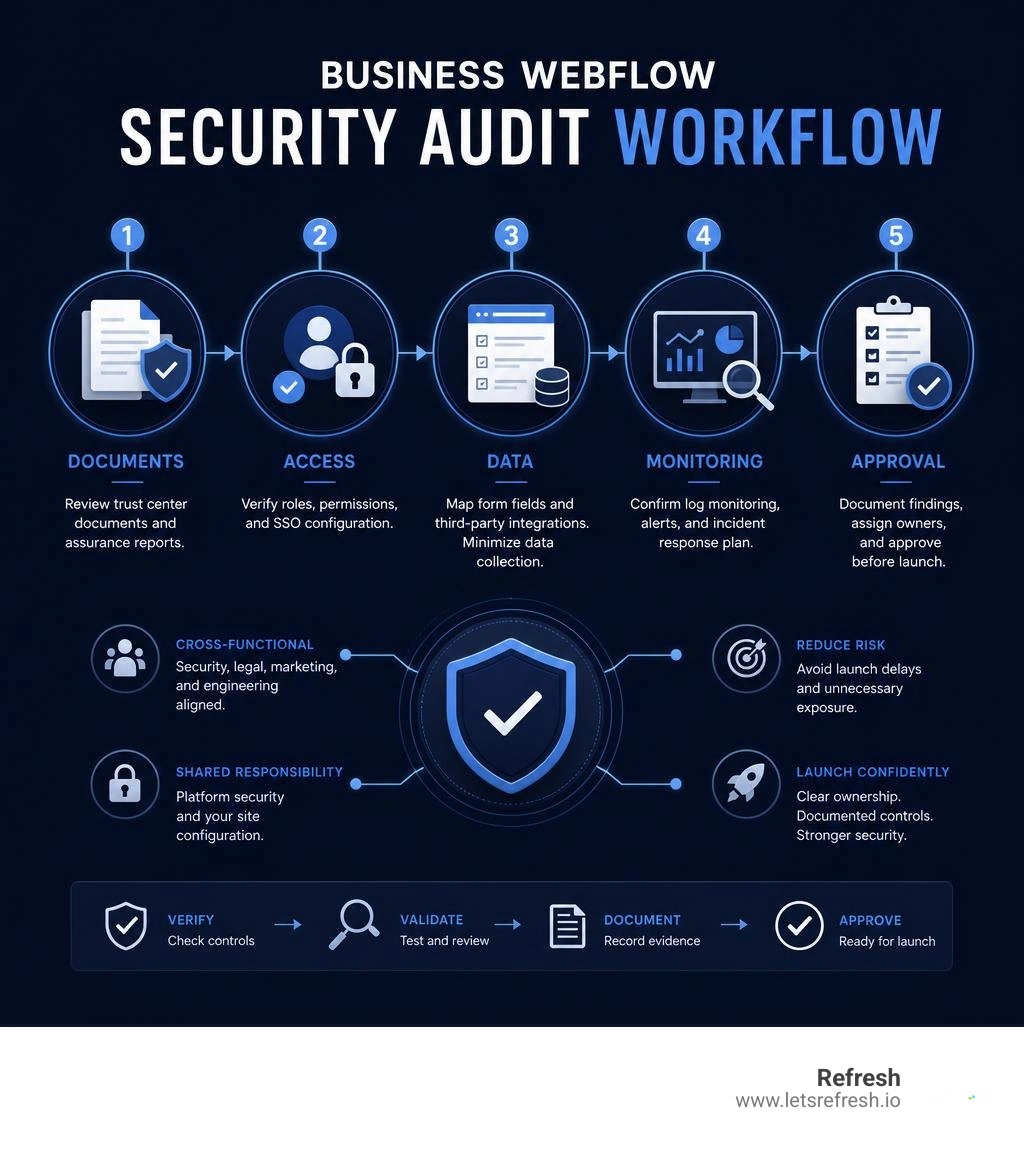
A business Webflow security audit should verify three things before launch: Webflow's platform controls, your site's configuration and custom code, and your team's access and data-handling process. Start by requesting Webflow Trust Center documents, reviewing Workspace permissions and SSO settings, mapping every form field and third-party integration, and confirming how your team will monitor logs and respond to incidents.
Webflow is a strong choice for business websites because it manages core hosting security and maintains independent assurance programs, including SOC 2 Type II and ISO 27001. But those reports do not automatically approve your specific site. Your forms, embedded scripts, user roles, publishing workflow, privacy notices, and external tools remain part of your responsibility.
For a growth-stage company, this review is not just a procurement task. It is a practical way to avoid preventable launch delays, reduce exposure from unnecessary data collection, and give security, legal, marketing, and engineering teams a clear answer to who owns each control.
I am Alexander Palmiere, Founder and CEO of Refresh Digital Strategy. After helping launch more than 200 SEO optimized Webflow sites and providing dedicated website support services, I have seen that effective business Webflow security audits work best when security decisions are built into the project from the start, not added at the end.
The Webflow Shared Responsibility Model Explained
When evaluating security for an enterprise Webflow deployment, misunderstandings usually happen when teams treat the platform like an unmanaged server or assume SaaS hosting handles every layer of risk. Webflow operates under a shared responsibility model. Security duties divide into three distinct tiers: the core platform infrastructure, the build configuration handled by your implementation agency, and internal data governance owned by your security and marketing teams.
Understanding this division prevents your team from asking Webflow to audit custom JavaScript while ensuring your organization does not neglect critical access controls. Aligning these responsibilities ensures you benefit from secure web hosting services without leaving gaps in application governance.
| Responsibility Tier | Owner | Covered Controls & Assets |
|---|---|---|
| Platform Infrastructure | Webflow | AWS cloud hosting, physical data centers, core CDN, DDoS mitigation, platform-level patching, database replication. |
| Build Configuration | Agency / Development Team | Custom JavaScript, third-party embeds, form action endpoints, security header configuration, staging environments. |
| Data Governance | Client / Security Team | User provisioning (SSO/SAML), role-based access control, privacy policies, form data lifecycle, internal compliance reviews. |
Platform-Level Infrastructure and Compliance
Webflow provides enterprise-grade infrastructure hosted primarily on Amazon Web Services (AWS). This architecture features automated scaling, Tier-1 content delivery networks (CDNs), and built-in DDoS mitigation via AWS Shield Advanced. All customer data is secured with TLS 1.2/1.3 encryption in transit and AES-256 encryption at rest.
To validate its internal controls, Webflow maintains a comprehensive compliance portfolio. The platform undergoes continuous auditing to maintain certifications including SOC 2 Type II, ISO 27001, ISO 27017 (Cloud Security), ISO 27018 (PII Protection), ISO 42001 (Artificial Intelligence Management), PCI DSS, and DORA compliance. Enterprise teams can evaluate these frameworks directly through the Webflow Trust Center.
In addition, Webflow enforces automated threat management by blocking website traffic originating from OFAC-sanctioned countries and using anti-bot edge detection to mitigate automated scrapers and malicious probes.
Build Configuration, Custom Code, and Third-Party Embeds
While Webflow secures the hosting foundation, your site build introduces unique variables. Custom JavaScript, third-party marketing tags, embed widgets, and custom API integrations execute within the visitor's browser, outside Webflow’s core software development lifecycle.
Vulnerabilities like Cross-Site Scripting (XSS) or supply chain compromises in external npm packages can bypass platform safeguards if custom scripts are unvetted. Implementing hardened Content Security Policy (CSP) headers, auditing tag manager containers, and utilizing dedicated webflow website support ensures that custom front-end code meets organizational security standards.
Core Pillars of Business Webflow Security Audits
A thorough audit evaluates how your organization configures the platform to protect data, enforce access standards, and maintain operational resilience.

Conducting Business Webflow Security Audits on Workspace Access
Identity and Access Management (IAM) is your primary defense against unauthorized changes and account takeovers. When conducting business webflow security audits on your administrative workspace, your security team should review:
- SAML 2.0 Single Sign-On (SSO): Enforce authentication through your enterprise Identity Provider (IdP) such as Okta, Microsoft Entra ID, or Google Workspace.
- SCIM Provisioning: Implement System for Cross-domain Identity Management (SCIM) to automate user onboarding and guarantee instant offboarding when employees leave your organization.
- Just-In-Time (JIT) Provisioning: Automate role assignment based on IdP directory groups to eliminate dormant or unassigned accounts.
- Mandatory Multi-Factor Authentication (MFA): Require hardware security keys or authenticator apps for all non-SSO collaborator accounts.
- Role-Based Access Controls (RBAC): Restrict publishing rights to authorized lead developers and separate workspace administration from content editing roles.
As outlined when Announcing Webflow’s SOC 2 Type II compliance, platform access is strictly governed, and your organization must apply the same least-privilege standards to your own team members.
Data Handling, Form Submissions, and Privacy Compliance
Webflow sites routinely capture user data through lead capture forms, event registrations, and newsletter signups. By default, submissions are processed and stored within Webflow’s US-based AWS databases, with email notifications dispatched to site administrators.
For enterprise privacy compliance under GDPR, CCPA, and modern state privacy frameworks:
- Avoid Sensitive Data Collection: Webflow is not HIPAA-compliant for storing Protected Health Information (PHI) directly. Patient intake forms or sensitive financial records should use specialized external endpoints.
- Custom Form Routing: Use custom form actions or encrypted webhooks to route sensitive form payloads directly to your internal CRM, marketing automation platform, or secure database without storing submissions in the CMS.
- Data Minimization: Audit all form fields to collect only strictly necessary business data.
- Consent and Privacy Policy Integration: Verify that dynamic cookie banners and consent management platforms interface correctly with embedded tracking scripts before execution.
Logging, Monitoring, and Disaster Recovery Capabilities
Enterprise operational assurance requires verifiable visibility into changes and resilient business continuity protocols. Webflow provides the Workspace Audit Log API on Enterprise plans, enabling security teams to export event logs directly into enterprise SIEM platforms like Splunk or Datadog.
- Log Generation and Retention: Workspace audit logs index within 10 minutes of an event and are retained in active storage for one full year. Webflow maintains system infrastructure logs in Datadog for 15 days, with long-term archive snapshots stored in Amazon Glacier for 12 months.
- Site Activity Tracking: Real-time activity logs allow managers to see which team members published changes, modified redirects, or altered workspace settings.
- Snapshot Schedules and Backups: Automated database snapshots occur every 4 hours and are retained for 2 days. Weekly snapshots are preserved for 4 weeks, and monthly backups are archived for 12 months.
- RPO and RTO Targets: Webflow maintains a Recovery Point Objective (RPO) within 4 hours (with real-time replication delivering an effective RPO within 1 hour) and a Recovery Time Objective (RTO) of 24 hours in the event of a catastrophic regional failure.
Evaluating these capabilities confirms that your digital assets rest on business grade web hosting infrastructure engineered for enterprise uptime.
Navigating Enterprise Governance, Data Residency, and DPAs
Legal and compliance reviews often focus heavily on cross-border data transfers and vendor oversight. Webflow processes and stores all customer hosting and workspace data within the United States on AWS infrastructure. Dedicated EU-only data residency is not offered.
To maintain compliance with European data protection standards, Webflow participates in the EU-US Data Privacy Framework (DPF), the Swiss-US DPF, and provides Standard Contractual Clauses (SCCs) within its standard Data Processing Addendum (DPA). Full architectural details are documented in the Webflow Security Whitepaper.
When reviewing Webflow's subprocessor ecosystem:
- Webflow maintains a strict 15-calendar-day objection window for new subprocessors.
- Enterprise legal teams must subscribe to notifications via Webflow's legal subprocessor portal to monitor vendor additions.
Penetration Testing Standards and Bug Bounty Disclosures
Enterprise security policies often require evidence of active vulnerability management. Webflow executes annual third-party penetration tests using certified external security assessment firms. While individual customers are prohibited from launching independent vulnerability scans or denial-of-service tests against the shared multi-tenant infrastructure, Webflow provides customers with an official Letter of Engagement and assessment summaries under an NDA.
Furthermore, Webflow runs a responsible vulnerability disclosure bug bounty program and actively tracks common vulnerabilities and exposures (CVEs), publishing proactive security advisories whenever upstream supply-chain dependencies require patching.
Incident Response Protocols and Tabletop Readiness
Security assurance requires structured incident response protocols. Webflow's internal security teams conduct quarterly tabletop exercises simulating diverse threat scenarios, ranging from credential compromises to data pipeline interruptions.
In the event of a confirmed security incident affecting customer data, Webflow commits to notifying affected customers without undue delay in accordance with global breach disclosure laws. Real-time platform availability and ongoing incident updates remain publicly accessible via the status portal, allowing your team to incorporate these updates into ongoing webflow maintenance procedures.
Streamlining Enterprise Security Approvals Without Deal Blockers
Security reviews can sometimes stall enterprise web initiatives when teams submit unstructured questionnaires late in the project timeline. Running security, compliance, and design scoping workstreams in parallel eliminates deployment bottlenecks.
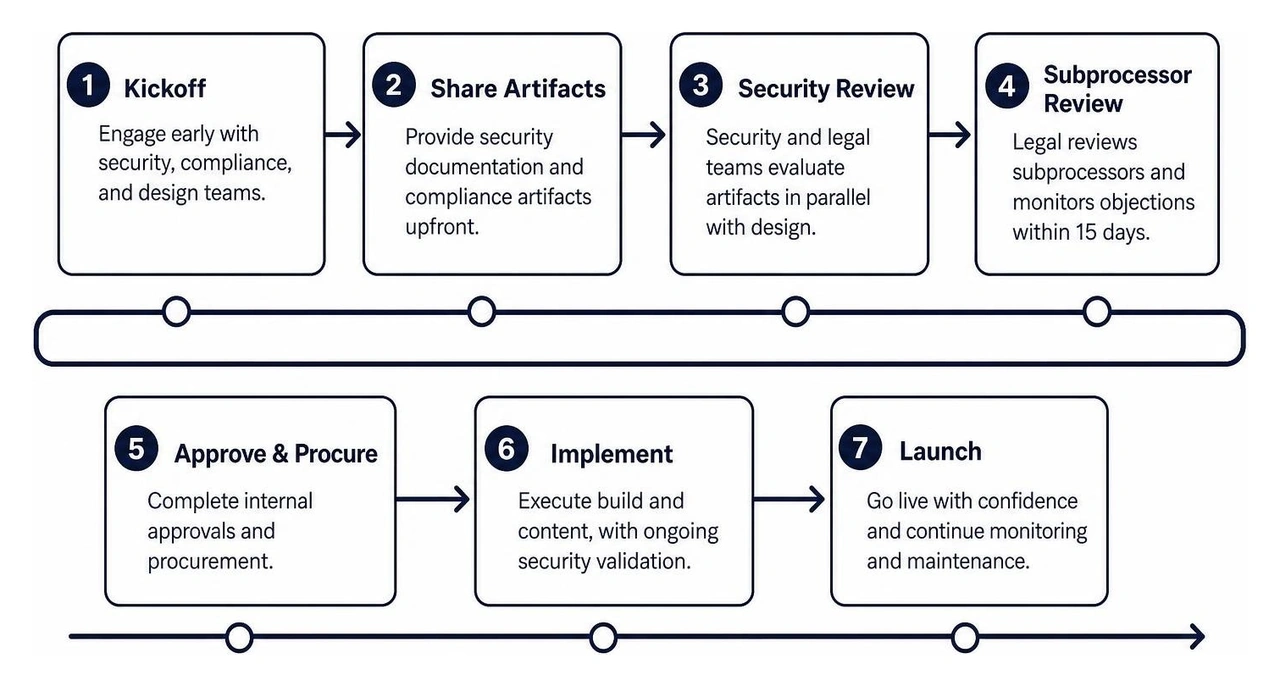
By engaging your technical implementation agency early, your team can coordinate comprehensive website support services to prepare compliance artifacts simultaneously with design sprints.
Pre-Launch Checklist for Business Webflow Security Audits
Before pointing your production DNS records to Webflow, execute this operational validation checklist:
- Request Trust Center access early; authorized links remain active for 8 weeks and take 2 to 3 business days to approve.
- Sign and archive Webflow's Data Processing Addendum (DPA) and register for subprocessor change notifications.
- Enable SAML 2.0 SSO and SCIM provisioning within your Enterprise Workspace, verifying least-privilege role assignments.
- Enforce HTTP Strict Transport Security (HSTS) with a minimum max-age duration of one year (31,536,000 seconds).
- Configure custom security headers, including
X-Frame-Options: SAMEORIGINandX-Content-Type-Options: nosniff. - Implement a Content Security Policy (CSP) to restrict script execution to authorized domains.
- Map all form fields, verify custom webhooks for sensitive data routing, and strip unnecessary storage parameters.
- Connect the Workspace Audit Log API to your enterprise SIEM pipeline and verify test event indexing.
- Verify that automated backups and manual version snapshots are created prior to DNS propagation.
Frequently Asked Questions about Webflow Security Audits
Does Webflow store customer data in the European Union?
No. Webflow stores all customer data, form entries, and asset storage on AWS infrastructure located within the United States. Organizations transferring personal data from the EU, EEA, or Switzerland rely on the EU-US Data Privacy Framework and Standard Contractual Clauses (SCCs) embedded in Webflow’s Data Processing Addendum. For organizations with strict EU data residency requirements, form handling and dynamic databases should be routed to external European endpoints via custom API actions.
Can our internal security team perform independent penetration tests on Webflow?
Webflow’s terms of service prohibit customers from conducting automated vulnerability scans, port scans, or penetration tests directly against the shared multi-tenant SaaS hosting infrastructure to prevent service disruption. Instead, Webflow provides enterprise customers with an executive summary and Letter of Engagement from its annual third-party penetration tests through its security portal.
How long are Webflow Workspace audit logs retained?
Workspace audit logs generated on Enterprise plans are retained for 12 months. Events are indexed and queryable via the Workspace Audit Log API within approximately 10 minutes of occurrence. Teams requiring multi-year compliance archiving should configure automated log pipelines to export events into an external SIEM solution such as Splunk, Datadog, or Amazon S3.
Conclusion
Conducting a thorough security audit verifies that your website is built on robust enterprise infrastructure while protecting your brand from custom code vulnerabilities, data leaks, and access lapses. Webflow stands out as the preferred platform for modern organizations, pairing enterprise certifications like SOC 2 Type II and ISO 27001 with intuitive visual development tools.
Achieving complete compliance requires clear visibility into the shared responsibility model. When your marketing, security, and development teams align around proven access controls, clean data flows, and active monitoring, your website becomes an engine for safe, scalable business growth.
At Refresh, we support businesses across Pittsburgh, PA, Cleveland, OH, and Charlotte, NC in creating scalable, enterprise-grade Webflow websites that satisfy strict security standards and modern Generative Engine Optimization (GEO) requirements. If your organization is planning an enterprise build or needs guidance navigating technical compliance reviews, explore our enterprise Webflow design and security support to launch your next project with total confidence.


.avif)