

Keep Website Performance Visible Before It Hurts Growth
Ongoing website performance monitoring means checking your site's speed, uptime, Core Web Vitals, and critical user journeys on a continuing basis - not only when someone reports a problem. To get started, track a baseline for your most important pages, monitor real visitor experience and simulated journeys, then set alerts for meaningful regressions.
For a growth-stage startup, this turns website performance from a surprise into an operating signal. You can catch a slow product page, broken signup form, regional outage, or third-party script issue before it affects leads, trust, and revenue.
Start by watching:
- Availability: Is the site and its key pages reachable?
- User experience: Are LCP, INP, and CLS within Google's recommended thresholds?
- Critical journeys: Can visitors complete actions such as booking a demo, submitting a form, or checking out?
- Trends over time: Did a new release, image upload, integration, or Webflow update make a page slower?
A single test is useful, but it is only a snapshot. Websites change constantly as teams publish content, add marketing tags, update integrations, and grow traffic. Continuous visibility helps you find the cause, prioritize the fix, and confirm that the improvement lasts.
I am Alexander Palmiere, Founder and CEO of Refresh Digital Strategy. After helping launch more than 200 websites for small and midsized businesses, I have seen how ongoing website performance monitoring supports reliable Webflow sites, stronger digital experiences, and sustainable growth.

Ongoing website performance monitoring terms made easy:
- Ongoing monitoring is a core part of professional website support services.
- Core Web Vitals are the user experience metrics Google uses to evaluate page speed and stability, as defined in its Web Vitals documentation.
Why Ongoing Website Performance Monitoring Is Essential for Growth
A website is never truly "finished." The moment a site launches, it enters an active lifecycle where content updates, tracking pixels, marketing automations, and third-party integrations continuously alter its codebase. Without a system in place to observe these shifts, speed degrades silently.
When pages slow down, visitors leave. According to Google, a site that takes three seconds to load experiences a 32% increase in bounce rate compared to one that loads in one second or less. For commercial sites, unexpected slowdowns directly depress conversion rates, inflate customer acquisition costs, and damage search engine rankings.
Applying website performance tips and best practices requires continuous feedback. A single code regression that adds just 400ms to Largest Contentful Paint (LCP) can trigger up to a 40% traffic drop over an eight-week span. Once rankings slip, recovering visibility can take between three and six months. Ongoing monitoring ensures teams catch these regressions within hours rather than discovering them months later in an analytics post-mortem.
Business Impact: Conversions, Revenue, and User Trust
Speed is a foundational component of user experience and brand credibility. If an e-commerce platform or B2B lead generation portal experiences high latency, users quickly lose confidence in the security and professionalism of the organization.
Every incremental delay carries a quantifiable cost:
- Revenue Protection: E-commerce operations can lose hundreds or thousands of dollars per minute during outages or severe latency spikes. For a business with an average order value of $50, unnoticed Core Web Vitals degradation can result in upwards of $44,000 in lost monthly revenue.
- Conversion Efficiency: Even a 100ms delay in page load time measurably reduces conversion rates, eroding the efficiency of paid search and social campaigns.
- Search Engine Rankings: Google utilizes Core Web Vitals as active ranking signals. Sites failing these criteria risk losing top positions to faster competitors.
- Customer Retention: Delivering a consistently fast loading website reinforces user trust, keeps engagement high, and protects customer lifetime value.
Why Websites Degrade Over Time Without Active Oversight
Performance decay rarely happens all at once. Instead, it is the cumulative result of minor, unmonitored operational changes:

- Unoptimized Media: Content editors frequently upload uncompressed high-resolution images or unformatted video backgrounds that bloat total page weight.
- Third-Party Script Creep: Marketing teams add analytics tags, heatmaps, remarketing pixels, and customer support chat widgets. Over time, obsolete scripts remain on the site, blocking the main thread.
- Database and CMS Bloat: Dynamic content platforms accumulate unindexed queries, orphaned post drafts, and oversized revision histories that increase Time to First Byte (TTFB).
- Platform & Plugin Regressions: Software patches, theme adjustments, or content management system updates can introduce render-blocking assets or layout instabilities.
Left unmonitored, these minor additions create significant technical debt that slows down the user journey.
Core Pillars of Comprehensive Performance Monitoring
A modern performance observability framework must look beyond simple uptime pings. Comprehensive monitoring relies on a layered strategy combining simulated lab testing, live user telemetry, and infrastructure path analysis.

Synthetic Monitoring vs. Real User Monitoring (RUM)
To gain actionable insight into your site's health, you need both synthetic monitoring (lab data) and Real User Monitoring (field data). Synthetic monitoring allows teams to run controlled tests across global checkpoints, while RUM captures what live visitors experience on actual hardware.
| Feature / Metric | Synthetic Monitoring (Lab Data) | Real User Monitoring (Field Data) |
|---|---|---|
| Data Source | Automated headless or real browsers | Live visitor traffic via JavaScript beacons |
| Environment | Controlled network, device, and location | Variable real-world networks, CPUs, and devices |
| Primary Use Case | Baseline benchmarking and regression testing | Discovering real user pain points and SEO validation |
| Strengths | Consistent, reproducible diagnostic data | Measures true 75th percentile Core Web Vitals |
| Limitations | Does not account for unpredictable user interactions | Requires consistent traffic volume to generate insights |
Using dedicated field-data tools ensures you observe how actual mobile and desktop visitors navigate your site across variable network conditions.
Tracking Core Web Vitals and Key Performance Metrics
Google evaluates web performance using Core Web Vitals, measured at the 75th percentile of page loads across a rolling 28-day window:
- Largest Contentful Paint (LCP): Measures perceived loading speed. It marks the point when the main content of a page has loaded. Target: ≤ 2.5 seconds.
- Interaction to Next Paint (INP): Assesses overall page responsiveness by measuring the latency of all user interactions (clicks, taps, key presses). Target: ≤ 200 milliseconds.
- Cumulative Layout Shift (CLS): Measures visual stability by tracking unexpected layout shifts during page rendering. Target: ≤ 0.1.
Supplementary diagnostic metrics include:
- Time to First Byte (TTFB): Measures server response time and backend efficiency. Target: ≤ 800 milliseconds.
- First Contentful Paint (FCP): The time until the browser renders the first piece of DOM content. Target: ≤ 1.8 seconds.
Real-time visibility into these metrics helps teams receive alerts before a drop in field scores impacts search engine rankings.
Internet Performance Monitoring (IPM) Beyond Basic Uptime
Traditional website monitoring checks whether an HTTP status returns a 200 OK. However, modern applications depend on an intricate web of external infrastructure systems. Internet Performance Monitoring (IPM) tracks the health of the entire Internet Stack:
- DNS Resolution Time: Latency introduced during domain name lookups.
- CDN Edge Routing: Cache hit ratios and regional latency across content delivery network points of presence.
- BGP Routing Anomalies: Internet routing issues that can isolate specific geographic regions.
- Third-Party API Health: Availability and response times of critical payment gateways, CRM connections, and inventory feeds.
Observability services that unite uptime, real-user telemetry, and network checks into unified dashboards help reduce diagnostic complexity.
How to Set Up an Ongoing Website Performance Monitoring Strategy
Establishing a robust monitoring strategy requires a structured, multi-tier implementation workflow.
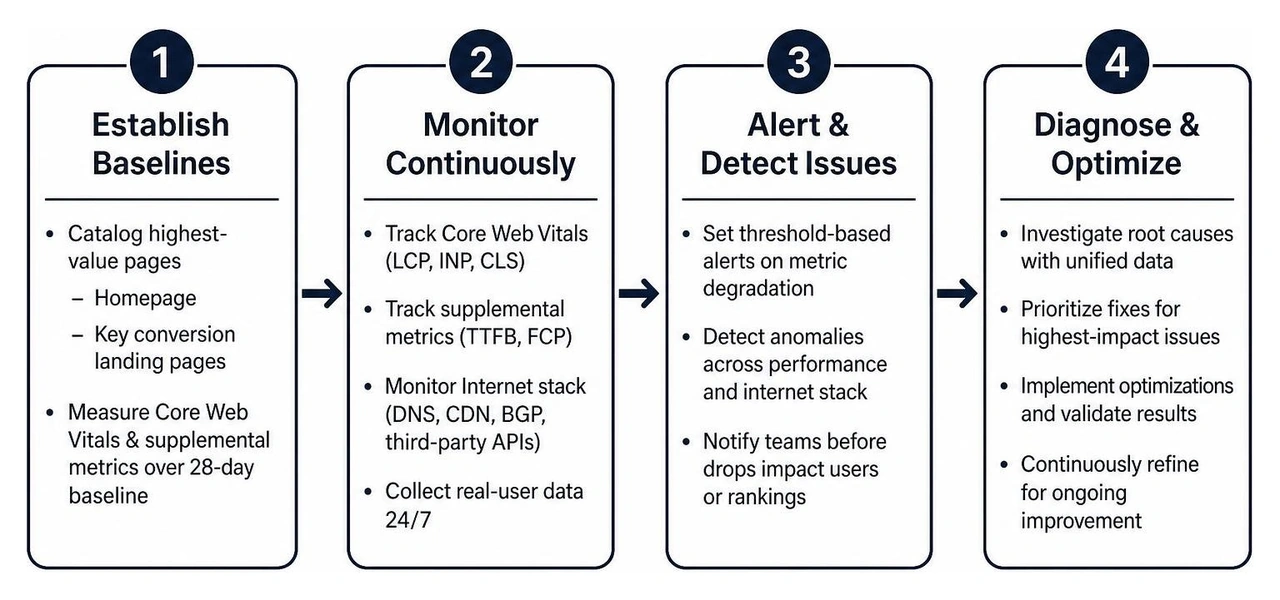
Step 1: Establish Baselines for Ongoing Website Performance Monitoring
Begin by cataloging your site's highest-value pages:
- The homepage
- Key conversion landing pages
- Core product or service pages
- Checkout or lead inquiry submission forms
Conduct initial performance audits across multiple device types (mobile and desktop) to record baseline TTFB, LCP, INP, and CLS scores. Pair this with a review of your hosting infrastructure, consulting a fast website hosting complete guide to confirm your server environments can handle sustained traffic loads.
Step 2: Implement Real User and Synthetic Tracking
Deploy lightweight JavaScript tracking tags on your website to capture real-time user experiences across diverse devices, browsers, and geographies. Ensure the tracking tag is asynchronous and lightweight to prevent any negative impact on your Core Web Vitals.
Simultaneously, configure synthetic test runners to execute automated journeys at scheduled intervals (such as every 5 to 15 minutes) from multiple geographic nodes. These synthetic checks should simulate user behaviors like adding a product to a cart or completing an onboarding form.
Step 3: Configure Intelligent Alerts and Escalation Paths
Alert fatigue causes teams to ignore critical performance signals. Build an alert escalation model that prioritizes actionable issues:
- Warning alerts: Notify the website owner or marketing lead when LCP, INP, CLS, or TTFB crosses an internal performance budget.
- Critical alerts: Escalate to technical support when multiple checkpoints detect downtime, broken forms, failed checkout flows, or severe latency.
- Resolution tracking: Document the cause, fix, and verification result so recurring issues can be prevented.
To eliminate false alarms, configure your system to require consecutive failures from multiple geographic checkpoints before dispatching high-priority notifications.
Step 4: Audit Infrastructure and Third-Party Dependencies
Regularly audit asset delivery pipelines and external integrations. Enforce strict controls over caching policies, asset compression (using modern formats like WebP and AVIF), and JavaScript deferral. When third-party tracking scripts experience latency, ensure they fail gracefully without blocking core site functionality.
Partnering with professional website support services provides the technical oversight required to resolve infrastructure bottlenecks quickly.
Best Practices to Sustain Long-Term Speed and Stability
Maintaining high performance over time requires embedding optimization directly into your everyday publishing and development routines.
Integrating Monitoring into Webflow and CMS Workflows
At Refresh, we build exclusively on Webflow because its modern, clean architecture supports lean code, managed hosting, native asset compression, and robust global CDN distribution out of the box.
To keep a Webflow site performing at its peak:
- Establish clean class naming conventions to avoid redundant CSS rules.
- Audit visual assets before publishing, ensuring images use modern formats and appropriate responsive dimensions.
- Manage custom code embeds carefully, placing non-critical scripts before the closing
</body>tag withdeferorasyncattributes. - Conduct continuous Webflow page speed optimization audits to identify opportunities for asset minification and layout cleanup.
Scaling Ongoing Website Performance Monitoring with Proactive Maintenance
Ongoing performance management should integrate seamlessly with your broader digital marketing initiatives:
- Enforce Performance Budgets: Set strict upper limits on total page weight (e.g., maximum 1.5MB per landing page) and script execution times.
- Maintain Search Visibility: Align speed optimizations with monthly SEO maintenance to protect organic search rankings and strengthen Generative Engine Optimization (GEO) signals.
- Publish Status Pages: Maintain a public status page to communicate system health transparently with your customers during unplanned disruptions.
- Pre-Deployment Audits: Test staging builds against production baselines to catch performance regressions before updates go live.
Frequently Asked Questions About Website Performance Monitoring
What is the difference between synthetic tests and real user monitoring?
Synthetic monitoring uses automated scripts running in controlled lab environments to simulate visitor interactions from specific locations. It is ideal for baseline benchmarking, diagnosing code issues, and running tests in staging environments. Real User Monitoring (RUM) collects performance data directly from real visitors on their actual hardware and network connections, providing the field data Google uses to calculate Core Web Vitals rankings.
How does Internet Performance Monitoring differ from traditional monitoring?
Traditional website monitoring only verifies that a server returns a successful response code (such as HTTP 200). Internet Performance Monitoring (IPM) monitors the complete Internet Stack—evaluating DNS lookup times, CDN edge caching efficiency, BGP routing stability, and third-party API dependencies—to identify external bottlenecks before they cause downtime.
What are the target thresholds for Core Web Vitals?
According to Google's performance guidelines, a page provides a good user experience when measured at the 75th percentile if:
- Largest Contentful Paint (LCP): 2.5 seconds or less
- Interaction to Next Paint (INP): 200 milliseconds or less
- Cumulative Layout Shift (CLS): 0.1 or less
Conclusion
Website speed and availability directly drive conversion rates, customer retention, and organic visibility. Treating speed optimization as a one-time project leaves your digital presence vulnerable to performance drift, unexpected outages, and search ranking drops. Implementing an ongoing monitoring framework gives your team the real-time visibility needed to protect revenue and maintain exceptional user experiences.
At Refresh, we help businesses across Pittsburgh, PA, Cleveland, OH, and Charlotte, NC design, build, and maintain high-speed digital experiences that fuel sustainable growth. Explore how our team can help you partner with Refresh for high-performance Webflow design and maintenance.


.avif)