Why Every Small Website Needs the Right Foundation
Host small website projects with the right approach, and you'll set yourself up for growth, security, and speed. Here's what you need to get started:
Quick Answer: Best Ways to Host Your Small Website
- Choose a hosting type - Shared hosting ($3-10/month) for simple sites, managed WordPress ($10-20/month) for blogs, or Webflow for design-focused projects
- Register a domain name - Typically $10-20/year through providers like Network Solutions or included free with hosting
- Select a reliable provider - Look for 99.9% uptime, free SSL certificates, and 24/7 support
- Upload your files - Use FTP, one-click installers, or visual builders depending on your platform
- Configure DNS settings - Point your domain to your hosting server (usually handled automatically)
One small business owner described waking up to find their site down again because of cheap, unreliable hosting. Every crash drove customers away. That's the hidden cost of choosing the wrong foundation for your online presence.
Web hosting is simply renting space on a special computer (a server) that stores your website files and makes them accessible 24/7. Think of it like the land your house sits on - without it, you can't build anything people can visit.
The good news? You don't need expensive enterprise hosting or technical expertise. Over 500,000 website owners successfully host small sites with affordable plans starting around $2.95 per month. The key is matching your hosting choice to your actual needs: traffic volume, website type, budget, and growth plans.
I'm Alexander Palmiere, and through developing over 200 websites at Refresh Digital Strategy, I've helped countless small businesses host small website projects that punch above their weight. The right hosting setup transforms a tiny site into a reliable asset that works around the clock.
Essential Hosting Resources:
Understanding the Basics to Host Small Website Projects
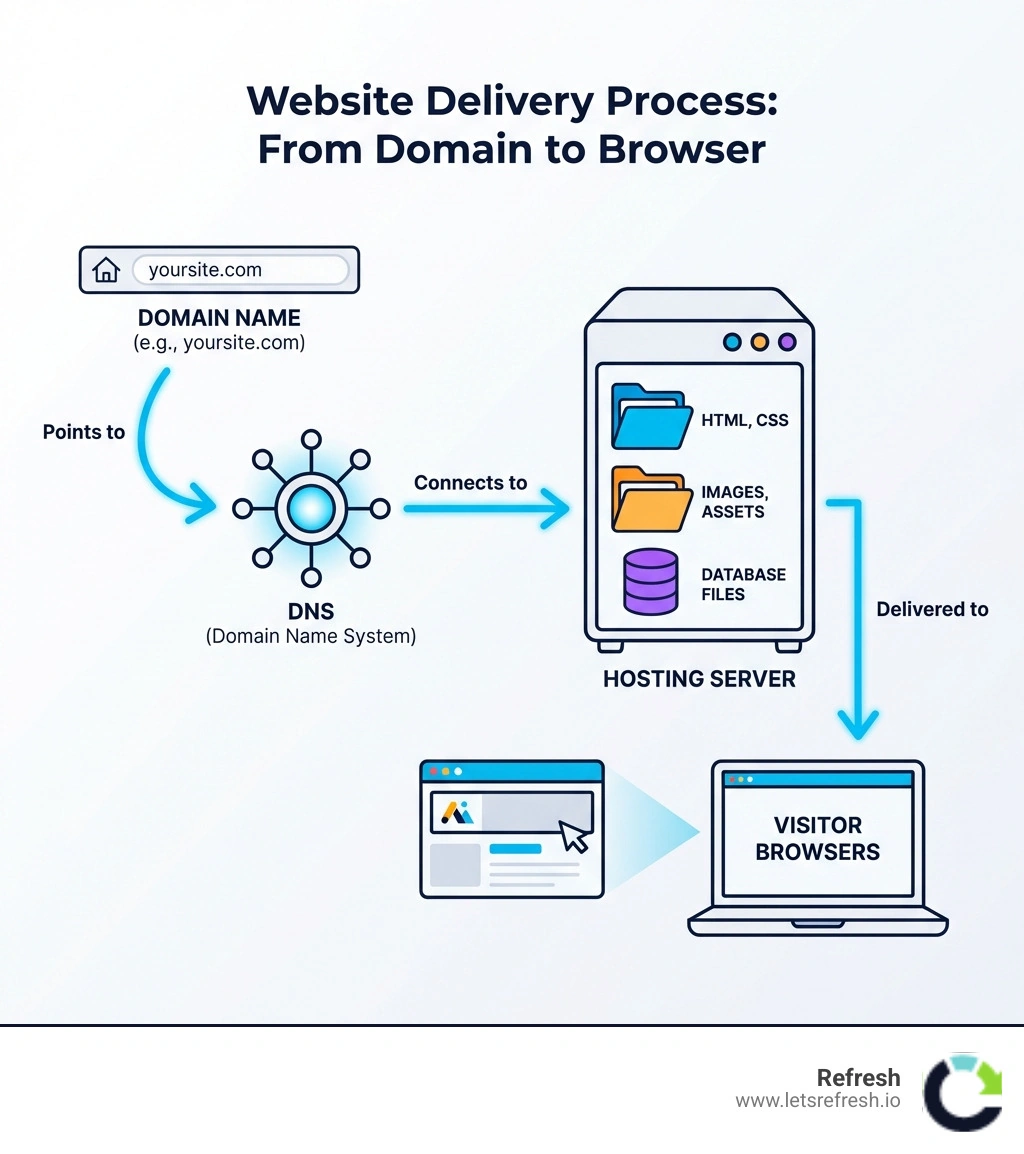
Before we dive into the "how-to," we need to explain the technical jargon. When we talk about how to host small website files, we are essentially talking about three core components working in harmony: the server, the domain name, and the Domain Name System (DNS).
What is Web Hosting, Exactly?
Web hosting is the storage space you need to save the files of your website—photos, videos, text, code, and more—so they can be accessible on the internet. By purchasing a website hosting package, you're buying space on a provider's servers. It’s exactly like the space on the hard drive of your computer, but because it’s on a professional server, those files are accessible from anywhere in the world.
The Domain Name: Your Digital Address
A domain name is the address people type into their browser to find you (like letsrefresh.io). While the hosting is the "house," the domain name is the "street address." You can find available names using tools like DomainWheel, which helps brainstorm creative options that aren't already taken.
DNS: The Internet's Librarian
DNS (Domain Name System) is the invisible middleman. It translates the human-friendly domain name into a computer-friendly IP address. When someone types your URL, the DNS looks up which server holds your files and directs the visitor there.
Reliable hosting is the engine behind every fast, secure, and trustworthy website. For a small business in Pittsburgh, PA, or Cleveland, OH, having a site that loads instantly isn't just a luxury—it's a requirement for building trust. If your site is slow or down, customers in Charlotte, NC, will simply click away to a competitor.
Comparing Hosting Types for Small Businesses
Not all hosting is created equal. Choosing the wrong type can lead to a "noisy neighbor" effect where other websites on the same server hog all the resources, causing your site to crawl.
Shared Hosting
This is the most affordable way to host small website projects, often starting as low as $1.99 to $2.99 per month. You share server resources with hundreds of other sites. It's perfect for new blogs or basic portfolios, but it can lag during traffic spikes.
VPS (Virtual Private Server)
Think of this as a private apartment in a large building. You still share the physical server, but you have your own dedicated slice of resources. It’s the perfect next step when your website outgrows shared hosting, offering more power for medium-sized businesses.
Cloud Infrastructure
Cloud hosting spreads your data across multiple servers. If one server has an issue, another picks up the slack. This provides incredible uptime and scalability.
Managed WordPress Hosting
This is a concierge service specifically for WordPress users. The host handles updates, security, and caching. While it’s pricier (starting around $35/month), it saves you hours of technical headaches.
Webflow: The Refresh Choice
At Refresh, we specialize in Webflow development for a reason. Webflow provides enterprise-grade hosting built on Amazon Web Services (AWS) and Fastly. It combines the ease of a visual builder with the speed and security of a professional cloud setup. For small to medium businesses that want a high-impact site without the "plugin bloat" of WordPress, Webflow is our top recommendation.
| Hosting Type | Typical Monthly Cost | Best For | Scalability |
|---|---|---|---|
| Shared | $2 - $10 | New blogs, tiny sites | Low |
| VPS | $20 - $80 | Growing businesses | Medium |
| Managed WordPress | $15 - $50 | Content-heavy blogs | Medium |
| Webflow | $14 - $39 | Professional SMB sites | High |
| Dedicated | $80+ | Enterprise, high traffic | Maximum |
Learn more about our managed web hosting service to see which fits your growth plan.
Step-by-Step Guide to Launching Your Site

Ready to go live? Whether you are starting from scratch or performing a website migration, the process follows a predictable path.
Preparing to Host Small Website Files
First, you need to know if your site is static or dynamic.
- Static Websites: These contain fixed content (HTML, CSS, JS). They are incredibly fast and easy to host. For a truly tiny site, Tiiny.host is a fantastic tool that lets you drag and drop a zip file to go live in seconds.
- Dynamic Websites: These use a database to build pages on the fly (like WordPress). These require more server "muscle" and a database setup (usually MySQL).
Technical Steps to Host Small Website Traffic
- Choose Your Provider: Based on our testing, Hostinger is a budget-friendly powerhouse, while Bluehost is a fortress for security.
- Register Your Domain: If you haven't already, buy your domain. Many hosts include this for free for the first year.
- Point Your Name Servers: In your domain registrar settings, you'll need to enter the "Name Servers" provided by your host. This tells the world where your "land" is located.
- Install Your CMS: Most hosts offer a "One-Click Install" for WordPress. If you're using Webflow, you simply click "Publish" to their global staging or custom domain.
- Configure SSL: An SSL certificate (HTTPS) is an absolute must. Google is merciless to websites without one, and it's essential for keeping customer data safe. Most quality hosts now provide a free SSL certificate via Let’s Encrypt.
- Avoid Dangling DNS: Always double-check your records. Dangling DNS issues occur when a domain points to a resource that no longer exists, leaving you vulnerable to subdomain takeovers.
Optimizing Performance, Security, and GEO
Once your site is live, the work isn't over. You want your small website to perform like a giant.
Speed is King
Fast load times keep customers on your site and boost your Google rankings. Look for hosts that use NVMe (nonvolatile memory express) storage. This is significantly faster than traditional SSDs. Additionally, a CDN (Content Delivery Network) like Cloudflare or Fastly stores copies of your site in data centers across the globe (including locations near Pittsburgh and Cleveland), so a visitor in Charlotte gets the data from a local server rather than one across the country.
Security Considerations
Small businesses are often targets for "brute-force" attacks. Ensure your host offers:
- Malware Scanning: To catch shady code before it causes trouble.
- Firewalls: To block malicious traffic.
- Automatic Backups: So you can restore your site in one click if things go wrong.
Generative Engine Optimization (GEO)
In the age of AI, we don't just optimize for traditional search; we optimize for Generative Engine Optimization (GEO). This means ensuring your hosting is fast and your content is structured so that AI models (like ChatGPT or Google's Gemini) can easily crawl and cite your website as a source. A slow, poorly hosted site is less likely to be featured in AI-generated answers.
For more tips on speed, check out our fast website hosting complete guide.
Frequently Asked Questions about Small Website Hosting
How much does it cost to host a small website?
For a basic shared plan, expect to pay between $2 and $10 per month. Domain registration adds another $10 to $20 per year. If you opt for managed hosting or platforms like Webflow, your costs will be closer to $15 to $35 per month, but this often includes better security and support.
Can I host a website on my own computer?
Technically, yes, but we strongly discourage it. To host on your own computer, you’d need to keep it running 24/7, deal with security risks, manage your own hardware, and pay for a static IP address. It often ends up being more expensive and less reliable than a $3/month professional host.
What is the difference between static and dynamic hosting?
A static website is like a printed brochure—the content stays the same for every visitor. It’s fast and very cheap to host. A dynamic website (like an online store or a blog with a search bar) builds the page every time someone visits. This requires a database and more server processing power.
Conclusion
Choosing how to host small website projects is one of the most important decisions you'll make for your business. It’s the difference between a site that crashes during your biggest sale and one that scales effortlessly as you grow.
At Refresh, we believe in building long-term partnerships with small to medium-sized businesses across Pittsburgh, Cleveland, and Charlotte. We don't just build websites; we provide the expert Webflow support and digital marketing strategy needed to make sure your "tiny site" has a massive impact.
Whether you're looking for a fresh brand identity, a high-performance Webflow site, or a comprehensive SEO strategy, we're here to help you steer the digital journey.
Ready to build something great? Visit us at Refresh and let's start the conversation.


.avif)