Why LinkedIn Business Page Optimization Drives Real B2B Growth
LinkedIn business page optimization is the process of completing, structuring, and actively managing your LinkedIn Company Page so it ranks higher, attracts the right audience, and converts visitors into leads.
Here's a quick snapshot of what it involves:
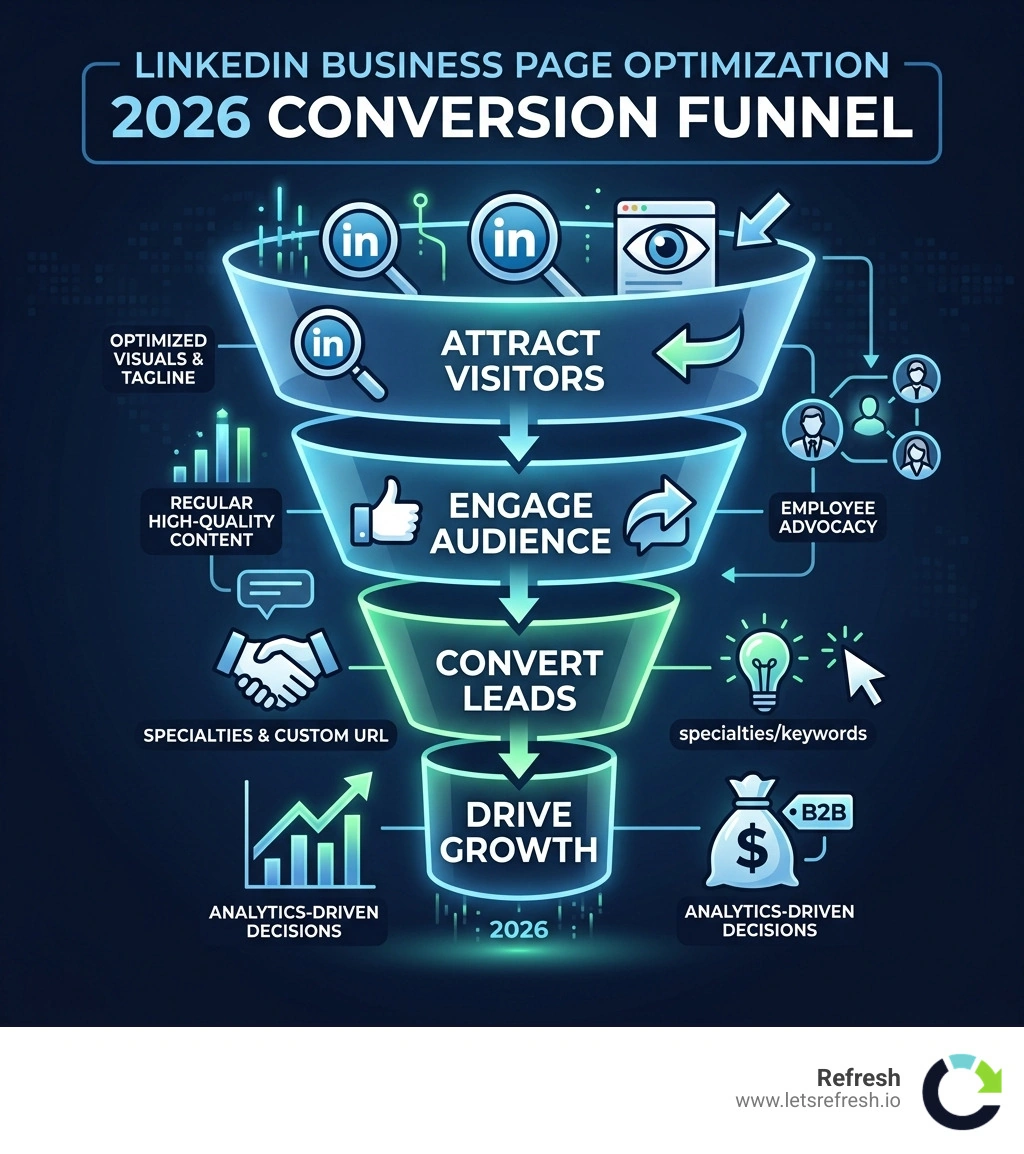
| Optimization Area | What to Do |
|---|---|
| Visual identity | Upload a 300x300px logo and 1128x191px banner |
| Tagline & About section | Lead with keywords; first 156 characters appear in Google |
| Custom URL | Match your brand name for search discoverability |
| Specialties | Add up to 20 niche keywords for algorithm signals |
| Content cadence | Post at least weekly for 2x engagement lift |
| Employee advocacy | Employees have 10x the reach of your company page |
| Analytics | Track follower growth, engagement, and demographics |
The stakes are high. LinkedIn is responsible for 80% of B2B leads generated through social media, and 91% of executives call it their first choice for professional content. Yet with over 67 million companies competing for attention, a half-finished page is practically invisible.
A polished, optimized page isn't just a nice-to-have. It's your brand's first impression — and often the deciding factor between a prospect clicking through or bouncing to a competitor.
I'm Alexander Palmiere, Founder and CEO of Refresh Digital Strategy, and I've helped over 200 businesses build stronger digital presences — including linkedin business page optimization as part of a broader strategy. Let's walk through exactly how to make your page work harder.
The Foundation of LinkedIn Business Page Optimization
When we talk about building a presence in cities like Pittsburgh, Cleveland, or Charlotte, we always start with the foundation. You wouldn't build a high-performance Webflow site on a shaky domain, and you shouldn't launch a B2B marketing campaign on a LinkedIn page that looks like a digital ghost town.
Visual identity is the first thing a prospect notices. It takes less than a second for a visitor to form an opinion about your brand based on your profile photo and banner. To ensure your brand doesn't "suck butt" (to borrow a phrase from the industry) on a mobile screen, you need to adhere to specific dimensions. Your logo should be a crisp 300x300 pixels. If your logo has a lot of white space, consider a "logo lockup" with a contrasting background so it doesn't disappear into LinkedIn’s white interface.
The banner image (1128x191 pixels) is your most valuable real estate for storytelling. Don't just repeat your logo. Use this space to highlight your team, a recent campaign, or a clear value proposition. In April 2026, we’re seeing more brands use slideshow cover images to showcase multiple facets of their business—from company culture to core service offerings.
Consistency is king. Your LinkedIn visuals must align with your Social Media Account Setup and your primary website. If your Webflow site uses a specific neon blue and bold typography, your LinkedIn banner should feel like a natural extension of that experience. This builds immediate trust and professional credibility.

Customizing Your Public URL for Search Discoverability
One of the easiest yet most overlooked steps in linkedin business page optimization is personalizing your public URL. By default, LinkedIn assigns a string of messy numbers to your page. We want something clean, like linkedin.com/company/refresh-digital.
To change this, head to your Admin Tools and select "Edit public URL." A custom URL is easier to share on business cards, email signatures, and in your website footer. The "30-day rule": you can only change your URL once every 30 days. Most importantly, customizing your URL doesn't deactivate the original one immediately, preserving your existing traffic while you transition to a more brand-aligned version. This is a vital step in Linkedin Company Profile Creation that many businesses miss.
Strategic Keyword Placement for LinkedIn Business Page Optimization
LinkedIn pages are indexed by Google, meaning your page is an SEO asset. Google typically previews up to 156 characters of your page text in search results. This makes your tagline the "elevator pitch" of the digital world.
When we work on How to Optimize Your LinkedIn Business Page, we advise placing your most important keywords at the very beginning of your tagline. Instead of a vague mission statement like "Innovating for a better tomorrow," try "B2B SEO and Webflow Development Agency in Charlotte | Driving Leads & Growth."
Your headline has a 120-character limit. Use it to state clearly who you help and how you help them. Think of it as a landing page header. If a prospect finds you via Google or LinkedIn search, that headline needs to confirm they are in the right place within milliseconds.
Crafting a High-Conversion About Section and Specialties
Your "About" section shouldn't be a dry history of the company. In 2026, the most successful B2B pages use this space to speak directly to their buyer personas. We recommend a framework that focuses on the customer's problems first, followed by your solution, proof of success, and a clear Call to Action (CTA).
Break up long blocks of text. Use bullet points and short paragraphs to make the content scannable. 91% of LinkedIn video views happen on mobile, and the same "mobile-first" mentality applies to reading your company bio. If you’re a Pittsburgh SEO Magician | LinkedIn, you want your local expertise to shine through without making the reader work for it.

Leveraging Specialties and Product Pages for GEO
Generative Engine Optimization (GEO) is the new frontier of search. As AI models like SearchGPT and others become the primary way users find information, your LinkedIn "Specialties" act as vital data signals. You can add up to 20 specialties—use them all!
These shouldn't just be broad terms. Use niche keywords that reflect exactly what you do. Instead of just "Marketing," use "SaaS Lead Generation," "Webflow Design," or "B2B Content Strategy." These specialties help the LinkedIn algorithm (and external AI engines) categorize your business, ensuring you show up in the right conversations.
For businesses with distinct product lines or sub-brands, Showcase Pages are essential. They allow you to create dedicated hubs for specific initiatives without cluttering your main page. If we are providing Social Media Management Charlotte, we might use a Showcase Page specifically for our Charlotte-based networking events or local SEO workshops.
Building Trust with Recommendations and Social Proof
Social proof is the "secret sauce" of Social Media Customer Engagement. While individuals get recommendations, companies can leverage "Featured Groups," "Newsletters," and "Product Pages" to build authority.
Encourage your partners and long-term clients to mention your company in their own posts and then re-share those mentions. This creates a "community authority" effect. Additionally, launching a LinkedIn Newsletter is a fantastic way to stay top-of-mind. Newsletters send a notification to your followers every time you publish, which is a powerful way to bypass the standard feed algorithm.
Content Strategy and the 4-1-1 Rule for Engagement
A common mistake in linkedin business page optimization is treating the page like a megaphone for sales pitches. Nobody goes to LinkedIn to be sold to; they go to learn, network, and be inspired. This is where the 4-1-1 rule comes in:
- 4 pieces of curated content: Share relevant industry news or insights from other thought leaders.
- 1 piece of "soft" content: Share a behind-the-scenes look at your team in Cleveland or a company milestone.
- 1 piece of "hard" content: This is your promotional post—a webinar invite, a new service launch, or a case study.
By providing value 80% of the time, you earn the right to promote your business the other 20%.
Amplifying Reach Through Employee Advocacy
Did you know that employees typically have 10x the reach of a company page? Your team members are your best brand ambassadors. When an employee shares a company update, it’s viewed as more authentic and trustworthy than the corporate brand posting it.
We encourage our clients to use the "My Company" tab on LinkedIn. This feature allows admins to curate specific posts for employees to easily share with their own networks. However, the key is to keep it voluntary. Training your team on how to personalize their shares—rather than just clicking a "repost" button—can lead to a 400% increase in reach. This is a core part of Professional Social Media Management.
Advanced Analytics for LinkedIn Business Page Optimization
You can't improve what you don't measure. LinkedIn provides robust analytics that go far beyond "likes." We focus on follower demographics to ensure we are reaching the right decision-makers. Are your followers CEOs and Marketing Directors, or are they entry-level students?
One critical milestone is the 150-follower threshold. Data shows that once a page reaches 150 followers, its growth rate becomes 9x faster. This is the "tipping point" where the algorithm starts to trust your page's relevance.
| Metric | Why it Matters | Goal |
|---|---|---|
| Engagement Rate | Shows if your content actually resonates | >2% is healthy |
| Follower Growth | Indicates brand awareness and authority | Consistent weekly increase |
| Click-Through Rate (CTR) | Measures how well your CTAs are working | Varies by industry |
| Visitor Demographics | Ensures you are targeting the right personas | Match your buyer persona |
Using Social Media Analytics Tools helps us perform quarterly audits to see which content formats—like native video or document carousels—are driving the most referral traffic to your Webflow site.
Managing Roles and Boosting Visibility
As your company grows, you'll need a team to manage the page. LinkedIn offers several admin roles to maintain security and efficiency:
- Super Admin: Has total control. Usually reserved for the business owner.
- Content Admin: Can post updates and respond to comments.
- Analyst: Can only see the data—perfect for third-party consultants.
- Paid Media Admin: Manages ads and sponsored updates.
Managing these roles carefully is a hallmark of Social Media Marketing Plans. Always ensure you are only adding 1st-level connections as admins to keep your account secure.
Utilizing Targeted Posts and Sponsored Updates
Organic reach is great, but sometimes you need a boost. LinkedIn allows you to "target" organic posts to specific segments (e.g., by location, industry, or seniority) if you have more than 1,000 followers.
For even more visibility, you can use "Sponsored Updates." A "ninja trick" we use is to wait 24–48 hours after an organic post. If it’s performing well naturally, that’s the post you should "boost." By putting a budget behind content that is already proven to engage, you get a much higher ROI on your ad spend. This is especially effective for Social Media Marketing Charlotte Nc Guide strategies where local targeting is paramount.
Frequently Asked Questions about LinkedIn Page Performance
What are the most common mistakes to avoid on a LinkedIn Page?
The "Ghost Town Effect" is the biggest killer. Posting once every three months signals to prospects that your business might not be active or reliable. Another mistake is the "Corporate Voice"—being too stiff and formal. LinkedIn is a social network; be helpful, friendly, and human. Lastly, never ignore comments. Responding as your page builds relationships and signals to the algorithm that your content is worth promoting.
When should I use Showcase Pages vs. Product Pages?
Use Showcase Pages when you have a distinct sub-brand or a long-term initiative that targets a completely different audience than your main page. Use Product Pages to build a community around a specific software or service. Product Pages allow you to collect specific product reviews and highlight "featured customers," which is a goldmine for B2B lead generation.
How do I manage administrator access and roles?
Access is managed through the "Settings" menu in the Admin View. It’s best practice to have at least two Super Admins so you aren't locked out if one person leaves the company. Periodically audit your admin list to remove anyone who no longer needs access. This keeps your brand's "digital front door" secure.
Conclusion
Optimizing your LinkedIn page is a journey, not a one-time task. From the crispness of your 300x300px logo to the strategic placement of keywords for GEO, every detail contributes to your professional reputation.
At Refresh, we believe your social media presence should be as high-performing and beautiful as your website. Whether we are building a custom Webflow site or managing a complex Social Media Management campaign, our focus is always on long-term growth and measurable results.
If your LinkedIn page currently feels more like a "2005 website" than a 2026 lead-generation machine, it’s time to spice things up. By following these linkedin business page optimization steps, you’ll turn your page into a dynamic asset that builds trust, attracts talent, and drives real B2B growth.


.avif)