Your Brand Is Invisible Without a LinkedIn Company Page

LinkedIn company profile creation is the process of setting up a dedicated business page on LinkedIn to represent your company, attract clients, and build credibility with over one billion professionals worldwide.
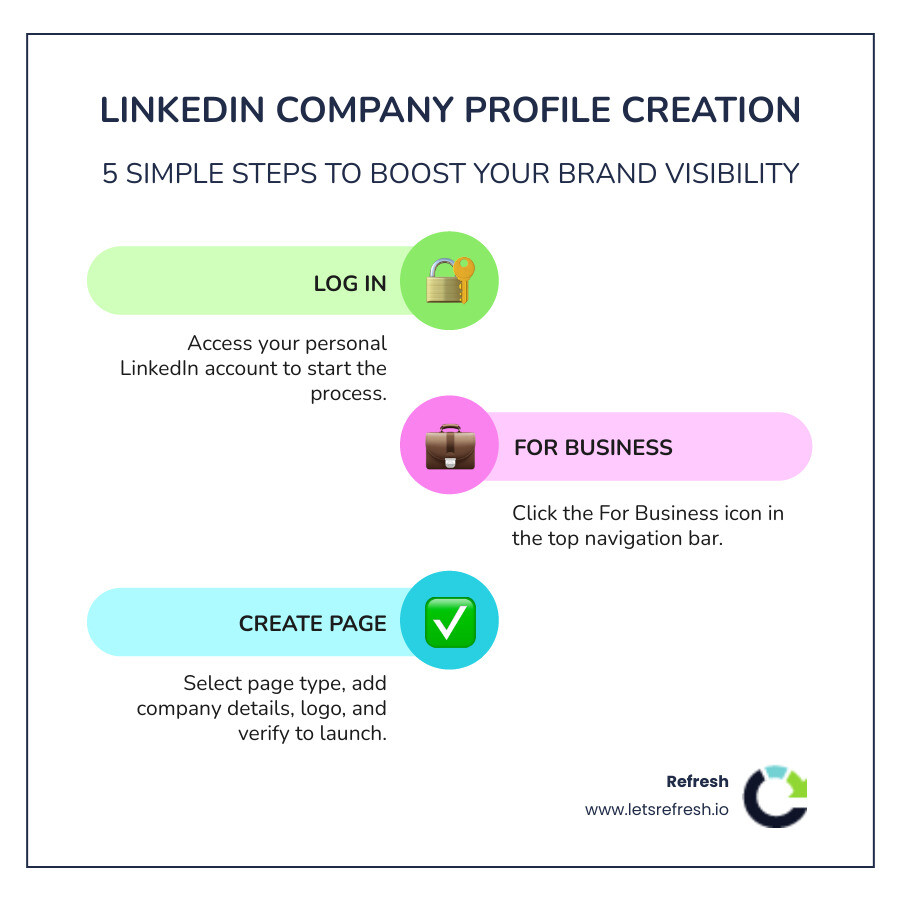
Here's how to create one in five steps:
- Log in to your personal LinkedIn account
- Click the "For Business" icon in the top navigation bar
- Select "Create a Company Page" and choose your page type
- Fill in your company name, URL, industry, size, and logo
- Check the verification box and click "Create Page"
That's the short version. The rest of this guide covers everything else — optimization, content strategy, admin roles, and more.
If you're a startup founder trying to grow your brand online, a missing or incomplete LinkedIn page is a real problem. LinkedIn's audience has twice the buying power of the average web audience. Companies with complete profiles get 30% more weekly views. And yet, many growing businesses either have no page at all or one that was set up and forgotten.
This guide cuts through the confusion. No jargon. No outdated screenshots. Just a clear path from the ground up to a page that actually works for your business.
I'm Alexander Palmiere, Founder and CEO of Refresh Digital Strategy, where I've helped over 200 businesses build stronger digital presences — including guiding clients through LinkedIn company profile creation as part of a broader digital strategy. Let's walk through exactly what you need to do.
Why LinkedIn Company Profile Creation Matters for Your Brand

In the B2B world, your LinkedIn Company Page is often the first place a potential client or partner looks to verify that you are a "real" business. It serves as a digital storefront that stays open 24/7. Beyond just existing, having a presence on this Social Media Platform connects you to a network of professionals who mean business.
The statistics are hard to ignore. LinkedIn’s audience has 2X the buying power of the average web audience. This isn't just a place for resumes; it’s a marketplace where decisions are made. When we talk about linkedin company profile creation, we are talking about building a bridge to those decision-makers.
Establishing Authority in Your Industry
Trust is the currency of the digital age. A professional Company Page acts as a seal of approval. Research shows that advertising on this network can increase purchase intent by 33%. By sharing insights, company news, and team highlights, you move from being a "vendor" to being a "thought leader." This authority makes the sales process smoother because the prospect already feels they know and trust your brand before the first discovery call.
Reaching a Global Professional Audience
Whether you are based in Pittsburgh, PA, Cleveland, OH, or Charlotte, NC, your business has the potential to reach far beyond your local borders. LinkedIn received more than 587.5 million visits through organic traffic in 2024 alone. This massive volume of traffic means that even a small niche business can find its tribe. By properly executing your linkedin company profile creation, you ensure that when those millions of users search for solutions in your industry, your company is positioned to be found.
Prerequisites and Choosing Your Page Type
Before you jump into the setup, there are a few things we need to have ready. You cannot create a company page out of thin air; LinkedIn requires a foundation of accountability. This starts with a personal LinkedIn account. You must be logged into a real profile with a verified email address to act as the creator.
Proper Social Media Account Setup requires that you have the legal authority to represent the organization. LinkedIn will ask you to check a box confirming this, so ensure you aren't overstepping internal boundaries before clicking "Create."
Selecting the Right Category for LinkedIn Company Profile Creation
When you begin the process at the LinkedIn page creation web page, you will be presented with three primary options. Choosing the right one is crucial for how your page functions:
- Company: This is the standard choice for most businesses, whether you are a small shop or a large enterprise.
- Showcase Page: These are sub-pages linked to a main Company Page. They are used to highlight specific brands, business units, or initiatives. Think of these as "niche" pages for a specific segment of your audience.
- Educational Institution: Reserved for schools, universities, and learning centers.
Most of our clients at Refresh begin with a standard Company Page. You can always Create a LinkedIn Page of the Showcase variety later as your brand expands.
Technical Requirements for Success
To avoid looking like an amateur, you need your assets ready. LinkedIn is a visual platform, and "tech-haters" often stumble here.
- Logo: You need a square logo (300x300 pixels). This is what appears in search results and next to your employees' names.
- Banner: The cover image should be professional and branded. Aim for 1584x396 pixels.
- URL: You get to choose a custom URL (e.g., linkedin.com/company/refresh-digital-strategy). Keep it short and consistent with your other social handles.
Step-by-Step Guide to LinkedIn Company Profile Creation
Let’s get into the "how-to" part. If you are on a desktop, look at the top right of your homepage. You’ll see an icon that says "For Business" (it looks like a grid of squares). Click that, scroll to the bottom of the sidebar that pops up, and select "Create a Company Page."
If you prefer using your phone, the iOS app supports page creation. Simply tap your profile picture, go to "Settings," and look for the option to create a page. For those on Android, there is a slight hurdle: the native app doesn't currently support page creation. The workaround is to open your mobile browser (like Chrome), go to the LinkedIn Company Page setup link, and "Request Desktop Site" in your browser settings.
Essential Details for Your New LinkedIn Company Profile Creation
Once you’ve selected your page type, you’ll be asked for the "Identity" of your business. This includes:
- Organization Name: Use your full legal or brand name.
- Website: Provide your primary URL. If you have a high-performing Webflow site, this is where you link it.
- Industry: Choose the most accurate category so the algorithm knows who to show your page to.
- Organization Size: Be honest here; it helps with LinkedIn’s internal data and filtering.
- Tagline: This is a short, punchy sentence about what you do. Using keywords here can help increase traffic to your company page by up to 30 percent.
Finalizing and Verifying Your Presence
The final step in the initial setup is the verification checkbox. By checking this, you swear you are the authorized representative. Once you hit "Create Page," you are officially the "Super Admin."
As a Super Admin, you have total control. However, we rarely recommend managing a page alone. Part of effective Social Media Management is delegating tasks. You can eventually add "Content Admins" to post updates or "Analysts" to look at the data without giving them the power to delete the page.
Optimizing Your Page for Discovery and SEO
Creating the page is only half the battle. Now we need people to find it. This is where Generative Engine Optimization (GEO) comes into play. When people search for services on LinkedIn or even on Google, your page needs to show up.
A fully completed profile can increase views by 30% in a week. Don’t leave any section blank. The "About" section allows for 2,000 characters—use them. Put your most important keywords in the first two sentences, as this is what search engines often crawl.
Strategic Content and Visuals
Visuals drive engagement. On LinkedIn, image posts receive 2x higher engagement than links. Don't just post a link to a blog post and walk away. Upload a high-quality image or a short video (under 1 minute) to accompany it.
You should also add a "Custom Button" to your page header. This could be "Visit Website," "Contact Us," or "Learn More." This small tweak turns a passive viewer into a potential lead.
Leveraging Employee Advocacy
Your employees are your greatest marketing asset. On average, employees have 10x more connections than their company has followers. When an employee shares a company post, it reaches a much wider, more "human" network.
| Feature | Company Page Reach | Employee Reach |
|---|---|---|
| Trust Level | Moderate (Branded) | High (Personal) |
| Network Size | Limited to Followers | 10x Larger Average |
| Engagement | 2x lower than personal | 2x higher than branded |
Encourage your team to link their personal profiles to the company page. This automatically adds them to your "People" tab and helps build the brand's credibility.
Content Strategies for Long-Term Engagement
Consistency is the "secret sauce" that most people ignore. You don't need to post every hour, but you do need a rhythm. Posting 2 to 5 times per week can result in an estimated 1,182 impressions per post lift compared to posting just once a week.
At Refresh, we emphasize Professional Social Media Management that focuses on value over volume. Use a mix of:
- Video: 3x more engagement than text-only posts.
- Polls: Great for gathering data and encouraging quick clicks.
- Team Highlights: Shows the human side of your business.
Building a Community of Followers
Once your page is live, you need followers. LinkedIn provides a feature for page admins to "Invite Connections" to follow the page. You get a set number of credits per month; use them wisely. Don't just spam everyone; invite people who would actually find your content useful. You can find a detailed manual for this action online to help automate some of these invitations if your network is large.
Converting Visitors into Leads
The ultimate goal of linkedin company profile creation is often revenue. LinkedIn’s built-in Lead Gen Forms are incredibly effective. In fact, LinkedIn’s average conversion rate for lead gen forms is 13%, which is nearly six times higher than the industry average for standard landing pages. By providing resources such as a whitepaper, a webinar, or a consultation through these forms, you can capture high-quality B2B leads directly within the platform.
Frequently Asked Questions about LinkedIn Pages
Can I create a company page without a personal account?
No. You must have a personal LinkedIn profile to create and manage a Company Page. This is a security measure to ensure that every business page is tied to a real human being. However, your personal information isn't publicly tied to the page unless you choose to list yourself as an employee or post as yourself.
How do I manage admin roles for my team?
Go to your "Admin Tools" at the top of your page and select "Manage Admins." You can assign different levels of access. "Super Admins" can do everything, while "Content Admins" can only post and "Analysts" can only see the numbers. We recommend having at least two Super Admins so you aren't locked out if one person leaves the company.
Why is page creation not supported on Android?
Currently, the LinkedIn Android app lacks the native interface for page creation. While this is frustrating for mobile-first users, the "Desktop Mode" workaround in your mobile browser is a reliable fix. Most professional page management is still best handled on a laptop or desktop where you can easily upload high-resolution graphics and long-form text.
Conclusion
Setting up your business on LinkedIn doesn't have to be a tech-driven headache. By following these steps for linkedin company profile creation, you are laying the groundwork for better visibility, higher-quality leads, and a stronger professional reputation.
At Refresh, we specialize in helping small to medium-sized businesses in Pittsburgh, Cleveland, and Charlotte bridge the gap between "having a business" and "having a brand." Whether it's through expert Webflow development or a comprehensive Professional Social Media Management strategy, we focus on long-term partnerships that drive real growth.
Ready to stop being invisible? Let's get your brand the attention it deserves. Reach out to us today to see how we can optimize your digital presence for the era of Generative Engine Optimization.


.avif)