

How Professional Site Speed Services Support Growth
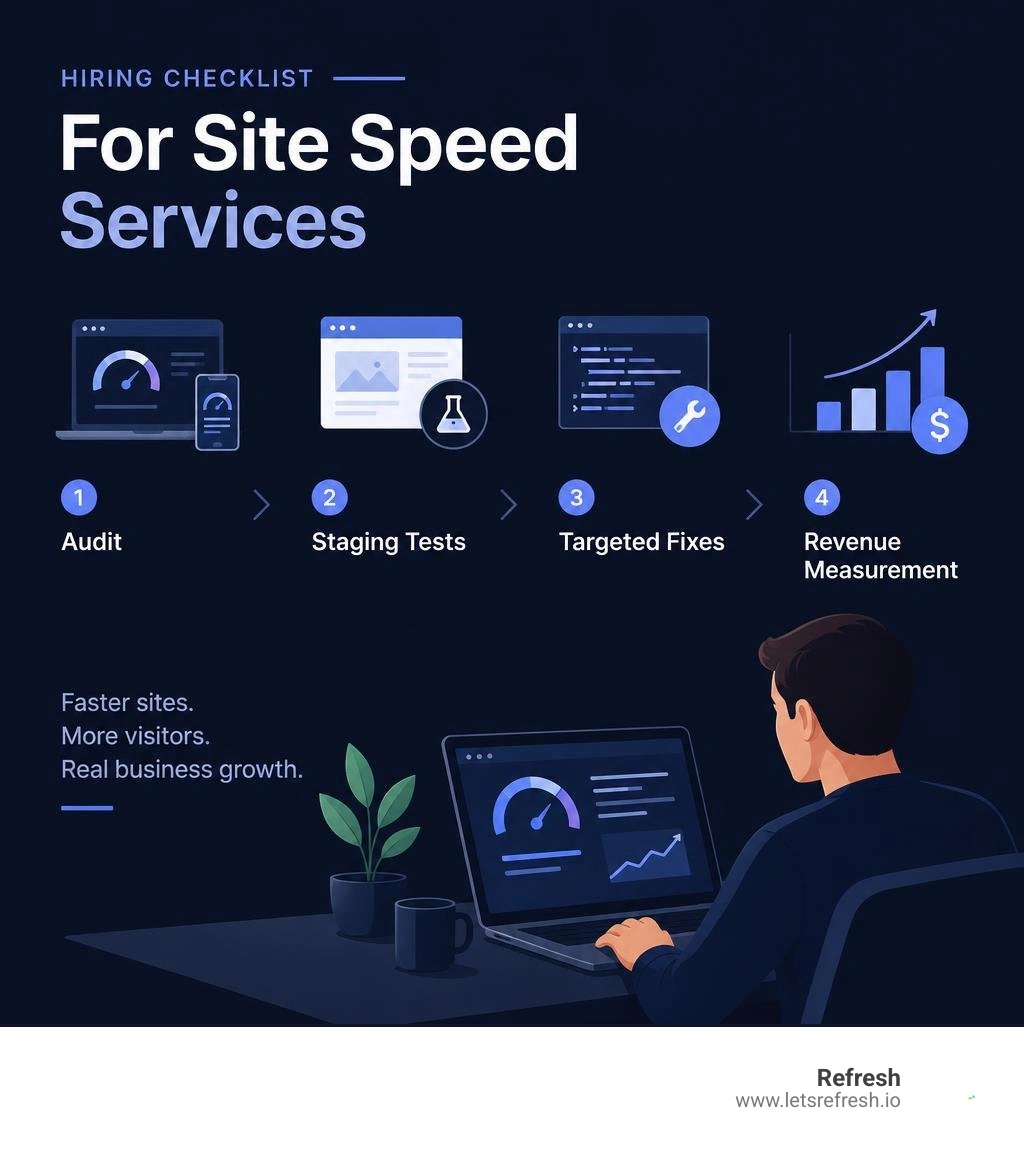
To hire professional site speed services, ask for a mobile performance audit, a clear plan for the slowest pages, testing on a staging site, and before-and-after results. The work should address the cause of delays, whether that is large images, heavy scripts, or slow server responses, without disrupting forms or other key features.
For a growing business, the goal is not just a higher test score. It is a faster path from a visitor's first click to an inquiry or sale. If you are rebuilding an outdated site, performance should be part of the plan from the start.
I'm Alexander Palmiere, founder and CEO of Refresh. After helping develop and launch more than 200 websites, I see professional site speed services as part of a lasting Webflow and digital strategy, not a one-time score chase.
Professional site speed services terms simplified:
The Business Impact of Page Speed and Core Web Vitals
A slow website behaves like a physical storefront with a jammed front door. Visitors will simply walk away rather than wait for it to open. Industry data consistently shows that 53% of mobile visitors leave a page if it takes longer than 3 seconds to load. Performance is not an abstract technical detail—it is the foundation of digital revenue.
Google measures real-world user experience through Core Web Vitals. These metrics focus on three primary aspects of the user journey:
- Largest Contentful Paint (LCP): Measures perceived loading speed by tracking when the main content block becomes visible. An ideal LCP is 2.5 seconds or less.
- Interaction to Next Paint (INP): Assesses interface responsiveness by capturing the latency of user interactions like clicks, taps, and key presses. A good INP score is 200 milliseconds or lower.
- Cumulative Layout Shift (CLS): Gauges visual stability by calculating unexpected layout movements during page render. A stable layout maintains a CLS score under 0.1.
Passing these thresholds is essential for running a fast-loading website. According to Shopify web performance research, performance improvements create direct commercial lifts. Optimizing technical delivery helps brands capture demand that would otherwise slip away during sluggish page loads.

Search Rankings, Generative Engine Optimization, and User Engagement
Page experience signals play a prominent role in search visibility. Studies show that sites meeting Core Web Vitals benchmarks capture 47.6% of page-one search results and achieve up to 3.2 times higher organic traffic growth.
Fast technical execution is equally important for Generative Engine Optimization (GEO). As AI-powered search engines and generative models synthesize real-time data across the web, their crawlers prioritize lightweight, semantically structured pages. Slow, bloated websites exhaust crawler budgets, leading to indexing delays and reduced visibility in generative answers.
When your pages load instantly, search engines can parse your content cleanly, and users stay engaged longer. This creates higher session durations, lower bounce rates, and stronger engagement signals across desktop and mobile devices.
Conversion Rates and Revenue Retention Metrics
Milliseconds equal margin. Research reveals that a 1-second delay can reduce conversion rates by up to 7%. For an online business generating $100,000 per month, that slight lag translates into an $84,000 annual loss in unrealized revenue.
Conversely, every 100-millisecond reduction in load time yields an average 1% increase in conversions. When you invest in engineering that helps boost website performance, you also improve your advertising return on ad spend (ROAS). Faster landing pages yield higher Google Ads quality scores, reducing cost-per-click metrics while maximizing the return on every marketing dollar spent.
Common Bottlenecks Across Modern CMS Platforms

Website performance bottlenecks rarely originate from a single source. They typically accumulate across multiple layers of your technology stack, from uncompressed assets to excessive server-side database requests.
JavaScript Overhead, CSS Bloat, and Unoptimized Media
Unoptimized media assets and bloated scripts represent the most common culprits behind poor performance scores:
- Heavy Media Files: High-resolution PNGs and uncompressed JPEGs burden client bandwidth. Implementing modern WebP formats and proper compression ensures crisp visuals without excessive file weight.
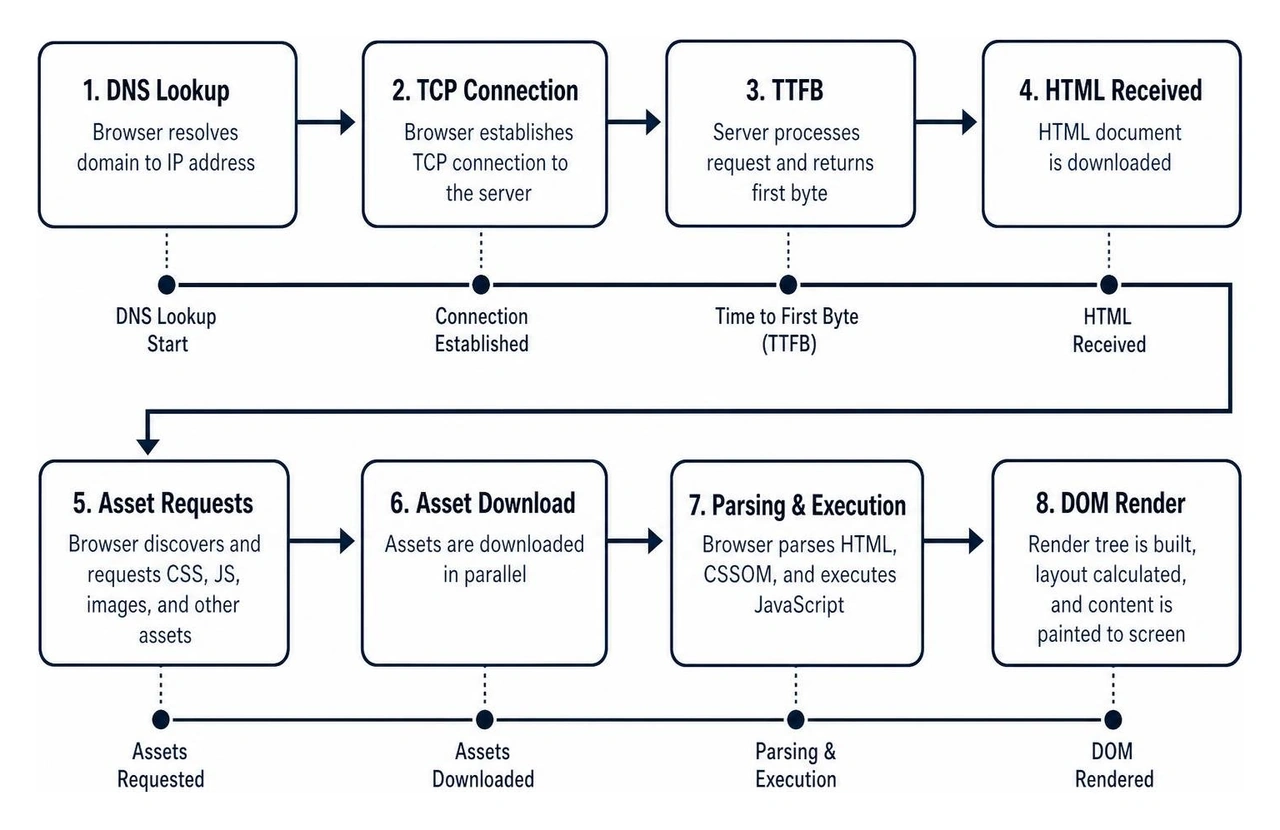
- Render-Blocking CSS & JavaScript: When a browser encounters external scripts in the document head, it pauses HTML parsing until those files are fetched and executed.
- Deep DOM Trees: Complex page structures overwhelm device memory, slowing down interaction speeds and degrading INP metrics.
Addressing these technical issues through targeted maximizing website performance tips and best practices restores visual stability and eliminates unnecessary network overhead.
Database Queries, Server Latency, and Hosting Architecture
Front-end optimizations cannot fix an underperforming hosting environment. Time to First Byte (TTFB) sets the foundation for your overall load sequence. If your origin server takes 1.5 seconds to process dynamic database queries and generate HTML, your LCP will struggle to stay below the recommended 2.5-second mark.
Traditional dynamic CMS platforms query the database repeatedly for every visitor, creating server latency when traffic spikes. Implementing robust object caching and choosing a modern infrastructure provider, as detailed in our fast website hosting complete guide, eliminates these bottlenecks before they reach your visitors.
What to Expect from Professional Site Speed Services
Generic speed plugins and automated optimization tools often use brute-force tactics. They may aggressively minify scripts or defer styling, which frequently breaks mobile menus, shopping carts, or tracking scripts. Professional site speed services provide code-level performance engineering tailored to your specific architecture.
| Feature / Metric | Automated Caching Plugins | In-House DIY Tweaks | Professional Engineering Services |
|---|---|---|---|
| Audit Depth | Surface-level automated scan | Basic browser dev tools | Code-level profiling & waterfall analysis |
| Testing Protocol | Direct live-site edits | Ad-hoc testing | Full staging environment & regression QA |
| Script Optimization | Blanket deferral (risk of breaks) | Manual plugin deactivation | Custom critical path & async execution |
| Asset Delivery | Basic image compression | Manual resizing | Automated next-gen conversion & CDN edge caching |
| Database Tuning | Generic table cleaning | Limited manual queries | Autoload profiling & object cache engineering |
| Core Web Vitals Impact | Inconsistent lab score gains | Hit-or-miss improvements | Field-validated LCP, INP, and CLS optimization |
| Long-Term Safeguards | Vulnerable to plugin updates | Difficult to maintain | Performance budgets & ongoing monitoring |
Key Capabilities Included in Professional Site Speed Services
When you partner with a dedicated performance agency, the engagement follows a structured engineering workflow:
- Comprehensive Technical Audit: Profiling every network request, database query, and third-party script.
- Staging Environment Validation: Implementing all modifications on an isolated staging clone to protect your live conversions.
- Asset & Code Optimization: Refactoring critical CSS, eliminating render-blocking dependencies, and tuning visual assets.
- Server & Cache Engineering: Aligning edge caching, server configurations, and CDN delivery paths.
- Real-User Field Verification: Monitoring real-world metrics to ensure lasting performance gains.
Securing these results requires ongoing website performance monitoring to prevent future code updates from degrading your page speed.
Evaluating Professional Site Speed Services vs. Automated Fixes
Automated tools apply identical rules across diverse websites, often causing visual glitches and broken user interfaces. Expert performance engineers analyze the critical rendering path by hand. They separate non-critical third-party trackers from core layout styles, ensuring your brand identity remains intact while pages load near-instantly.
Core Engineering Techniques Used to Accelerate Web Performance
Achieving optimal performance requires refining both asset delivery and server architecture. High-performance teams execute these techniques systematically to pass every Core Web Vitals audit.

Asset Delivery, Critical CSS, and Script Execution Management
To accelerate perceived loading times, modern engineering isolates the critical rendering path:
- Critical CSS Generation: Inlining the precise styles required to render above-the-fold content immediately, while deferring secondary stylesheets.
- Asynchronous Script Execution: Loading analytics, chat widgets, and secondary tools asynchronously to keep the main browser thread unblocked for user input.
- Font Optimization: Preloading key web fonts and utilizing CSS
font-display: swapto prevent invisible text during font downloads.
For teams building on modern visual platforms, applying targeted webflow page speed optimization ensures that custom interactions remain responsive without adding unnecessary script bloat.
Infrastructure Optimization and Webflow's Performance Architecture
Your choice of CMS platform fundamentally shapes your site's speed ceiling. Legacy platforms often accumulate code bloat through stacked plugins, disparate themes, and complex database dependencies.
This is why Webflow is our preferred platform for high-performance websites. Webflow produces clean, semantic HTML, modern CSS, and minimal JavaScript natively. Paired with enterprise-grade webflow hosting powered by AWS and Fastly's global CDN, it delivers exceptional TTFB and asset delivery out of the box without requiring fragile third-party caching plugins.
Frequently Asked Questions About Website Optimization
How quickly do Core Web Vitals improvements take effect?
While lab diagnostic tools like Google PageSpeed Insights and Lighthouse show technical improvements immediately after deployment, official Google ranking metrics rely on the Chrome User Experience Report (CrUX). CrUX aggregates real-world user data over a rolling 28-day window. You will see field scores in Google Search Console update progressively across that 28-day cycle as new visitor measurements replace historical data.
How much do expert speed optimization engagements cost?
Professional optimization pricing reflects the architectural complexity of your site, its traffic volume, and the depth of required code refactoring. Standard business sites with straightforward layouts generally involve lower engineering overhead, while large e-commerce platforms with thousands of dynamic products and complex integrations require deeper custom optimization. Investing in code-level acceleration typically pays for itself through measurable conversion lifts, reduced bounce rates, and lower digital advertising acquisition costs.
Will code-level speed optimization break existing design features?
A professional optimization workflow safeguards both visual styling and interactive functionality. By executing all code modifications, script reordering, and critical CSS extractions in an isolated staging environment first, performance engineers thoroughly test forms, checkout paths, animations, and third-party integrations across multiple screen resolutions before deploying changes to your live site.
Conclusion
Website performance directly shapes user perception, search visibility, and conversion revenue. Speed is not a cosmetic metric—it is a core business asset. By eliminating asset bloat, streamlining script execution, and building on a clean foundation like Webflow, your business can deliver lightning-fast digital experiences that outpace the competition.
At Refresh, we support businesses across Pittsburgh, PA, Cleveland, OH, and Charlotte, NC with performance engineering and full-service digital marketing solutions. Partner with Refresh to turn your website into a fast, revenue-generating engine built for sustainable growth.